


Introduction
In an era where digital transformation dictates market leadership, software architecture has evolved from a technical concern to a strategic business imperative. Organizations racing to deliver seamless customer experiences often find themselves hindered by legacy systems that cannot scale, communicate poorly across teams, or fail to align technical execution with business outcomes. The challenge isn’t just writing code—it’s creating a shared, living understanding of how complex systems fit together, evolve, and deliver value.
Enter the C4 model: a lightweight, hierarchical approach to visualizing software architecture that bridges the gap between high-level strategy and low-level implementation. Developed by Simon Brown, the C4 model empowers architects, developers, and stakeholders to communicate system structure with clarity, consistency, and purpose. When combined with modern AI-powered tooling like Visual Paradigm’s intelligent diagramming suite, the C4 model transforms from a documentation exercise into a collaborative, iterative design practice that accelerates delivery and reduces architectural debt.
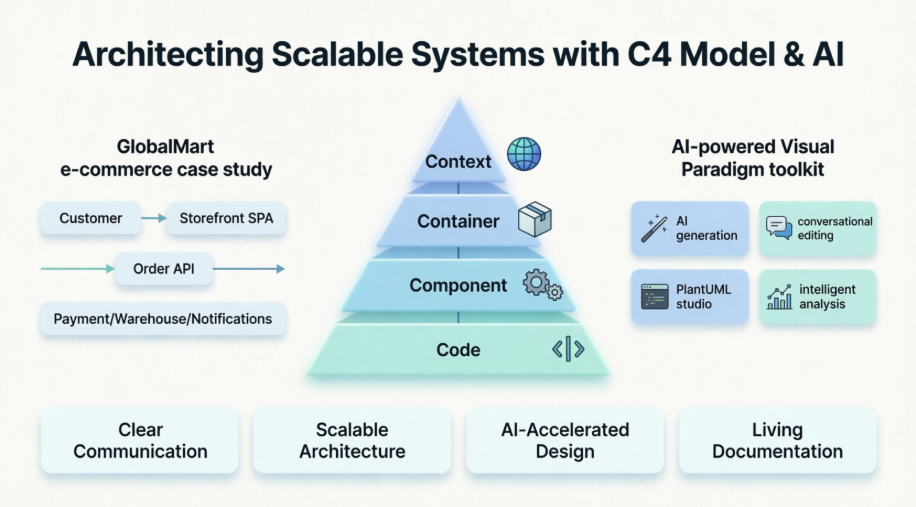
This case study explores how “GlobalMart,” a rapidly growing e-commerce retailer, leveraged the C4 model and Visual Paradigm’s AI capabilities to redesign its Order Management System (OMS). Through contextual diagrams, container breakdowns, and component-level detail—augmented by AI-assisted generation and refinement—GlobalMart’s engineering team created a scalable, microservices-inspired architecture that aligns technical decisions with business goals. Whether you’re an architect designing your next platform or a product leader seeking clearer technical communication, this guide offers a practical framework for building resilient systems that scale with demand.
Understanding the C4 Model: A Foundation for Clear Architecture
The C4 model is a software architecture framework designed to help teams describe and visualize systems at multiple levels of abstraction. Its four core layers provide a consistent vocabulary and visual language for stakeholders across technical and non-technical roles:

-
Context: The highest level, showing the system as a “black box” and its relationships with users and external systems. Ideal for executive briefings and stakeholder alignment.
-
Container: Breaks the system into high-level deployable units (applications, databases, microservices) and illustrates technology choices and communication patterns.
-
Component: Zooms into individual containers to reveal internal logical components, their responsibilities, and dependencies—critical for development teams.
-
Code: The most detailed level, mapping components to actual code structures (classes, modules) for implementation guidance.
When to Use the C4 Model
The C4 model shines in any project requiring clear architectural communication:
-
Aligning technical teams and business stakeholders on system scope and boundaries
-
Onboarding new team members with intuitive, layered documentation
-
Facilitating design reviews and architectural decision records
-
Supporting agile development with living, evolving diagrams
-
Enabling architecture-centric practices like event storming or domain-driven design
Case Study: GlobalMart’s Order Management System Transformation
The Challenge: Scaling Under Pressure
GlobalMart’s legacy monolithic order processor struggled during peak traffic events, resulting in:
-
System hangs and timeouts during high-volume sales
-
Duplicate payment charges due to race conditions
-
Lost order tracking and fulfillment delays
-
Poor customer experience impacting retention and revenue
The business required a modern Order Management System that could:
-
Enable customers to place orders and view real-time status updates
-
Integrate securely with external payment gateways (e.g., Stripe)
-
Communicate reliably with Warehouse Management Systems (WMS) for fulfillment
-
Notify customers via SMS/email without blocking core workflows
The Technical Direction: Microservices-Inspired Architecture
GlobalMart’s engineering team chose a container-based architecture emphasizing:
-
A secure, versioned API layer for business logic orchestration
-
A responsive Storefront SPA (Single Page Application) for customer interactions
-
A dedicated background worker for high-volume warehouse synchronization
-
Asynchronous messaging to ensure UI responsiveness during heavy load
C4 Modeling in Action: From Context to Components
Level 1: System Context Diagram
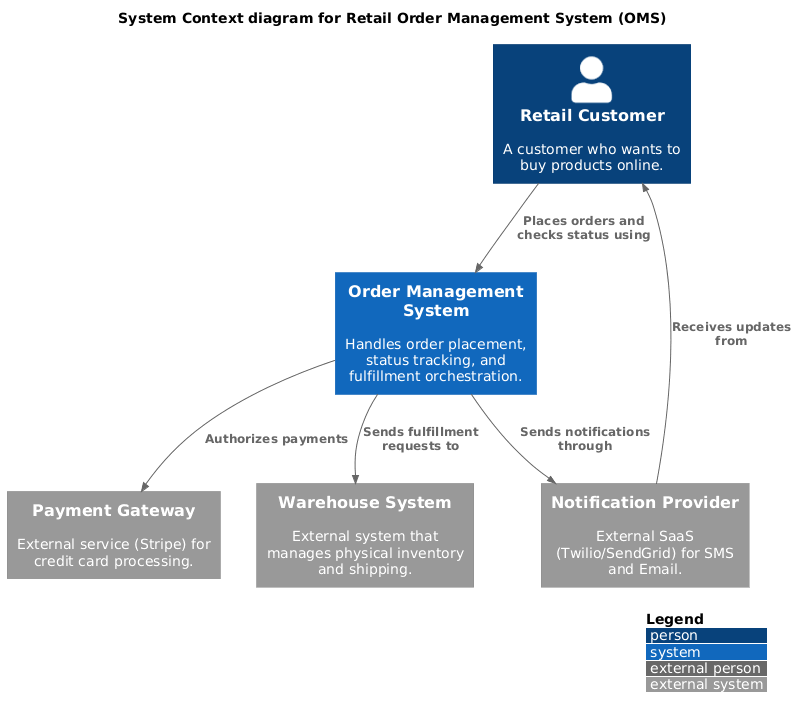
This diagram positions the OMS within its ecosystem, showing interactions with users and external systems.
PlantUML Code
@startuml
!include https://raw.githubusercontent.com/plantuml-stdlib/C4-PlantUML/master/C4_Context.puml

LAYOUT_WITH_LEGEND()

title System Context diagram for Retail Order Management System (OMS)

Person(customer, "Retail Customer", "A customer who wants to buy products online.")
System(oms, "Order Management System", "Handles order placement, status tracking, and fulfillment orchestration.")

System_Ext(payment_gateway, "Payment Gateway", "External service (Stripe) for credit card processing.")
System_Ext(wms, "Warehouse System", "External system that manages physical inventory and shipping.")
System_Ext(notification_service, "Notification Provider", "External SaaS (Twilio/SendGrid) for SMS and Email.")

Rel(customer, oms, "Places orders and checks status using")
Rel(oms, payment_gateway, "Authorizes payments")
Rel(oms, wms, "Sends fulfillment requests to")
Rel(oms, notification_service, "Sends notifications through")
Rel_Back(customer, notification_service, "Receives updates from")
@enduml
Level 2: Container Diagram
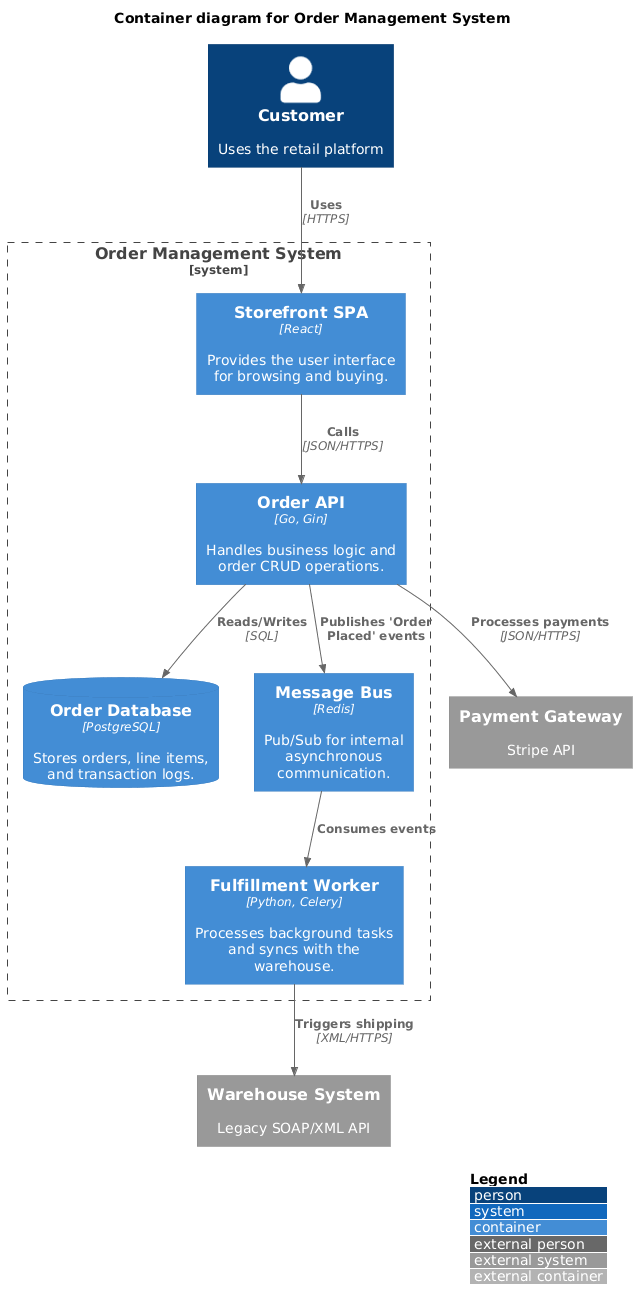
This view breaks the OMS into high-level technical building blocks, clarifying technology choices and communication patterns.
PlantUML Code
@startuml
!include https://raw.githubusercontent.com/plantuml-stdlib/C4-PlantUML/master/C4_Container.puml

LAYOUT_WITH_LEGEND()

title Container diagram for Order Management System

Person(customer, "Customer", "Uses the retail platform")

System_Boundary(oms_boundary, "Order Management System") {
    Container(spa, "Storefront SPA", "React", "Provides the user interface for browsing and buying.")
    Container(api_app, "Order API", "Go, Gin", "Handles business logic and order CRUD operations.")
    Container(worker, "Fulfillment Worker", "Python, Celery", "Processes background tasks and syncs with the warehouse.")
    ContainerDb(db, "Order Database", "PostgreSQL", "Stores orders, line items, and transaction logs.")
    Container(message_bus, "Message Bus", "Redis", "Pub/Sub for internal asynchronous communication.")
}

System_Ext(payment_gateway, "Payment Gateway", "Stripe API")
System_Ext(wms, "Warehouse System", "Legacy SOAP/XML API")

Rel(customer, spa, "Uses", "HTTPS")
Rel(spa, api_app, "Calls", "JSON/HTTPS")
Rel(api_app, db, "Reads/Writes", "SQL")
Rel(api_app, message_bus, "Publishes 'Order Placed' events")
Rel(message_bus, worker, "Consumes events")
Rel(worker, wms, "Triggers shipping", "XML/HTTPS")
Rel(api_app, payment_gateway, "Processes payments", "JSON/HTTPS")
@enduml
Level 3: Component Diagram (Order API)
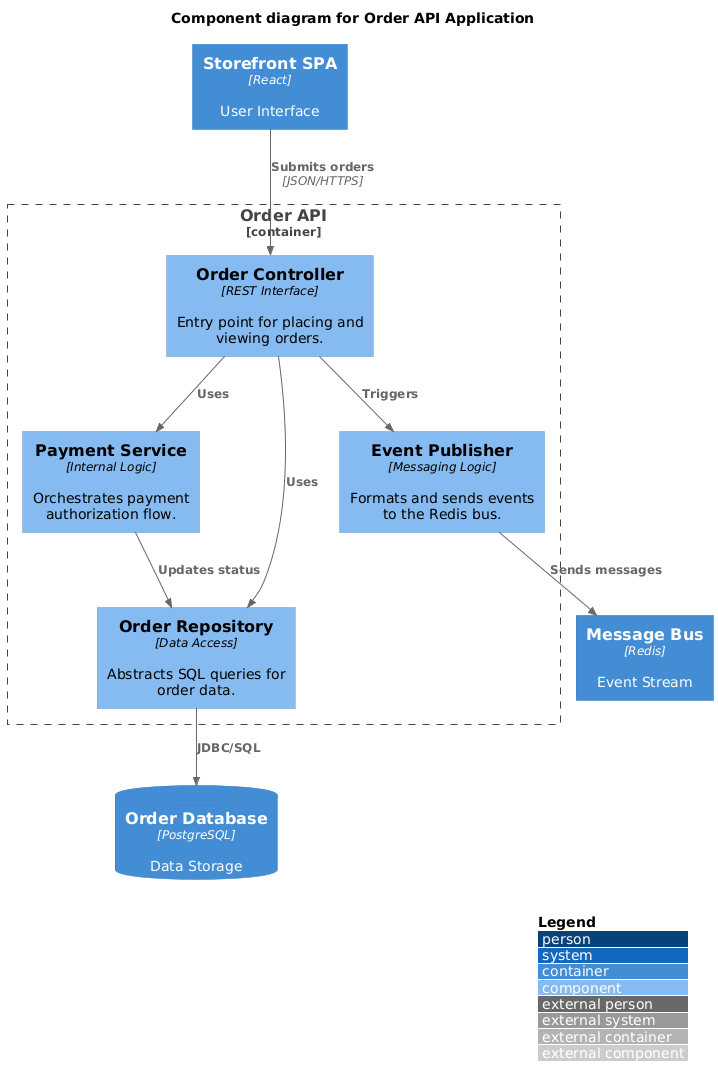
Zooming into the Order API container, this diagram reveals internal logical components and their responsibilities.
PlantUML Code
@startuml
!include https://raw.githubusercontent.com/plantuml-stdlib/C4-PlantUML/master/C4_Component.puml

LAYOUT_WITH_LEGEND()

title Component diagram for Order API Application

Container(spa, "Storefront SPA", "React", "User Interface")
ContainerDb(db, "Order Database", "PostgreSQL", "Data Storage")
Container(bus, "Message Bus", "Redis", "Event Stream")

Container_Boundary(api_logic, "Order API") {
    Component(order_ctrl, "Order Controller", "REST Interface", "Entry point for placing and viewing orders.")
    Component(pay_svc, "Payment Service", "Internal Logic", "Orchestrates payment authorization flow.")
    Component(repo, "Order Repository", "Data Access", "Abstracts SQL queries for order data.")
    Component(event_pub, "Event Publisher", "Messaging Logic", "Formats and sends events to the Redis bus.")

    Rel(order_ctrl, pay_svc, "Uses")
    Rel(order_ctrl, repo, "Uses")
    Rel(pay_svc, repo, "Updates status")
    Rel(order_ctrl, event_pub, "Triggers")
}

Rel(spa, order_ctrl, "Submits orders", "JSON/HTTPS")
Rel(repo, db, "JDBC/SQL")
Rel(event_pub, bus, "Sends messages")
@enduml
Accelerating Design with Visual Paradigm’s AI-Powered C4 Features
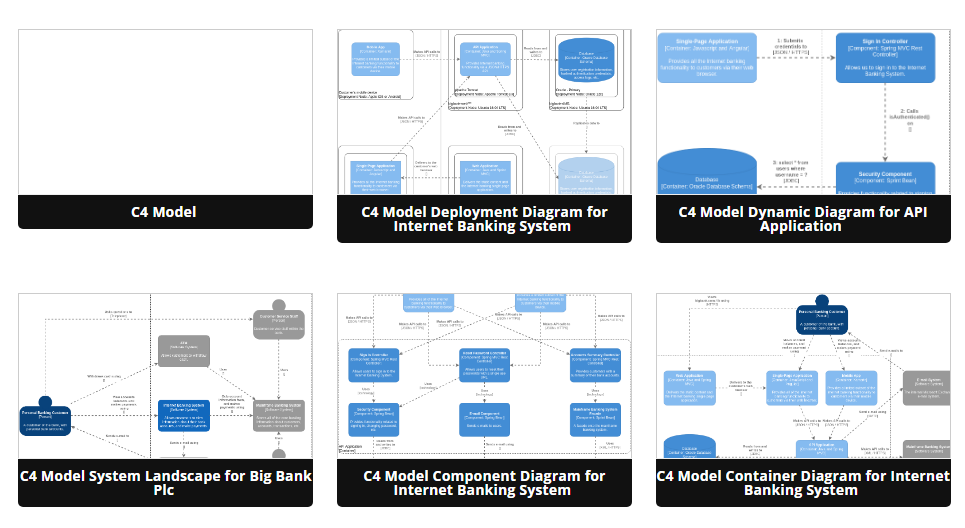
Visual Paradigm enhances traditional C4 modeling with intelligent automation that accelerates design, documentation, and collaboration.
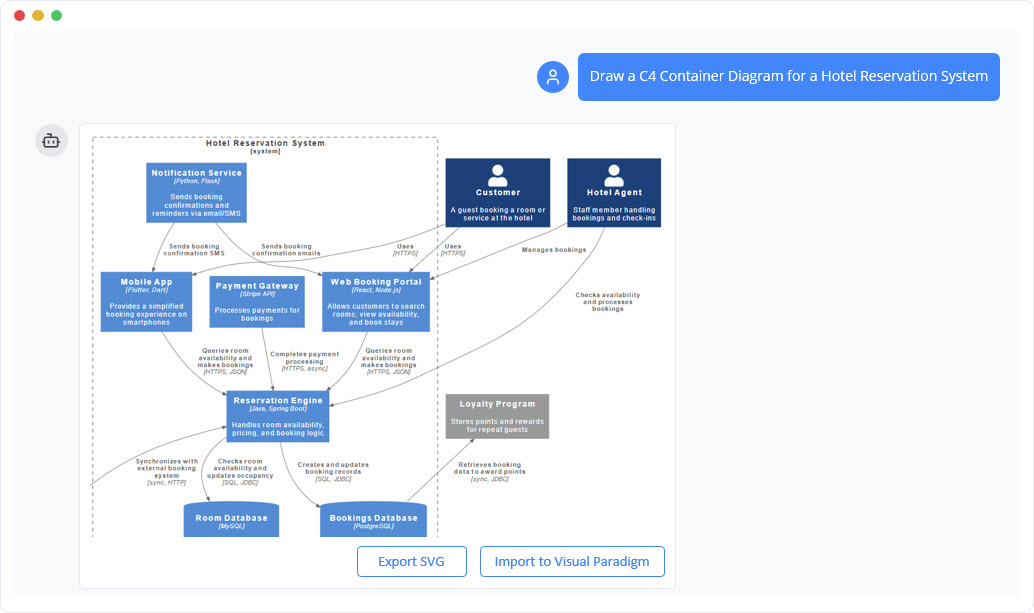
Instant Diagram Generation
Describe your system in plain English, and the AI instantly generates diagrams across all C4 levels—Context, Container, Component, and Code—reducing manual setup time.
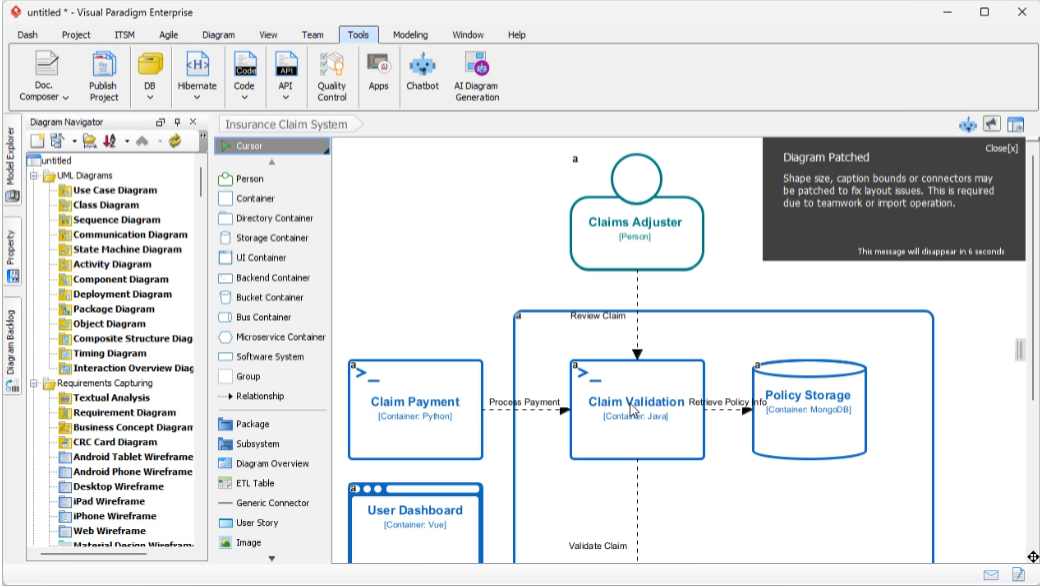
Conversational Editing
Refine diagrams through a chatbot interface. Simple commands like “Add payment gateway” or “Rename Customer to Buyer” update the visual model in real time.
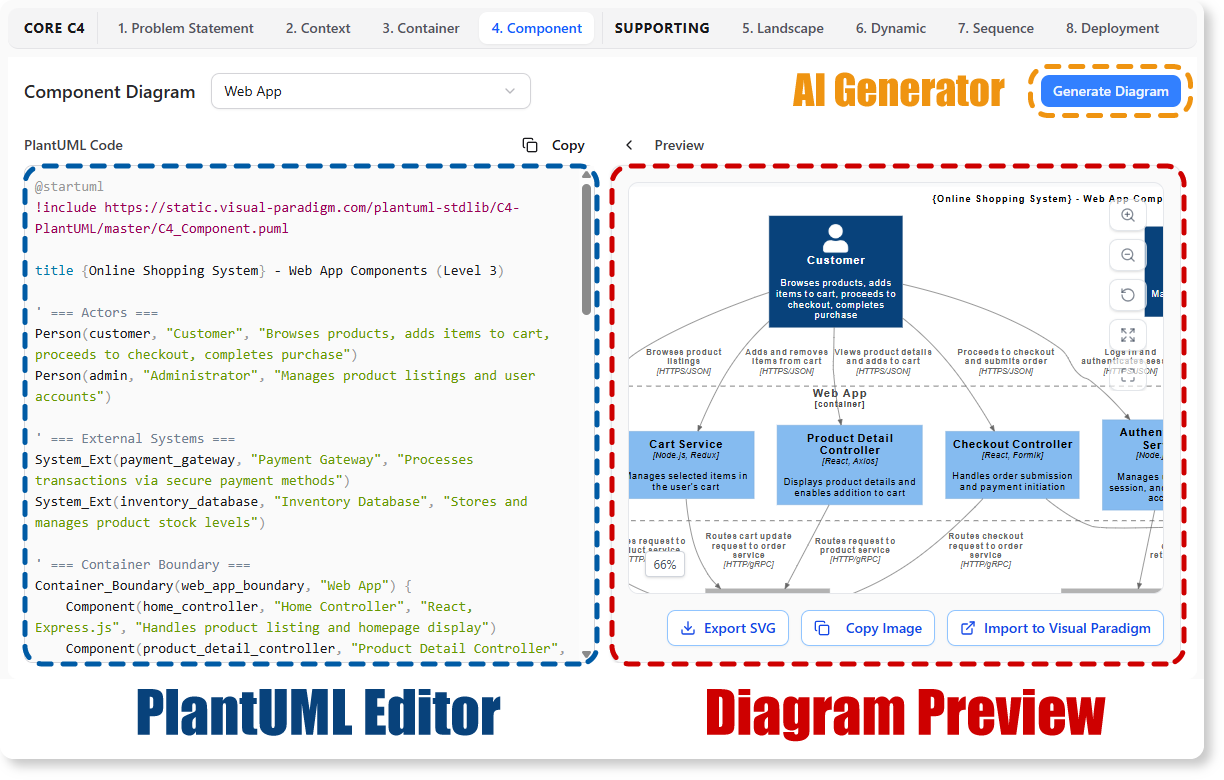
AI-Powered C4 PlantUML Studio
Convert natural language descriptions directly into version-controllable PlantUML code, ensuring precision and reproducibility across teams.
Intelligent Analysis & Automated Content
The AI detects architectural gaps, suggests design improvements, validates logical flow, and even drafts initial problem statements and technical specifications—jumpstarting documentation efforts before a single line of code is written.
Comprehensive C4 Support Across Visual Paradigm Platforms
Visual Paradigm fully supports the complete C4 model hierarchy across desktop, online, and AI-powered platforms. You can create, model, and maintain all structural and supporting views native to the framework.
Supported C4 Diagram Types
-
System Context Diagram: Maps high-level interactions between your system, its users, and external dependencies.
-
Container Diagram: Details high-level technology choices, deployable units (apps, databases), and their communication protocols.
-
Component Diagram: Drills down inside an individual container to reveal internal building blocks and modules.
-
System Landscape Diagram: Provides an enterprise-wide view showing how multiple systems fit together.
-
Dynamic Diagram: Illustrates runtime behavior and architectural collaboration sequences.
-
Deployment Diagram: Maps logical software containers to physical or virtual hosting infrastructure.
Core Modeling Capabilities
-
Drill-Down Navigation: Link diagrams hierarchically to decompose systems into containers, and containers into components seamlessly.
-
Resource-Centric UI: Smart magnets instantly connect elements; “Smart Sweeper” auto-aligns cluttered layouts.
-
UML Integration: Unify C4 architecture maps with traditional UML diagrams for end-to-end traceability.
-
Collaboration Ready: Real-time editing, version control, commenting, and export to PDF/PNG/JPG for stakeholder sharing.
Platform Options
Visual Paradigm Online
A browser-based C4 modeling tool featuring real-time collaboration, a library of C4 symbols, and integrated AI chatbot access. Ideal for distributed teams needing quick setup and shared workspaces.
Visual Paradigm Desktop
A powerful desktop application with deep modeling capabilities, custom attributes, and an integrated AI Diagram Generator accessible via Tools > AI Diagram Generation. Best for architects requiring advanced customization and offline access.
Both platforms support importing/exporting PlantUML, enabling seamless integration with existing documentation pipelines and version control systems.
Conclusion: From Architecture Clarity to Business Agility
GlobalMart’s journey illustrates a fundamental truth: scalable systems begin with clear communication. By adopting the C4 model, the engineering team created a shared language that bridged business goals and technical execution. Stakeholders could visualize system boundaries; developers could decompose complexity into manageable components; and leadership could track architectural evolution against strategic milestones.
When augmented with Visual Paradigm’s AI-powered tooling, this approach transforms architectural design from a documentation burden into a collaborative, intelligent practice. AI-assisted diagram generation accelerates initial modeling; conversational editing enables rapid iteration; and intelligent analysis strengthens resilience before implementation begins. The result isn’t just a scalable Order Management System—it’s a living architectural artifact that evolves with the business.
For organizations navigating digital transformation, the path forward is clear: start with context, decompose with intention, automate with AI, and validate continuously. Whether modernizing legacy systems or greenfielding new platforms, the C4 model—supercharged by intelligent tooling—provides the clarity, agility, and alignment needed to thrive in competitive digital markets. Architecture, done right, becomes not a constraint but a catalyst for innovation.
References
-
C4 Diagram Tool & Modeling Software | Visual Paradigm: Comprehensive overview of Visual Paradigm’s C4 modeling capabilities, including tool features, use cases, and enterprise architecture support.
-
AI Diagram Generator: Complete C4 Model Support: Release announcement detailing AI-powered generation of full C4 model suites from natural language descriptions.
-
AI Diagram Generator Release Notes: Technical updates and feature enhancements for Visual Paradigm’s AI diagram generation engine.
-
AI-Powered C4 PlantUML Studio: Dedicated tool page for converting plain English into precise, version-controllable PlantUML diagrams.
-
Visual Paradigm AI Platform: Central hub for Visual Paradigm’s AI-powered diagramming and modeling tools.
-
AI Chatbot for Diagramming: Feature page describing conversational AI capabilities for refining and editing architectural diagrams.
-
AI-Powered C4 PlantUML Markdown Editor: Release notes for the integrated markdown editor that combines natural language input with PlantUML rendering.
-
AI Chatbot Tool Page: Direct access to the AI chatbot interface for interactive diagram refinement and architectural guidance.
-
Use Case to Activity Diagram Feature: Documentation on automated transformation of use case models into activity diagrams within the Visual Paradigm suite.
-
C4 Model Tool in Visual Paradigm Online: Feature overview of the browser-based C4 modeling environment with collaboration and AI integration.
-
What Is C4 Model? Blog Post: Educational article introducing the C4 model methodology, its levels, and benefits for software architecture communication.
-
Unveiling the Power of C4 Model: Simplifying Software Architecture Diagrams: In-depth exploration of how the C4 model reduces complexity and improves stakeholder communication.
-
AI C4 Diagram Generator: Component Diagram | Visual Paradigm AI: Step-by-step guide to generating component-level C4 diagrams using AI assistance.
-
C4 Model Diagram Tool: Component, Container, Context: Feature breakdown of Visual Paradigm’s support for all core C4 diagram types.
-
Visual Paradigm Full C4 Model Support Release: Announcement of native support for the complete C4 model hierarchy across all Visual Paradigm platforms.
-
Architecting Smart Infrastructure: A C4 Model Case Study: Real-world case study applying C4 modeling and AI tools to EV charging infrastructure design.
-
C4 Diagram Tool Solution Page: Solution-focused overview of how Visual Paradigm’s C4 tools address common architecture documentation challenges.
-
Mapping the Enterprise: A Complete Guide to C4 System Landscape Diagrams: Comprehensive tutorial on creating enterprise-level system landscape views using the C4 model.
-
Mastering C4 Diagrams in Visual Paradigm: A Hands-On Review: Independent review comparing Visual Paradigm’s four methods for creating C4 diagrams.
-
The Ultimate Guide to C4 PlantUML Studio: Deep dive into leveraging PlantUML integration for version-controlled, code-first architecture documentation.
-
Integrating C4 Model and UML Diagrams: Best practices for combining C4’s clarity with UML’s precision for end-to-end architecture traceability.
-
C4 Model Templates in Visual Paradigm Online: Ready-to-use C4 diagram templates to accelerate project kickoff and standardize team outputs.
