


Introduction
As a business analyst and process optimization consultant who has evaluated dozens of modeling tools, I can confidently say that understanding Business Process Model and Notation (BPMN) 2.0 is only half the battle; having the right tool to execute it is what truly drives organizational value. BPMN 2.0 was explicitly designed to remove the confusion from understanding process maps, ensuring that whether an employee or an external consultant is trying to gauge the meaning, the standardized symbols speak a universal language.
In this comprehensive guide and review, I will break down the core principles of BPMN 2.0 from a practical, user-experience perspective, and share my hands-on insights into Visual Paradigm. This professional-grade software platform has consistently impressed me by seamlessly bridging the gap between high-level business strategy and granular IT execution, providing intuitive tools to model, analyze, and optimize workflows without requiring a computer science degree.
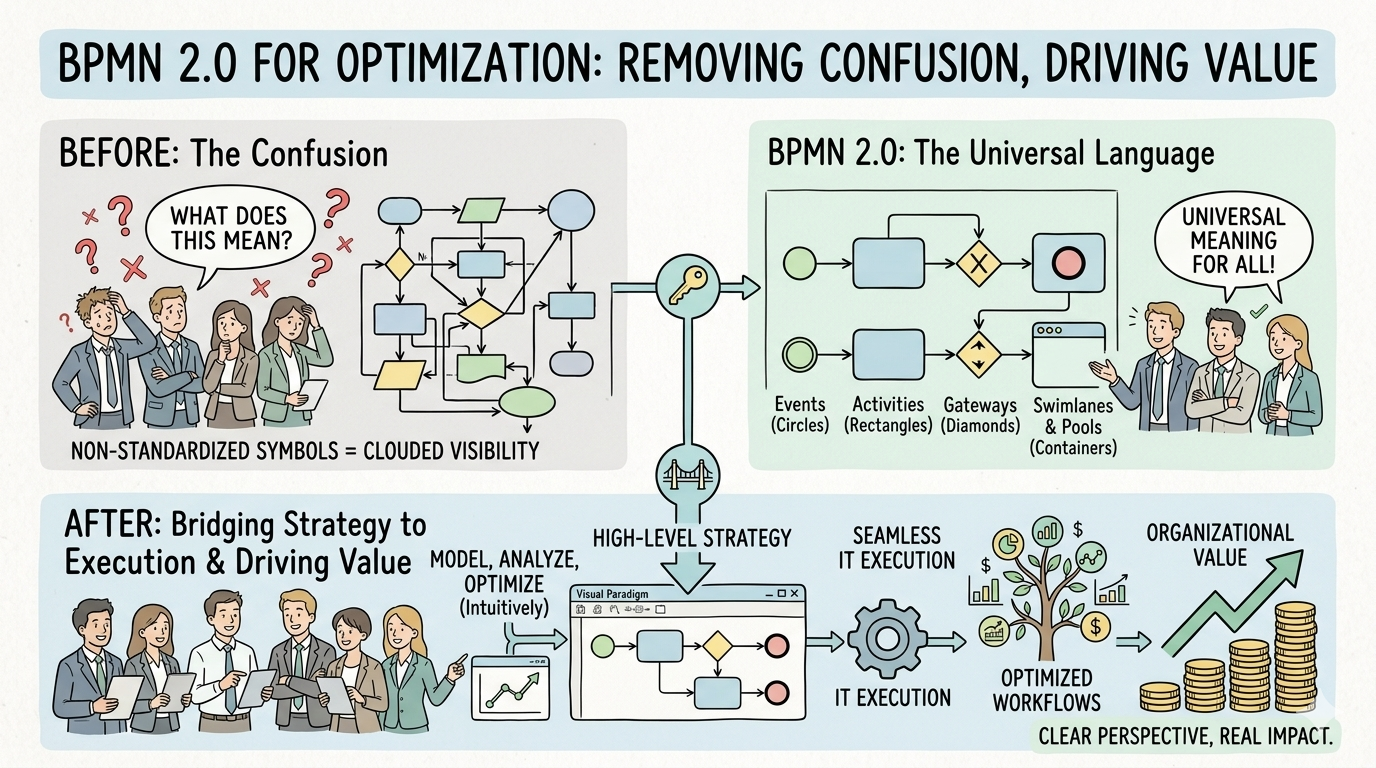
Demystifying BPMN 2.0: The User’s Perspective
From a business analyst’s viewpoint, visual process models are invaluable for contextualizing complex workflows so that every relevant stakeholder can understand them. While simple flowcharts might suffice for basic visualizations, BPMN 2.0 is the gold standard in environments that utilize process automation.
Its true value lies in helping participants understand the process without extensive technical knowledge, while also enabling purposeful troubleshooting before moving on to the next steps. The ultimate objective is to use modeling to improve efficiency and potentially garner a competitive advantage. Because it offers a standard notation that does not require elaborate training to comprehend, it also ensures that underlying XML documents can be visualized using common, recognizable notation.
Breaking Down the Core Components
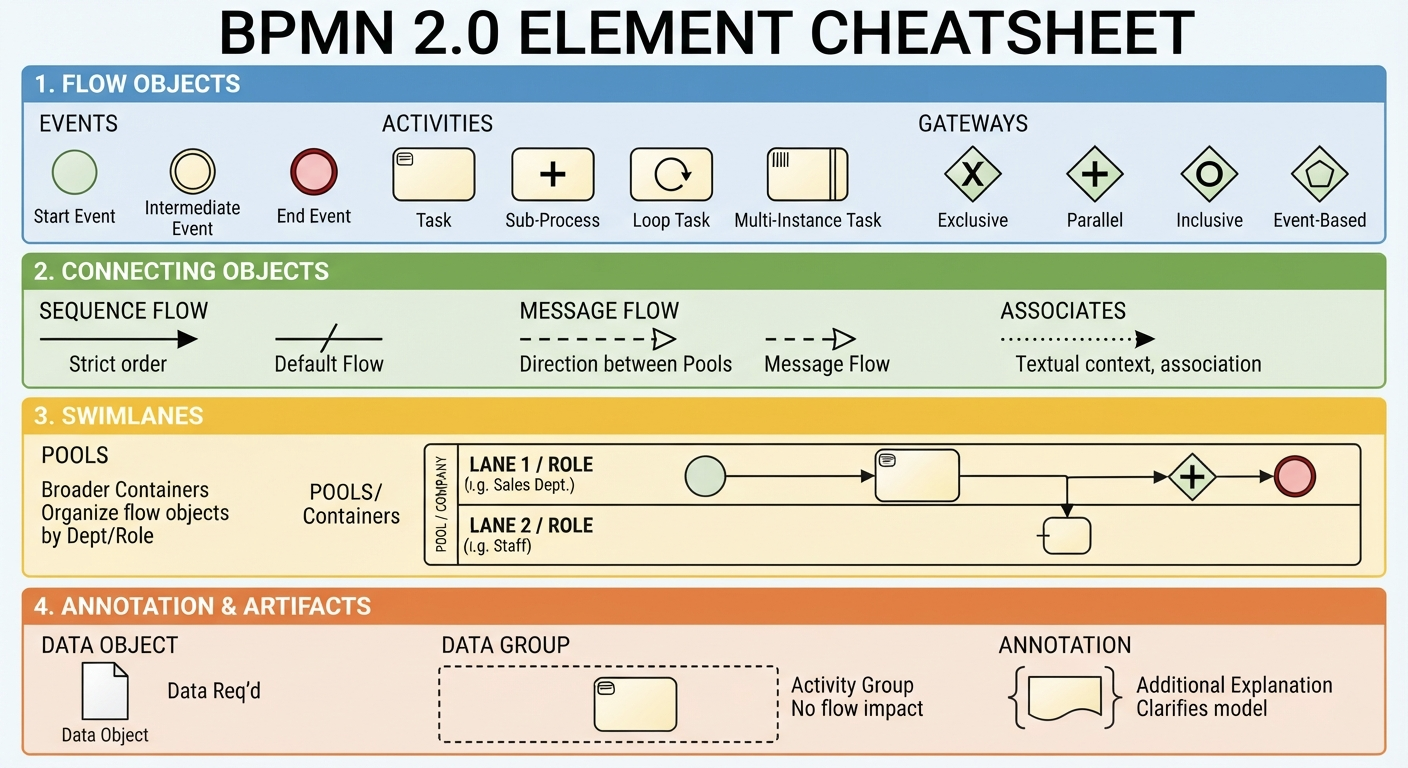
To create a BPMN 2.0 diagram, a core set of elements is used. In my experience, mastering these four major groups is the key to unlocking the framework’s potential:
- Flow Objects: Circles, rectangles, and diamonds that describe specific events or activities.
- Connecting Objects: Lines linked with flow objects to denote direction and sequence.
- Swimlanes: Resembling the lane lines of an Olympic swimming pool, these organize flow objects into varying categories (e.g., specific departments or roles).
- Pools: Broader containers that may describe different departments or entirely separate companies.
Swimlanes can be produced in multiples to represent every participant and their associated responsibility. Between swimlanes, you will frequently find tasks and data. Invariably, different components of a business are never completely independent. BPMN 2.0 helps illustrate these connections to convey a clear perspective of how things work and where impacts can be made.
Specific shaping aspects include:
- Events: Triggers that start a process, such as receiving an alert or an issue warning.
- Activities: Performed tasks, including loops, various instances, and subprocesses.
- Gateways: Decision points where paths can change (e.g., Path A vs. Path B).
- Sequence Flow: Directs the strict order of activities.
- Message Flow: Indicates the direction messages take between different pools.
- Associates: Textual context within an activity, event, or gateway.
- Data Object: Explains what data is needed before an activity can proceed.
- Data Group: Denotes an activity group without altering the flow of the diagram.
- Annotation & Artifacts: Additional explanations and groupings that clarify the model.
The Real-World Benefits and Use Cases
By offering a user-friendly visualization of a business process, stakeholders gain a significantly better understanding of their operations. The details ensure a common language is used, allowing business analysts, participants, managers, and IT staff to comprehend the concepts equally. This clarity directly improves implementation precision.
When should you use BPMN 2.0?
In my practice, it can be used at any point during a project lifecycle. For instance, it is perfect for describing the “As-Is” state at the beginning of a project. As the project progresses, you can use it to create a “To-Be” model. Models created during the latter stages often incorporate a higher level of detail. Ultimately, it should be used whenever it is critical to understand the steps needed to complete a process and identify which stakeholders are responsible.
Diagrams are vastly easier to understand than lengthy text documents, facilitating smoother collaboration. Users gain an enhanced sense of perspective, which improves productivity. For example, IT departments can finally see exactly where they fit within the broader spectrum of business priorities. When stakeholders understand the links between business processes, they can boost operational efficiencies and cut down on redundancies, allowing changes to be made quickly when implementing new initiatives or technologies.
The Payoff: Sub-Models and Diagram Types
BPMN 2.0 builds on earlier iterations by allowing for increasing detail, enabling organizations to create a standard based on continuous improvement. This additional detail often comes in the form of sub-models, allowing any stakeholder to determine which section is most relevant to their line of responsibility:
- Private Business Processes: Do not cross departments or organizations.
- Abstract Business Processes: Used to convey the process to the outside world while omitting private internal activities.
- Collaboration Business Processes: Describe activities between multiple business entities.
Furthermore, the framework supports various types of diagrams to suit different analytical needs:
- Choreography Diagram: Shows interactions between two or more participants (expandable with sub-choreographies).
- Collaboration Diagram: Shows interactions between two or more processes using more than one pool.
- Conversation Diagram: A simplified version of a collaboration diagram, showing a group of related message exchanges (expandable with sub-conversations).
Deep Dive into Gateway Types
Gateways are the decision engines of BPMN. Understanding their nuances is critical for accurate modeling:
- Exclusive: Diversion can only occur on one of the output paths.
- Inclusive: The flow can divert to one or more output flows depending on the decision. All flows must be finalized inclusively at the next gateway, unless an action is undefined.
- Parallel: Allows for multiple flows in parallel, with any condition. Flows must be finalized within another gateway unless there is no defined trigger.
- Exclusive Start: Creating a process through a gateway with multiple starting options.
- Parallel Start: A process starts only when every subsequent event occurs.
- Events: The gateway remains paused until an output flow triggers an event.
- Complex: A rare gateway used only for complex scenarios requiring specific synchronization and splitting.
BPMN 2.0 Modeling Principles: Best Practices from the Field
Before you begin modeling, ensure the process is clearly defined from beginning to end, and check for current inefficiencies. Follow these key principles for a professional result:
- Create a simple, easy-to-understand flow: Maintain a distinct start and end. Keep the direction consistent and logical (left to right, top to bottom). Avoid crossed lines.
- Utilize BPMN standards: Adhere strictly to the official notation guidelines.
- Add labeling where needed: Processes should be clearly labeled without abbreviations. Activities should use one noun and one verb. Divergence gateways must have clear names.
- Include clear diagrams: Keep layouts clean. Lay sequence flows horizontally, and data flows/associations vertically.
Crucial Scope and Task Tips:
- Limit redundancy. If the same person performs consecutive activities, consolidate them.
- Avoid “too much detail.” Only use subprocesses to group activities that serve the same process.
- Ensure messages are posted to processes where needed before reaching the end event.
- Use separate end events to convey successful completion versus unsuccessful termination (e.g., error signals, escalations, or compensation flows).
Note: BMPN 2.0 is not a data flow diagram. Keep the focus on process flow and responsibilities.
Visual Paradigm Review: Elevating BPMN 2.0 Modeling
After testing numerous platforms, Visual Paradigm stands out as a professional-grade software solution fully compliant with standard BPMN 2.0. It simplifies the standard visual language while offering enterprise-grade automation features that genuinely save time.
Key Core Components
The tool intuitively organizes processes through the four core elements mentioned earlier (Swimlanes, Events, Activities, and Gateways), but with a highly responsive drag-and-drop interface that enforces standard compliance automatically.
Advanced Workflow Automation Features
What truly sets Visual Paradigm apart in my review are its strategic enterprise tools:
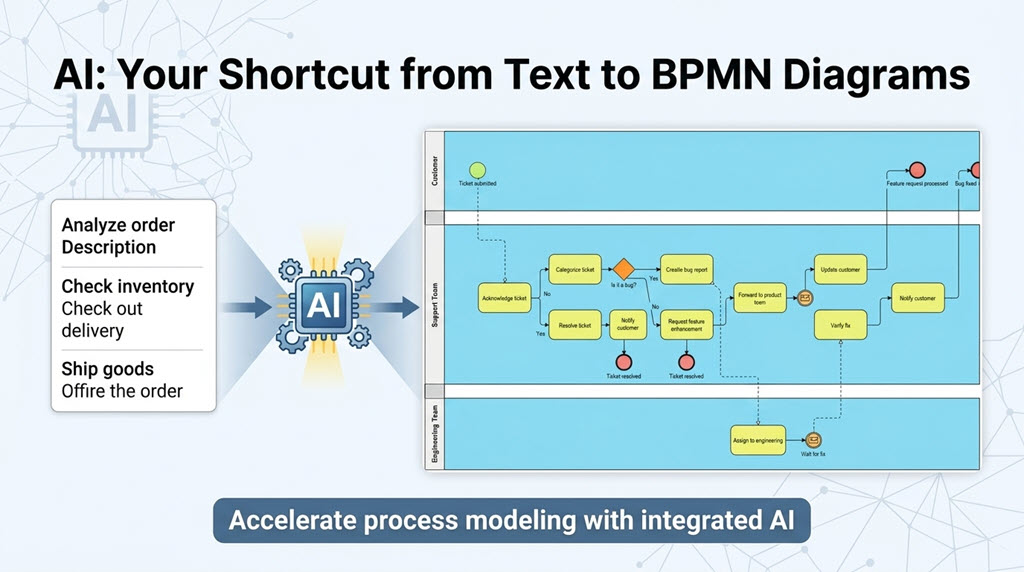
- AI Diagram Generation: This is a game-changer. It bypasses manual drafting by turning plain-English text descriptions into interactive, editable BPMN diagrams instantly.
- Process Simulation: Allows you to simulate workflows to find real-world performance bottlenecks and calculate average process times before actual implementation.
- As-Is & To-Be Design: Maps out your baseline current state alongside optimized future workflows side-by-side, making gap analysis highly effective.
- Standard Integration: Seamlessly maps process charts with external software engineering standards like UML use cases or database schemas.
Available Versions
- Desktop Client: A full-featured professional modeling environment ideal for deep data mapping, complex matrices, and offline execution.
- Visual Paradigm Online: A lightweight, cloud-based alternative built specifically for real-time team collaboration, quick web drafting, and easy sharing.
Conclusion
In summary, BPMN 2.0 is the optimized business modeling notation that uses simplified graphical elements to explain complex business processes. It successfully bridges the gap between high-level design and practical implementation while remaining understandable to all end users. However, the true payoff is realized when paired with a robust tool. Visual Paradigm elevates this experience by combining strict BPMN 2.0 compliance with modern innovations like AI generation and process simulation. Whether you are mapping a simple departmental workflow or orchestrating a multi-entity collaboration, adopting these principles and tools will eliminate guesswork, accelerate knowledge transfer, and drive continuous operational improvement.
Reference
- What is BPMN?: A foundational guide to understanding Business Process Model and Notation.
- Mastering BPMN with Visual Paradigm: A professional guide covering BPMN mastery from initial concept to final execution.
- BPMN Tutorial: A step-by-step tutorial for getting started with BPMN diagramming.
- How to Draw a BPMN Diagram: Practical instructions on creating effective and compliant BPMN diagrams.
- Business Process Model and Notation (Wikipedia): An encyclopedic overview of the BPMN standard, its history, and its specifications.
- BPMN Diagram and Tools Features: An overview of Visual Paradigm’s comprehensive BPMN diagramming tools and capabilities.
- Pool and Lane User Guide: Detailed documentation on configuring and using pools and lanes in Visual Paradigm.
- BPMN for Beginners: A complete, beginner-friendly guide to business process modeling notation.
- Online BPMN Tool Features: Highlights of the cloud-based BPMN tool designed for collaborative web drafting.
- AI-Powered Business Model Canvas: Exploration of AI-driven tools for generating business model canvases and related diagrams.
- Understanding the Motivation Viewpoint: Insights into enterprise architecture motivation viewpoints using ArchiMate.
- Enterprise Architecture Diagram Tool: Features of Visual Paradigm’s tool for creating comprehensive enterprise architecture diagrams.
- AI BPMN Generator Guide: How Visual Paradigm’s AI transforms plain text narratives into interactive BPMN diagrams.
- Process Simulation Example: A practical example of simulating workflows to identify bottlenecks and calculate process times.
- Business Process Modeling Guide: A comprehensive guide to modeling business processes effectively.
- As-Is to To-Be Business Process: A tutorial on mapping baseline current states alongside optimized future workflows.
- BPMN Modeling Video Tutorial: A video walkthrough demonstrating BPMN modeling techniques and best practices.
- Team Collaboration Guide: An introduction to team collaboration features for shared modeling and project management.
- Mac UML Modeling Guide: A guide to leveraging professional UML and BPMN modeling tools on macOS.
