
Orchestrating the VP Unified Platform: A Guide to the Ecosystem Architecture
In the rapidly evolving landscape of software architecture and systems engineering, tool fragmentation is a common challenge. Developers often find themselves switching between a heavy desktop application for deep modeling, a browser-based tool for quick collaboration, and disparate cloud services for documentation. The Visual Paradigm Unified Platform addresses this by acting as the central nervous system of the entire ecosystem. This tutorial explores the architecture of this platform, explaining how it functions not as a replacement for existing tools, but as an orchestration layer that unifies the user experience.
The Central Workspace Architecture
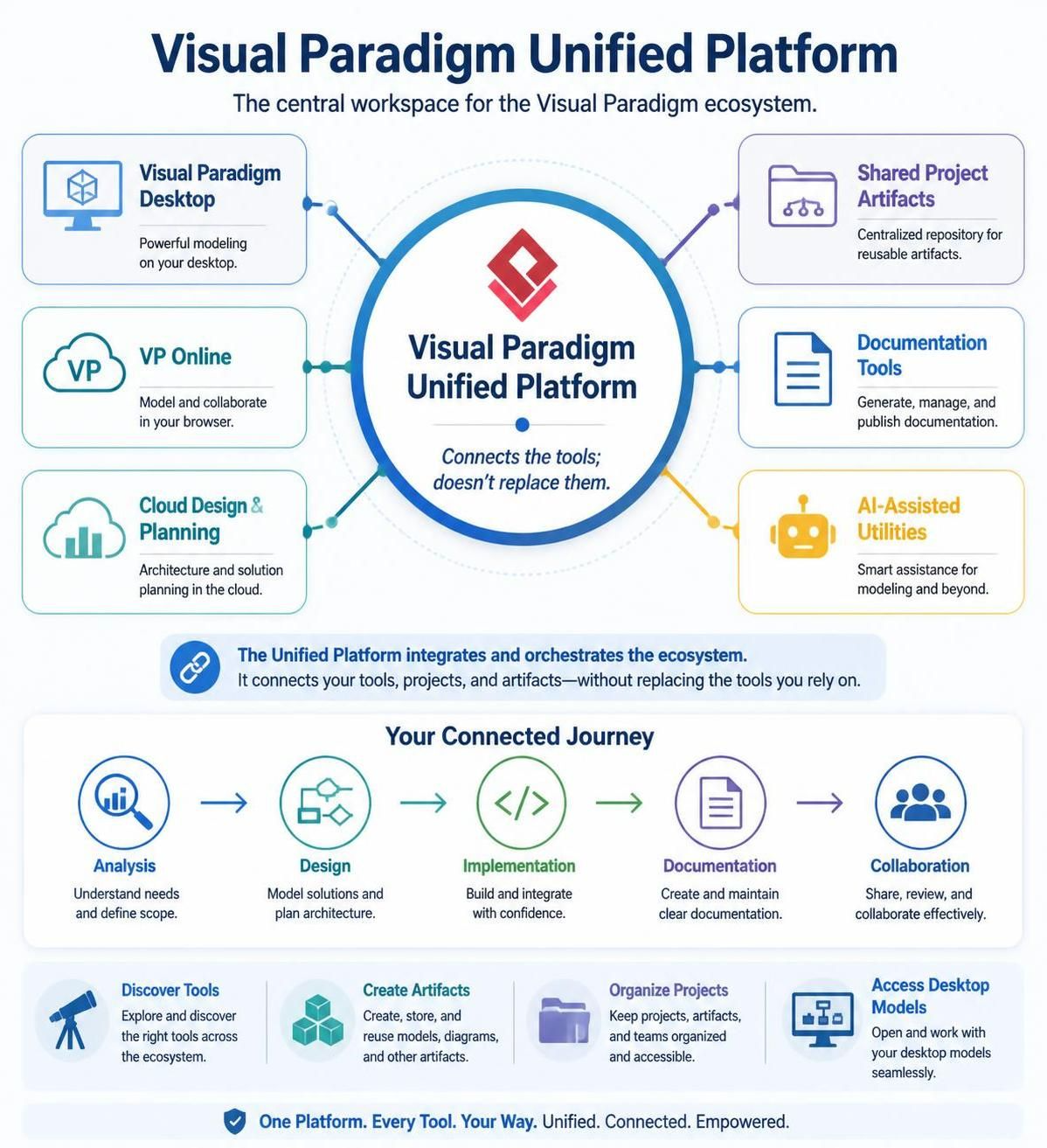
At the heart of the Visual Paradigm ecosystem lies the Unified Platform. Visually represented as the central hub connecting various components, its architecture is designed around the concept of integration and orchestration. It does not seek to supersede the specialized capabilities of its core components but rather to provide a seamless interface where they can coexist and interact.
The platform connects the following key pillars:
- Visual Paradigm Desktop: The powerhouse for deep, offline modeling. The Unified Platform acts as a bridge, allowing users to access these complex desktop models from a centralized web interface.
- VP Online: The cloud-native environment for browser-based collaboration. The platform ensures that cloud projects are treated as first-class citizens within the unified workspace.
- Cloud Design & Planning: Specialized applications for high-level architecture and solution planning, which are now integrated into the main project view.
- Shared Project Artifacts: A centralized repository structure that allows for the reuse of models and diagrams across different tools.
- Documentation Tools: Automated generation and management of documentation, ensuring that the “truth” of the system is preserved regardless of where the modeling occurred.
- AI-Assisted Utilities: Smart assistance tools that are now available directly within the workflow, providing context-aware support for modeling tasks.
The Connected Journey: From Analysis to Collaboration
The true power of the Unified Platform is revealed in the workflow it enables. The architecture supports a continuous lifecycle that flows logically through five distinct stages, ensuring that data integrity is maintained as artifacts move from one phase to another.
- Analysis: The process begins with understanding needs and defining scope. The Unified Platform allows users to explore requirements and connect them to specific project goals.
- Design: Once scope is defined, users move to modeling solutions and planning architecture. Here, the platform leverages the visual capabilities of the Desktop environment while maintaining cloud accessibility.
- Implementation: The architecture supports code generation and integration. Users can build and integrate solutions with confidence, knowing that the models are synchronized with the implementation artifacts.
- Documentation: Clear, maintainable documentation is a byproduct of good modeling. The platform automatically generates these artifacts, ensuring that documentation is never out of sync with the design.
- Collaboration: Finally, the platform facilitates effective sharing and review. Teams can work on the same project simultaneously, regardless of whether they are using the Desktop app or the browser.
Key Functional Capabilities
To support this journey, the platform provides four fundamental capabilities that empower the user:
- Discover Tools: A centralized directory where users can explore and discover the right tools across the ecosystem, eliminating the need to remember which tool handles which specific diagram type.
- Create Artifacts: Users can create, store, and reuse models, diagrams, and other artifacts directly within the platform, fostering a culture of reusability.
- Organize Projects: The platform enforces a structured organization of projects, artifacts, and teams, ensuring that data is accessible and manageable.
- Access Desktop Models: Perhaps the most critical feature is the ability to open and work with Desktop models seamlessly. This bridges the gap between heavy-duty offline work and agile online collaboration.
Technical Implementation: The Integration Layer
From a technical standpoint, the Visual Paradigm Unified Platform functions as an API-first integration layer. It exposes the capabilities of the underlying tools through a unified web interface. This architecture allows for the following technical benefits:
// Conceptual Architecture Flow
Input: User Action (e.g., "Open Project")
   |
   v
Unified Platform (Orchestration Layer)
   |-> Check Authentication & Permissions
   |-> Resolve Artifact Location (Desktop vs. Cloud)
   |-> Retrieve Metadata
   |
   v
Output: Contextual Workspace
   |-> Render UI Components
   |-> Load Model Data
   |-> Initialize AI Utilities
This structure ensures that the user experience remains consistent regardless of where the data physically resides. Whether a model is stored on a local machine or in the cloud, the Unified Platform presents it in a consistent, accessible manner.
Conclusion
The Visual Paradigm Unified Platform represents a shift from using isolated software tools to adopting a cohesive engineering environment. By treating Desktop, Online, and Cloud tools as interconnected components rather than silos, it empowers teams to focus on the architecture and design of their systems rather than the logistics of managing their software suite.