
Mastering the Visual Paradigm Ecosystem: A Unified Workflow for Modern Modeling
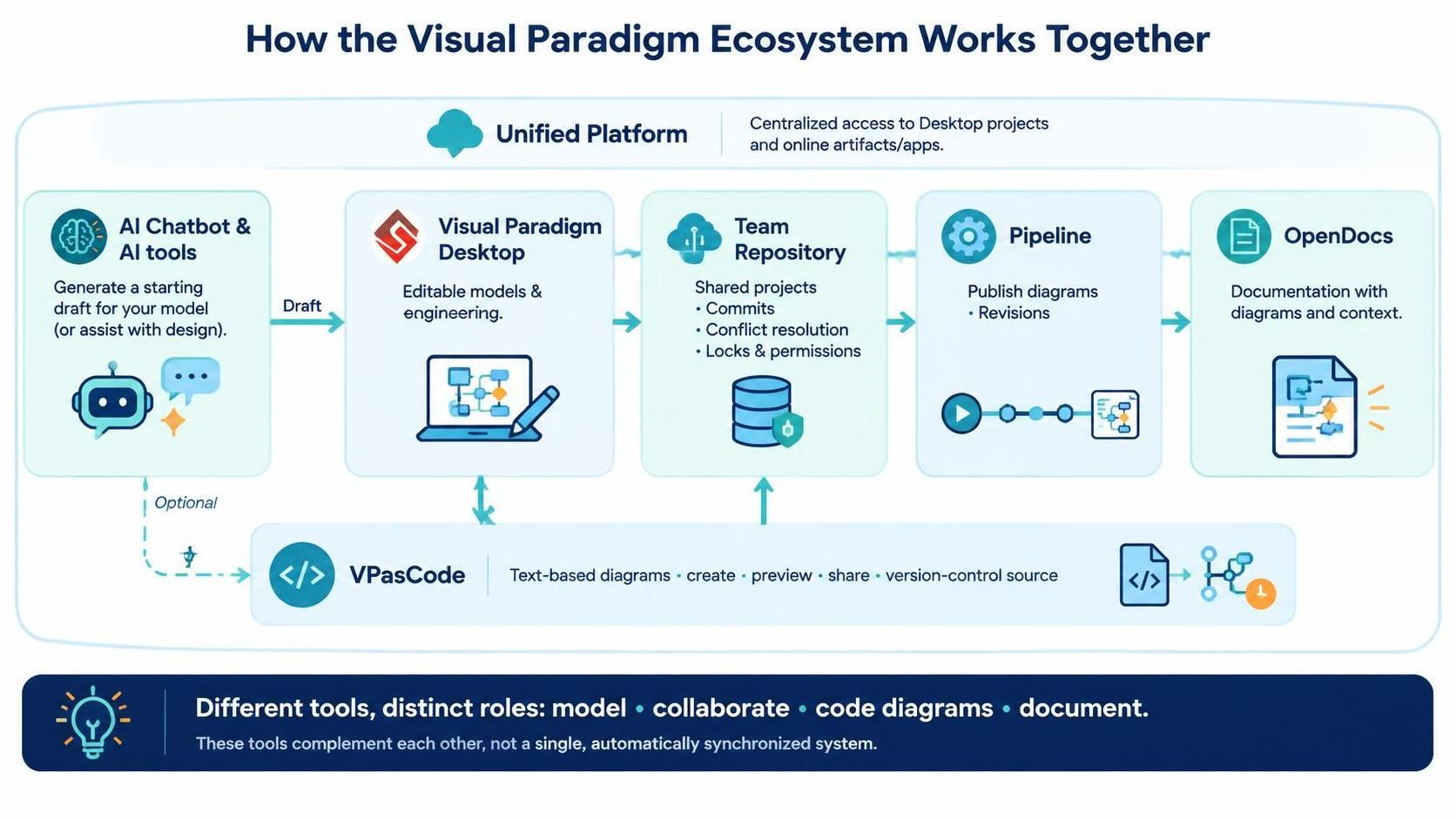
In the rapidly evolving landscape of software engineering and business architecture, relying on a single tool is rarely sufficient. The modern workflow requires a synergy between powerful desktop modeling, AI-assisted drafting, version-controlled collaboration, and comprehensive documentation. This tutorial explores the architectural ecosystem of Visual Paradigm, demonstrating how its distinct components—Desktop, VPasCode, Team Repository, and OpenDocs—work together to create a seamless end-to-end process.
The Architecture of the Unified Platform
The core philosophy behind this ecosystem is specialization within a unified framework. Rather than forcing every task into one monolithic application, the platform distributes responsibilities to the tool best suited for that specific activity. This “Unified Platform” acts as the central nervous system, providing a centralized workspace where users can access desktop projects, online artifacts, and various applications simultaneously.
By decoupling the different stages of the modeling lifecycle, teams can optimize their productivity. You can draft ideas with AI, refine them in the robust Desktop environment, manage them through version control, and finally, publish them into professional documentation. This modularity ensures that no single tool becomes a bottleneck for the entire team.
Step 1: Rapid Prototyping with AI Chatbots
The workflow often begins not with a blank canvas, but with a concept. The AI Chatbot and AI tools serve as the creative spark, capable of generating a starting diagram from a simple text description. This is particularly useful for brainstorming sessions or when a team needs a “draft” model to discuss.
Once the AI generates the initial structure, it acts as a bridge to the more powerful tools. The output from the AI can be fed directly into the Desktop environment for refinement or used as a seed for text-based modeling. This step significantly reduces the “blank page syndrome,” allowing engineers to focus immediately on logic and refinement rather than initial layout.
Step 2: Deep Modeling with Visual Paradigm Desktop
While AI provides the spark, Visual Paradigm Desktop provides the engine. This is the heavy-lifting component of the ecosystem, designed for creating and maintaining detailed, editable models. It is the primary workspace for engineering and modeling features.
In this phase, the “Draft” generated by the AI is transformed into a professional-grade model. Users can leverage advanced features to define complex relationships, validate models against standards, and ensure engineering rigor. The Desktop application is where the actual “modeling” work happens, serving as the source of truth for the project’s structural data.
Step 3: Collaborative Management via Team Repository
Software development is rarely a solo endeavor. Once a model is being built or refined, it must be shared. The Team Repository is the mechanism that enables this collaboration. It is not merely a storage location but a dynamic environment for shared project work.
Key functions of the Team Repository include:
- Version Control: Commit and update changes to maintain a history of the project’s evolution.
- Conflict Resolution: When multiple team members edit the same model, the repository provides the tools to resolve conflicts.
- Collaboration Controls: Features such as locks and permissions ensure that team members can coordinate editing without overwriting each other’s work.
Step 4: Text-Based Modeling with VPasCode
For developers who prefer a code-centric approach, the ecosystem introduces VPasCode. This component allows users to create, preview, and share text-based diagrams. It treats diagrams as source files, integrating them into a version-control workflow just like traditional code.
The relationship between VPasCode and the Desktop environment is bidirectional but distinct. While Desktop is for visual modeling, VPasCode is for those who want to define models via text. This optionality allows teams to choose their preferred interface—visual drag-and-drop or text coding—while maintaining a single source of truth within the repository.
Step 5: Publishing and Documentation with Pipeline and OpenDocs
The final stage of the workflow is communication. A model is only valuable if it can be understood by stakeholders, developers, and clients. The Pipeline and OpenDocs components handle the transition from “internal model” to “external artifact.”
The Pipeline takes diagrams from the Desktop environment and sends them to a shared artifact area. Crucially, it preserves revisions, ensuring that the documentation reflects the specific state of the model at the time of release. These artifacts are then integrated into OpenDocs, a tool designed for combining diagrams with explanatory documentation. This creates a cohesive project document that provides both the visual representation and the necessary context.
Conclusion: A Holistic Approach
The Visual Paradigm ecosystem is designed to support the entire lifecycle of a project, from the initial spark of an idea to the final publication of documentation. By understanding the distinct roles of each component—Desktop for modeling, Repository for collaboration, VPasCode for text-based workflows, and OpenDocs for reporting—teams can leverage a complete workflow that is both powerful and flexible.