
Mastering the AI-Assisted Flowchart Workflow with Visual Paradigm
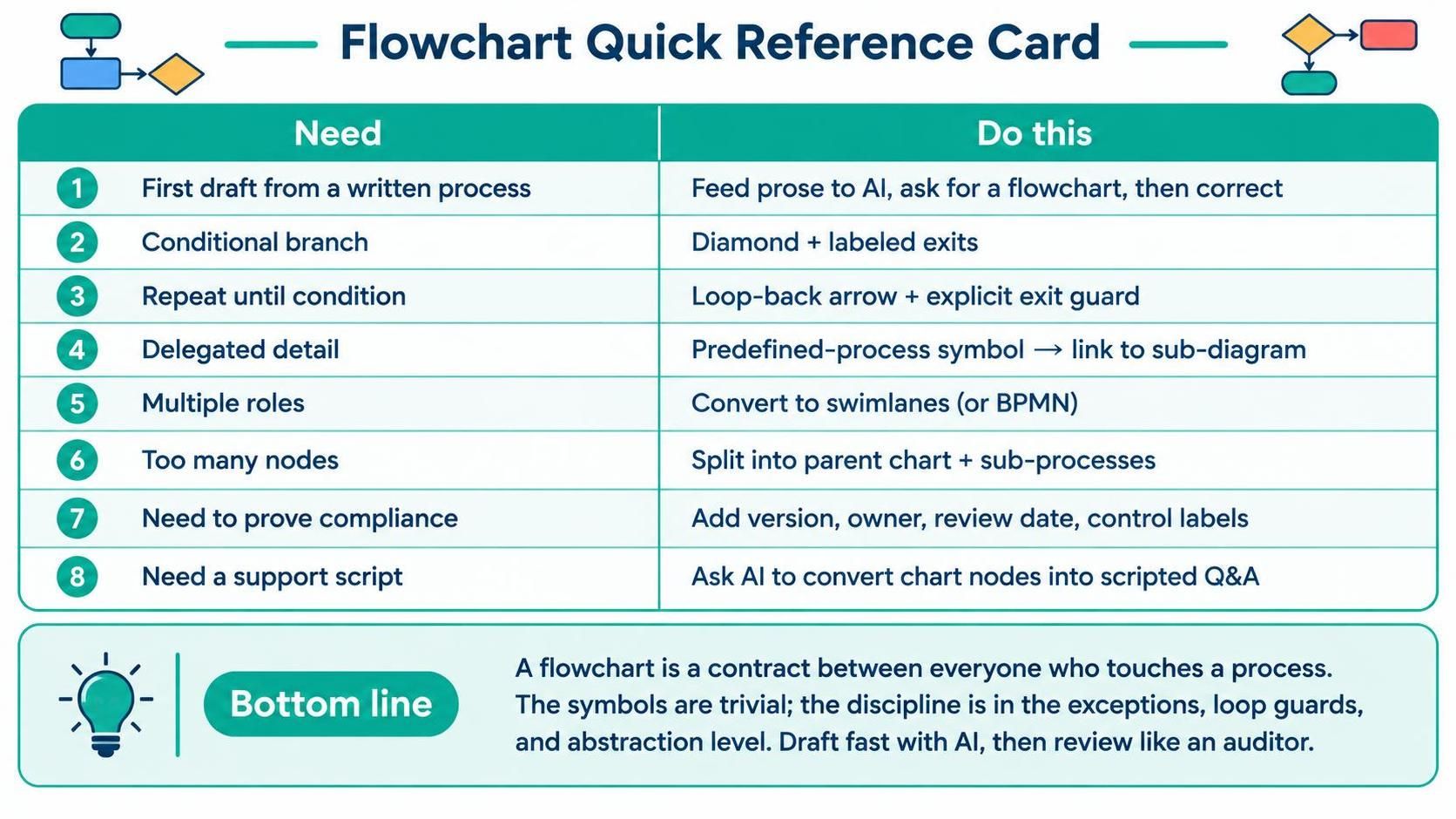
In the modern landscape of business process management, the traditional method of drawing flowcharts by hand or dragging and dropping shapes manually is often too slow to keep pace with agile development. The integration of Generative AI into tools like Visual Paradigm has revolutionized this workflow, shifting the focus from drawing to engineering.
This tutorial explores the symbiotic relationship between Visual Paradigm’s diagramming capabilities and AI-assisted generation, specifically focusing on how to transform written prose into robust, auditor-ready process diagrams.
The Shift from “Drafting” to “Contracting”
At the core of this methodology is a fundamental shift in perspective. As noted in the reference materials, a flowchart is not merely a drawing; it is a contract between everyone who touches a process. When you generate a diagram using AI, you are creating a textual-to-visual translation of a business reality.
To create a diagram that stands up to scrutiny, you must apply a dual-layer approach:
- AI-Assisted Drafting: Rapidly converting unstructured text into a structured visual format.
- Auditor-Grade Review: Verifying the logic, exception handling, and compliance labels.
Visual Paradigm serves as the canvas for this interaction, allowing you to import these AI-generated structures and refine them into professional documentation.
Step-by-Step: The AI-Assisted Modeling Workflow
1. The First Draft: From Prose to Process
The most time-consuming part of process modeling is often the initial setup. Instead of starting with a blank canvas, you can utilize a “Feed Prose” strategy. By feeding a written process description to an AI assistant, you can request an immediate flowchart generation.
This step is not about perfection; it is about speed. The AI generates the skeleton of the process, identifying the sequence of events and logical connectors. Once generated in Visual Paradigm, you can correct the flow, ensuring the visual representation matches the intent.
2. Handling Logic: Branches and Loops
A common pitfall in AI-generated diagrams is the simplification of complex logic. To ensure your diagrams are accurate, you must manually enforce specific visual conventions for decision points.
- Conditional Branches: AI often draws arrows without labels. You must ensure every Diamond (Decision) symbol has clearly labeled exits (e.g., “Yes/No” or “True/False”).
- Loop Guards: A loop is not a valid process structure unless it has an exit condition. When reviewing AI drafts, look for “Repeat until” conditions and ensure there is an explicit “Exit Guard” arrow preventing infinite loops.
3. Managing Complexity: Abstraction and Swimmings
As processes grow, a single flat diagram becomes unreadable. Visual Paradigm offers powerful features to manage this complexity, which AI can assist in structuring.
Delegated Detail: If a specific step is too complex to show in the main view, use the Predefined-Process symbol to delegate that detail to a sub-diagram. This creates a “parent chart” that links to the “sub-process,” keeping the main view clean.
Multiple Roles: If your process involves multiple departments or actors, a standard flowchart can become a “spaghetti chart.” The best practice here is to convert the flowchart into Swimlanes. Visual Paradigm allows you to easily map roles to lanes, clarifying who is responsible for which part of the process.
Compliance and Support: The Human Touch
While AI can generate the diagram, it cannot generate the governance. This is where the “Auditor Review” phase comes in. A compliant diagram requires metadata that a machine cannot invent.
To prove compliance, you must manually add:
- Version Control: Identifying the revision history.
- Ownership: Clearly defined owners for the process.
- Review Dates: Timestamps for the last audit.
- Control Labels: Specific tags required for regulatory adherence.
From Diagram to Script
Visual Paradigm does more than just store diagrams; it can help you operationalize them. Once your diagram is finalized, you can use AI to convert the nodes of your flowchart into a scripted Q&A format. This turns the visual map into a training manual or a support script, ensuring that the “contract” of the process is understood by the people executing it.
Conclusion
The combination of Visual Paradigm’s robust diagramming engine and AI’s generative speed creates a workflow that is both efficient and rigorous. By treating the flowchart as a contract and applying an auditor’s eye to the AI’s output, you ensure that your documentation is not just pretty, but accurate, compliant, and useful.