
Mastering Incident Claims with VPasCode: AI-Powered Mermaid Flowcharts
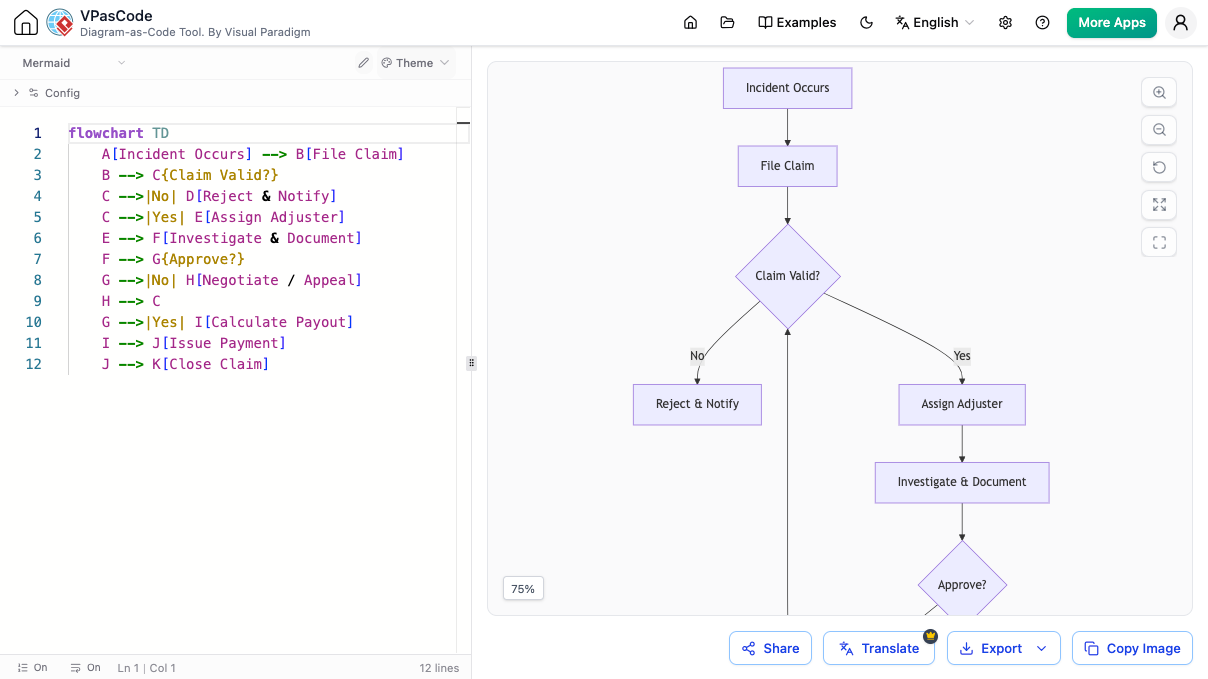
In the world of business process modeling, few diagrams are as critical for defining operational efficiency as the flowchart. This visual representation dictates the lifecycle of a transaction or event, mapping out every possible path from initiation to resolution. This tutorial explores the architecture of an Incident Claim Process using the VPasCode tool, demonstrating how to translate complex decision logic into a clean, executable Mermaid flowchart. By understanding the underlying syntax and logic gates, you can build robust systems that handle exceptions—like invalid claims—gracefully.
Understanding the Architecture: Top-Down Design
The diagram presented in the VPasCode environment is a classic example of a Top-Down (TD) flowchart. Unlike state diagrams that focus on the status of an object, a top-down flowchart focuses on the sequential progression of an event. The architecture begins with a trigger—the “Incident Occurs”—and cascades downward through a series of processing steps and decision points.
The structure relies on a strict hierarchy of nodes:
- Terminators (Rectangles): Represent the start and end of the process or major processing blocks like “File Claim” and “Investigate & Document.”
- Decision Diamonds: The core of the logic. These nodes, such as “Claim Valid?” and “Approve?”, branch the path based on binary outcomes (Yes/No).
- Connectors (Arrows): These define the direction of flow. In Mermaid, they use specific arrow syntax to link nodes, ensuring the viewer understands the sequence.
Deconstructing the Logic: The Validation Gate
The most critical architectural component in this diagram is the first decision point: “Claim Valid?”. In any enterprise system, validation is the first line of defense. The logic here acts as a gatekeeper:
- The process initiates with
A[Incident Occurs]. - The flow immediately moves to
B[File Claim]. - It then hits the decision diamond
C{Claim Valid?}.
If the claim is invalid, the system does not attempt to investigate; it immediately executes D[Reject & Notify]. This prevents wasted resources on fraudulent or incomplete data. This logical branch is crucial for system integrity and efficiency.
Handling the Loop: Negotiation and Appeals
Complex business processes often require feedback loops. This diagram demonstrates a sophisticated loop mechanism for handling disputes. If the claim is valid, it proceeds to an investigation phase, leading to a second decision: “Approve?”.
If the answer to “Approve?” is No, the process moves to H[Negotiate / Appeal]. However, the diagram does not end here. The arrow from the negotiation step points back to the “Claim Valid?” decision node. This creates a recursive loop where a rejected claim can be re-evaluated, potentially changing the outcome of the validation or approval stages. This architecture ensures that the system is iterative rather than linear, accommodating the reality of business negotiations.
Technical Syntax and Mermaid Implementation
The power of VPasCode lies in its ability to render text directly into diagrams. The syntax used here is Mermaid, a text-to-diagram tool. The diagram is defined using a specific flowchart declaration followed by node definitions and connection strings.
For example, the rejection logic is expressed as:
C -->|No| D[Reject & Notify]This line reads: “From node C, if the condition is ‘No’, connect to node D.” The pipe symbols | | allow us to label the specific branch of the arrow, making the diagram self-documenting.
When the loop is established, the syntax looks like this:
H --> CThis simple instruction creates the visual feedback loop seen in the right-hand pane of the tool, directing the flow from the negotiation step back to the validation diamond.
From Code to Export: Delivering Value
Once the logic is verified in the VPasCode editor, the system allows for immediate export. The tool supports high-quality formats like SVG and PNG, ensuring that the diagram remains crisp when embedded in technical documentation or business reports. Whether you are documenting a new insurance protocol or a software incident response plan, the ability to generate these diagrams instantly from code accelerates the design-to-delivery cycle.
By leveraging the AI generation capabilities of VPasCode, you can transform abstract ideas into structured, executable models. This not only improves communication among stakeholders but also serves as a precise blueprint for developers and business analysts alike.