
Mastering Enterprise Architecture: A Deep Dive into Visual Paradigm’s Modeling Ecosystem
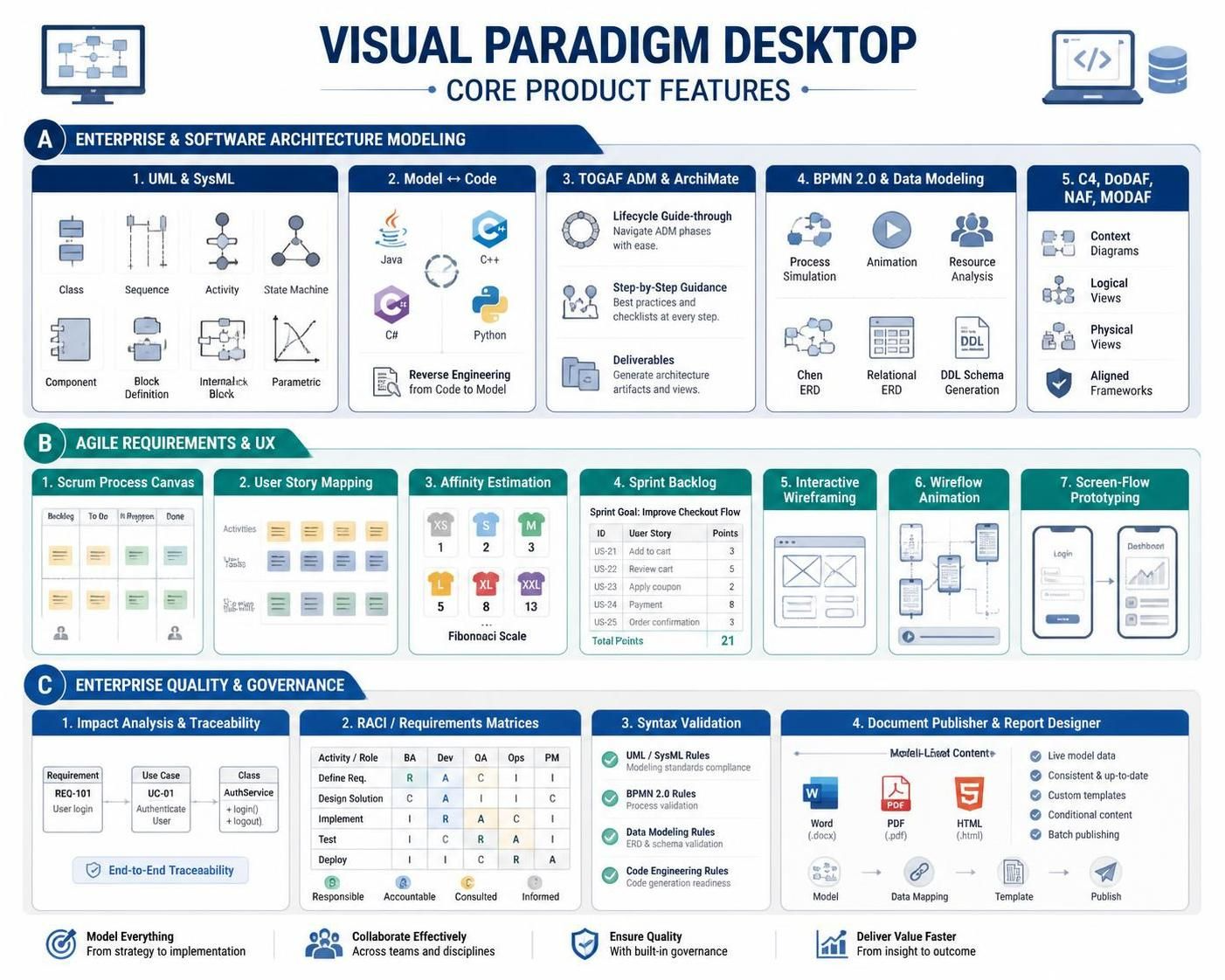
In the complex landscape of modern software engineering, bridging the gap between high-level business strategy and low-level implementation code is the primary challenge for architects. Visual Paradigm Desktop addresses this by offering a unified platform that integrates strategic frameworks like TOGAF with agile development practices and rigorous software modeling.
This tutorial explores the core architecture of Visual Paradigm, breaking down how it harmonizes the “Big Picture” of Enterprise Architecture with the “Small Picture” of User Experience and Code Generation.
Section A: Enterprise & Software Architecture Modeling
The foundation of Visual Paradigm lies in its robust support for industry-standard modeling languages. This section is designed for architects who need to document complex systems while ensuring they remain technically feasible.
1. Unified Modeling Language (UML) & SysML
Visual Paradigm provides native support for the full spectrum of UML 2.x and SysML v1/v2. This is not merely a drawing tool; it is a semantic modeling environment.
- Behavioral Modeling: Utilize Sequence Diagrams to map object interactions and State Machine Diagrams to define complex lifecycle states.
- Structural Modeling: Use Class Diagrams for object-oriented design and Component Diagrams for system assembly.
- Systems Engineering: The platform extends beyond standard UML to support Block Definition Diagrams (BDD) and Internal Block Diagrams (IBD), essential for systems engineering.
2. The Model-to-Code Bridge
One of the most critical features is bidirectional synchronization. This allows for Forward Engineering (generating code from models) and Reverse Engineering (creating models from existing codebases).
Supported languages include:
JavaC++C#Python
This ensures that your design documents are never outdated “shelf-ware” but are instead living artifacts that reflect the actual state of the repository.
3. Strategic Frameworks: TOGAF & ArchiMate
For enterprise architects, the tool offers a fully integrated TOGAF 10 Architecture Development Method (ADM) lifecycle guide. It acts as a digital consultant, providing step-by-step guidance through the ADM phases.
Complementing this is ArchiMate 3.2/4 support. This standard is crucial for visualizing the relationships between the Business, Application, and Technology layers of an organization.
4. Business Process & Data Modeling
Architects must also model how data flows and how processes execute. Visual Paradigm integrates BPMN 2.0 for process simulation and animation, allowing teams to “run” a process diagram to check for bottlenecks before implementation.
Data modeling is equally robust, supporting:
- Chen ERD: For conceptual database design.
- Relational ERD: For physical database design.
- DDL Generation: Automatic generation of Database Definition Language scripts.
5. C4 Model & Military Frameworks
The platform also embraces modern software architecture visualization via the C4 Model (Context, Container, Component, Code) and supports defense frameworks like DoDAF, NAF, and MODAF.
Section B: Agile Requirements & User Experience (UX)
Architecture does not exist in a vacuum; it must serve the end-user. Visual Paradigm brings Agile methodologies directly into the modeling environment.
1. Agile Event & Backlog Management
Instead of using separate spreadsheets for project management, the tool offers a Scrum Process Canvas. This includes:
- User Story Mapping: Visualizing the user journey.
- Affinity Estimation: Using the Fibonacci scale for story point estimation.
- Sprint Backlog Tracking: Managing tasks from “To Do” to “Done.”
2. UX Wireframing & Screen Flows
To bridge the gap between technical specifications and customer journeys, the tool provides interactive wireframing. You can create wireflow animations and screen-flow state-transition prototyping, effectively simulating the application’s behavior before a single line of code is written.
Section C: Enterprise Quality & Governance
Finally, the platform ensures that the massive amount of data generated by modeling is governed, traceable, and reportable.
1. Impact Analysis & Traceability
When a requirement changes, how does it affect the code? Visual Paradigm provides Impact Analysis Maps and Matrix Views (such as RACI matrices) to ensure end-to-end integrity. You can trace a Requirement ID (e.g., REQ-101) all the way to the specific Class and Method in the code.
2. Document Publisher & Report Designer
Documentation is a mandatory artifact in enterprise environments. The Drag-and-Drop Document Builder allows you to create standardized reports (Word, PDF, HTML) that pull live model elements. This means your architectural reports are always consistent with the current model state.
Conclusion
By combining the rigor of TOGAF and SysML with the speed of Agile and the precision of Code Generation, Visual Paradigm Desktop serves as a comprehensive lifecycle management tool. It ensures that whether you are designing a high-level enterprise strategy or debugging a Python script, you are working within a single, coherent system architecture.