
Mastering Deployment Diagrams with VPasCode: A UML Guide to Cloud Architecture
In the realm of software architecture, understanding where your application lives and how it talks to the outside world is just as critical as writing the code itself. This is where the Deployment Diagram shines. It provides a physical view of your system, mapping software artifacts onto hardware nodes and defining the execution environments. In this tutorial, we will explore a classic e-commerce architecture using Visual Paradigm’s VPasCode, a powerful diagram-as-code tool that allows you to define your infrastructure purely through text.
The Power of Code-Based Modeling
Traditionally, drawing deployment diagrams involved dragging and dropping boxes onto a canvas. While visual, this method can be prone to misalignment and lacks version control integration. By using VPasCode, you leverage the @startuml syntax (based on PlantUML) to write your infrastructure as text. This approach offers:
- Version Control Friendly: Your architecture is just a text file, making it perfect for Git workflows.
- Rapid Iteration: Changing a node name or protocol is as simple as editing a line of text.
- Consistency: Syntax-driven tools ensure that your diagram adheres to standard UML rules.
Analyzing the Architecture
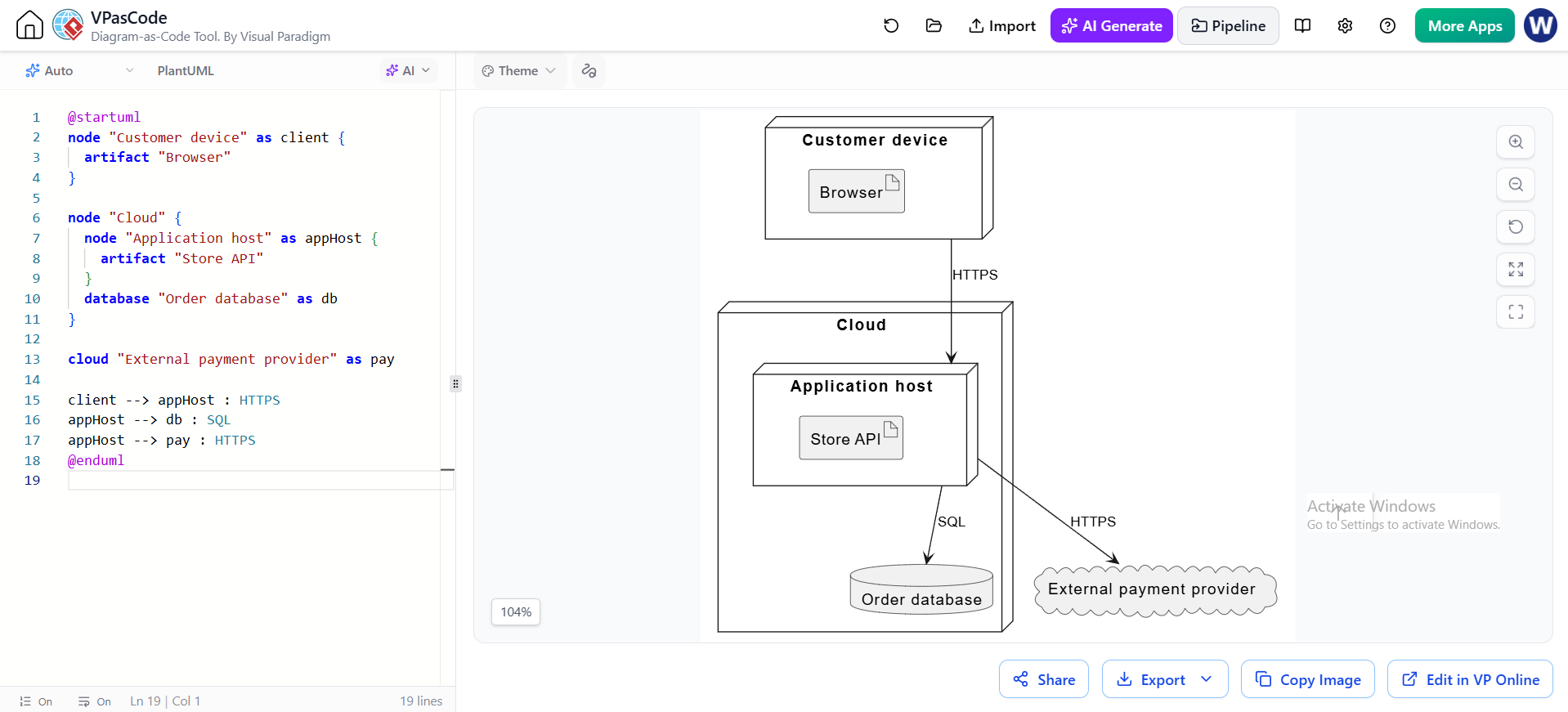
The diagram we are building represents a standard three-tier architecture with an external dependency. Let’s break down the components defined in our code:
1. The Client Side: Customer Device
At the top of our hierarchy, we have the Customer device. This is a physical node representing the hardware used by the end-user. Inside this node, we define an artifact: the Browser. This represents the software running on that hardware, serving as the entry point for the user.
2. The Cloud Infrastructure
Our backend resides in the Cloud. This is a container node that holds the core application logic:
- Application Host: The server where our business logic executes. It contains the Store API artifact. This is the engine of our online store.
- Order Database: A persistent storage node, often depicted as a cylinder, used to store transaction data.
3. External Dependencies
Modern applications rarely exist in a vacuum. Our system relies on an External payment provider. This represents a third-party service (like Stripe or PayPal) that handles financial transactions, connected via the internet.
Building the Diagram: The VPasCode Code
To recreate this architecture, we use the VPasCode editor. The code below demonstrates how to define nodes, nest them logically, and draw the communication lines between them.
@startuml
node "Customer device" as client {
  artifact "Browser"
}

node "Cloud" {
  node "Application host" as appHost {
    artifact "Store API"
  }
  database "Order database" as db
}

cloud "External payment provider" as pay

client --> appHost : HTTPS
appHost --> db : SQL
appHost --> pay : HTTPS
@enduml
Decoding the Syntax
Let’s walk through the specific commands used in the code block above:
- Defining Nodes: The
node "Name" as aliascommand creates a physical hardware or server instance. Theaskeyword assigns a shorthand name (likeclientorappHost) to make referencing easier later. - Nesting Artifacts: By placing
artifact "Browser"inside the curly braces{}of the “Customer device” node, we visually indicate that the browser runs on that specific device. - Communication Lines: The arrow
-->defines the direction of data flow. The text following the colon:specifies the protocol (e.g.,HTTPSorSQL), which is crucial for understanding the security and data types involved.
Interpreting the Data Flow
Once rendered, the diagram tells a story of how data moves through the system:
- Client to Server: The
clientsends a request to theappHostusing HTTPS. This indicates secure communication over the web, protecting user credentials and session data. - Server to Database: The
appHostcommunicates with thedbusing SQL. This is the standard protocol for querying and manipulating data in relational databases. - Server to Payment: Finally, the application talks to the external payment provider using HTTPS. This highlights that sensitive financial data is transmitted securely to the third-party service.
Conclusion
By mastering deployment diagrams and the VPasCode tool, you gain the ability to document complex infrastructure quickly and accurately. Whether you are designing a new cloud-native application or auditing an existing one, this textual approach ensures your documentation stays up-to-date with your code.