
Mastering BPMN Patterns: Orchestrating vs. Choreographing Enterprise Workflows
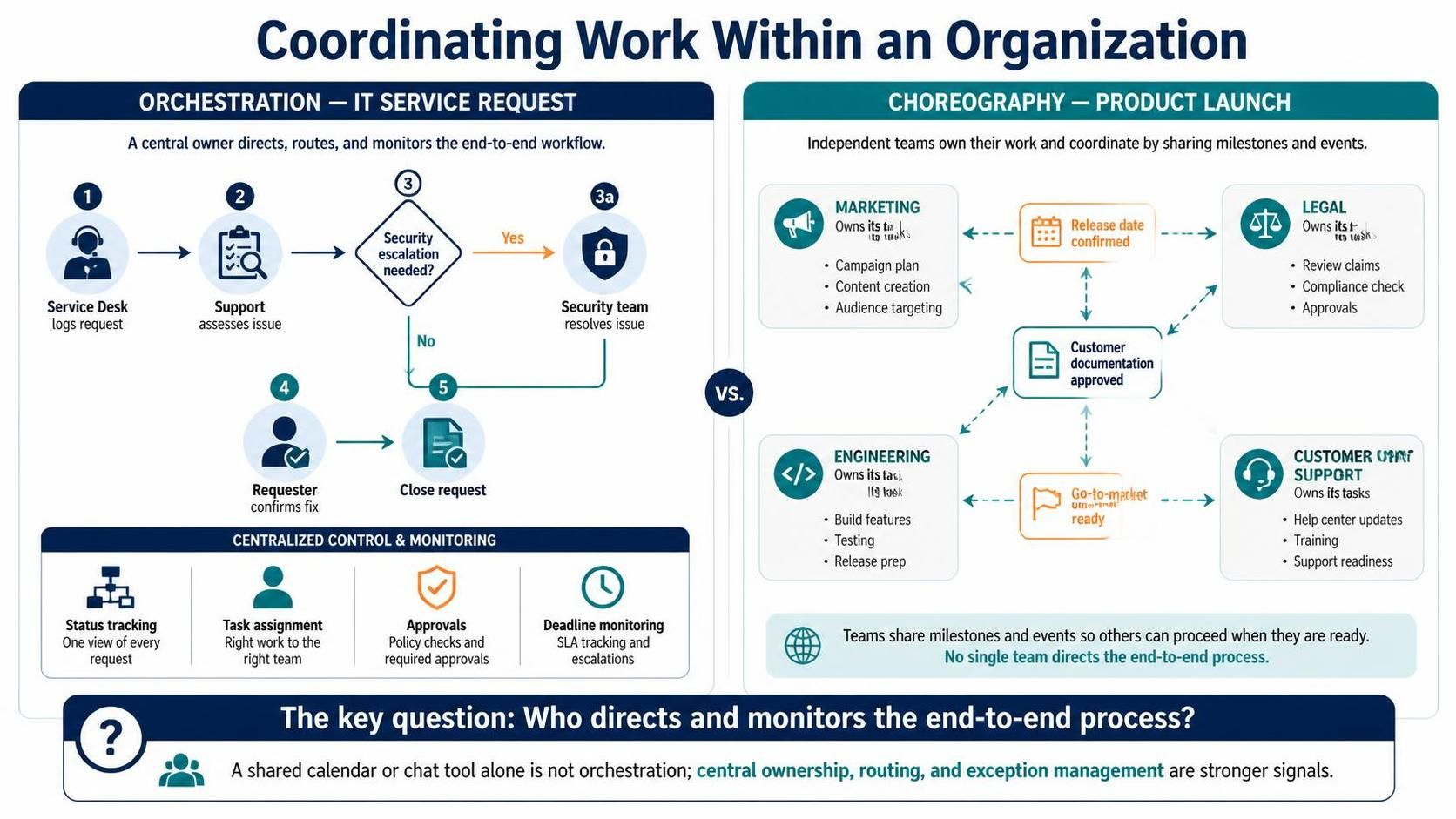
In the realm of business process modeling, choosing the right coordination pattern is often more critical than the specific tools used. Whether you are using Visual Paradigm, Signavio, or Camunda, the fundamental architecture of your process dictates its scalability and resilience. This tutorial breaks down the essential differences between Orchestration and Choreography, providing a step-by-step guide on how to model these patterns effectively.
The Core Concept: Who is the Conductor?
At the heart of the distinction lies a simple question: Who directs and monitors the end-to-end process?
- Orchestration acts like a conductor of an orchestra. There is a central controller (the orchestrator) that knows the entire score, directs the participants on when to play, and manages the overall flow.
- Choreography acts like a dance troupe. There is no central director on the floor. Instead, the dancers (participants) follow a shared set of rules and react to each other’s movements to create a cohesive performance.
Scenario 1: Orchestration in Action
Orchestration is best suited for processes with clear ownership, strict dependencies, and the need for centralized monitoring. A classic example found in the diagram is the IT Service Request workflow.
Modeling the Orchestration Flow
In Visual Paradigm, you would model this as a central process that controls the state of the request.
- The Trigger: The process begins when the Service Desk logs a request. In BPMN, this is typically an Event Subprocess or a start event.
- The Routing: The central engine sends the task to the Support Team to assess the issue. This is a User Task.
- The Decision Gate: Here, the orchestrator performs a Exclusive Gateway (the diamond shape). It asks: “Is security escalation needed?”
- The Branching Logic:
- If Yes: The orchestrator assigns the task to the Security Team.
- If No: The flow bypasses security and proceeds to closure.
- The Completion: Once the issue is resolved, the orchestrator assigns the task to the Requester to confirm the fix, finally closing the process.
Key Modeling Feature: In an orchestration diagram, the central process retains a “God’s eye view.” It tracks status, enforces SLAs, and manages exceptions at every step.
Centralized Control Features
When modeling orchestration, ensure your diagram highlights these critical capabilities:
- Status Tracking: A single view of every request.
- Task Assignment: Ensuring the right work is routed to the right team.
- Approvals: Enforcing policy checks and required approvals.
- Deadline Monitoring: Tracking SLAs and managing escalations.
Scenario 2: Choreography in Action
Choreography fits scenarios where teams operate with considerable autonomy. The Product Launch example illustrates this perfectly. Marketing, Legal, Engineering, and Customer Support all have their own internal lives, but they must coordinate to launch a product.
Modeling the Choreography Flow
In BPMN, this is often modeled using Choreography Diagrams (swimlanes representing participants) rather than standard Pools and Lanes.
- Independence: Marketing creates a campaign plan. Engineering builds features. They do this without a central manager telling them exactly when to start.
- Shared Events: Coordination happens through shared milestones. For instance, the Legal team must “Review claims” and provide “Compliance check” approval.
- The Trigger Chain:
- Event 1: “Release Date Confirmed.” Once Marketing confirms this, Legal and Engineering can proceed.
- Event 2: “Customer Documentation Approved.” This allows Customer Support to begin training.
- Event 3: “Go-to-Market Ready.” This is the final signal that allows the launch.
Key Modeling Feature: Notice that no single entity directs the whole process. The diagram relies on messages (dashed lines) exchanged between participants. If one team is late, the others simply wait for the signal.
Orchestrating Cross-Organization Processes
Real-world business rarely stays within a single organization. A common architecture is a hybrid model: Internal Orchestration + External Choreography.
Consider an Online Purchase:
- Internal Orchestration: The retailer orchestrates its own internal order validation. They decide when to check inventory and when to process the data.
- External Choreography: The retailer sends a payment request to a Payment Provider. The retailer does not control the provider. The provider independently authorizes or declines the payment and returns a result.
- External Choreography: If approved, the retailer arranges fulfillment. A Carrier accepts a shipment request, manages delivery, and reports tracking events back to the retailer.
The Boundary Matters: When modeling this in Visual Paradigm, do not model the Payment Provider or Carrier as internal departments. Use separate Pools to represent them. The interaction between organizations is a set of agreed exchanges: who sends what, what response is expected, and what happens if a response is missing?
Practical Modeling Tips
When you are building your diagrams in Visual Paradigm, keep these guidelines in mind to ensure clarity and accuracy.
Identifying Orchestration vs. Choreography
Do not rely solely on the presence of a central system. A shared calendar or messaging platform does not make a process orchestrated. Look for these signals:
- Is there a central process owner? Does someone route the work and manage exceptions?
- Is there visibility? Does one participant see the entire flow, or just its own slice?
- Is there control? Can the central entity force a participant to act, or can they only request it?
Summary
Choosing between orchestration and choreography is a strategic decision. Use Orchestration when you need strict control, clear ownership, and centralized monitoring of dependencies. Use Choreography when you need to coordinate independent teams or external organizations that require autonomy. By understanding these patterns, you can design systems that are robust, scalable, and aligned with your organization’s operational reality.