
Mastering BPMN Message Flows with the Nobel Prize Process
Effective business process modeling relies heavily on how we represent communication between different participants. In the world of Business Process Model and Notation (BPMN), the distinction between what happens inside a process and what happens between processes is the difference between a simple diagram and a functional system specification.
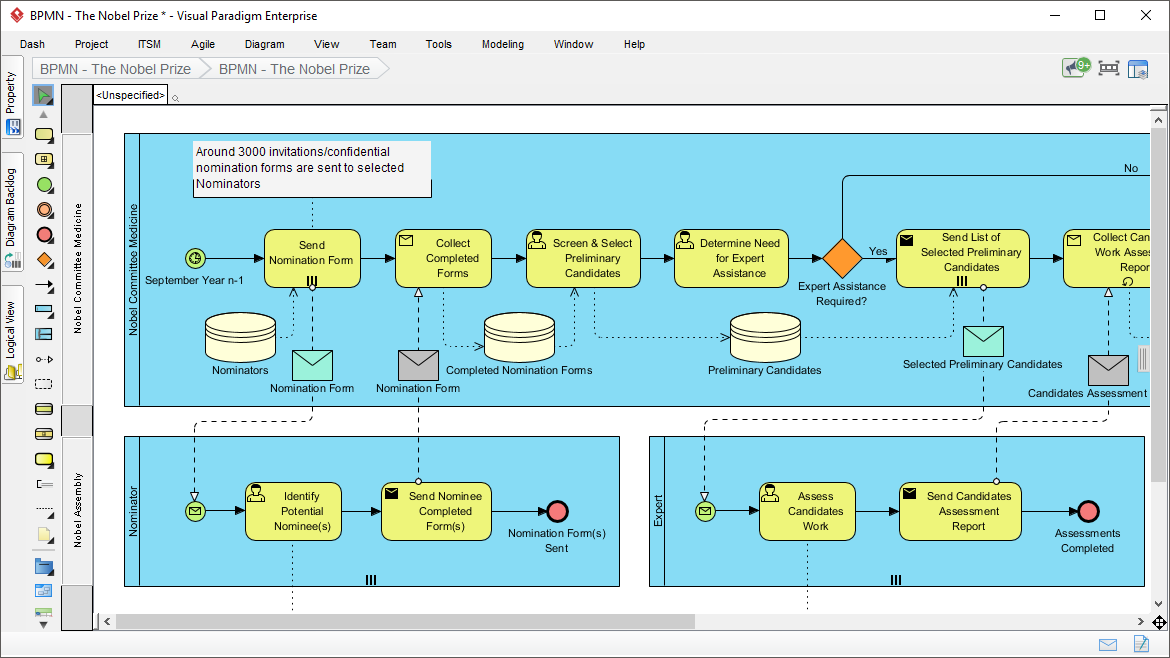
In this tutorial, we will analyze the “Nobel Prize” process diagram shown in the screenshot. This model is an excellent example of a Pooled Process architecture, where the system is divided into distinct organizational boundaries. We will focus on the specific type of flow used to bridge these gaps: the Message Flow.
1. The Architecture: Pools and Lanes
Before diving into the lines, we must understand the container. The screenshot displays a process divided into two major vertical sections. In BPMN terminology, these are called Pools.
- Top Pool (Nobel Committee Medicine): This represents the internal workflow of the committee members who manage the nomination and selection process.
- Bottom Pool (External Entities): This area is split into two distinct sub-processes or lanes: Nominator and Expert. These represent external parties who are not part of the Committee’s internal organization but interact with it.
The vertical line separating the top pool from the bottom section is the Pool Boundary. This boundary acts as a firewall. It signifies that the internal logic, variables, and tasks of the Committee are invisible and inaccessible to the Nominator or the Expert. Communication must happen through a specific “doorway.”
2. The Connecting Objects: Message Flows
This is the core concept of the diagram. You will notice lines connecting the Start Events (the green circles with envelopes) to the first tasks in the process. Unlike the solid black lines used for internal execution, these lines are open arrows (or sometimes dashed lines depending on the specific BPMN version, but here they are open arrows).
These are Message Flows. Their purpose is to represent the physical or logical transfer of information between two different participants (Pools).
Key Characteristics of Message Flows
- They Cross Boundaries: A message flow cannot exist entirely within a single Pool. It must always start in one participant and end in another.
- They Represent Communication: The open arrow indicates that a message is being sent. For example, the Committee sends a “Nomination Form” to the Nominator, or the Expert sends an “Assessment Report” back to the Committee.
- They Are Not Sequence Flows: A common mistake is to use a standard sequence flow (solid arrow) to connect pools. In a strict BPMN model, this is invalid. Sequence flows dictate the order of execution (Step A then Step B), whereas Message Flows dictate the delivery of data (Send this, then wait for that).
3. Analyzing the “Nobel Prize” Workflow
Let’s walk through the logic presented in the diagram, specifically looking at how the Message Flows drive the interaction.
The Nominator’s Role
Look at the Nominator lane. The process begins with a Start Event (green circle with an envelope). This is a Message Start Event.
- The Trigger: The Nominator cannot just “start” the process. They must first receive the “Nomination Form” from the Committee. The Message Flow connects the Committee’s “Send Nomination Form” task to the Nominator’s start event.
- The Execution: Once the form arrives, the Nominator performs the task “Identify Potential Nominee(s).” This is a manual task (indicated by the person icon).
- The Output: The Nominator completes the form and sends it back. The diagram shows a Message Flow arrow returning to the Committee, labeled “Completed Nomination Forms.”
The Expert’s Role
The Expert lane operates similarly but is triggered later in the timeline.
- The Trigger: The Committee first screens candidates. If the decision is “Yes” (Expert Assistance Required), a Message Flow is sent to the Expert containing the “Preliminary Candidates” list.
- The Execution: The Expert performs “Assess Candidates Work.”
- The Output: The Expert sends the “Assessment Report” back to the Committee via a Message Flow.
4. Visual Paradigm Implementation & Best Practices
When modeling this in Visual Paradigm (VP) or similar tools, the distinction between these flows is crucial for generating accurate executable code or valid BPMN XML.
Using the Message Flow Tool
To create these connections in VP:
- Select the Message Flow tool from the toolbar (usually an arrow with a dashed line or open arrow).
- Drag from the source (e.g., “Send Nomination Form”) to the destination (e.g., “Nominator” Start Event).
- Ensure the arrow heads are “Open” (not filled). Filled arrow heads are reserved for Sequence Flows.
The “Message” Intermediate Event
Notice that the tasks in the Committee pool (like “Send Nomination Form”) often have a small envelope icon on them. In BPMN, this is an Intermediate Message Event. It signifies that the task is not just a simple action, but a specific event of sending or receiving a message. This adds semantic richness to your diagram, making it clear that a message is being exchanged.
By using Message Flows correctly, you transform a static drawing into a contract of interaction. You clearly define who is responsible for what, and what information must be exchanged for the process to advance. This is essential for automation, as it tells the workflow engine exactly which variables to pass between the “Nominator” and “Committee” contexts.