
Mastering AI-Assisted Diagramming with Visual Paradigm VPasCode: A Modern Workflow Guide
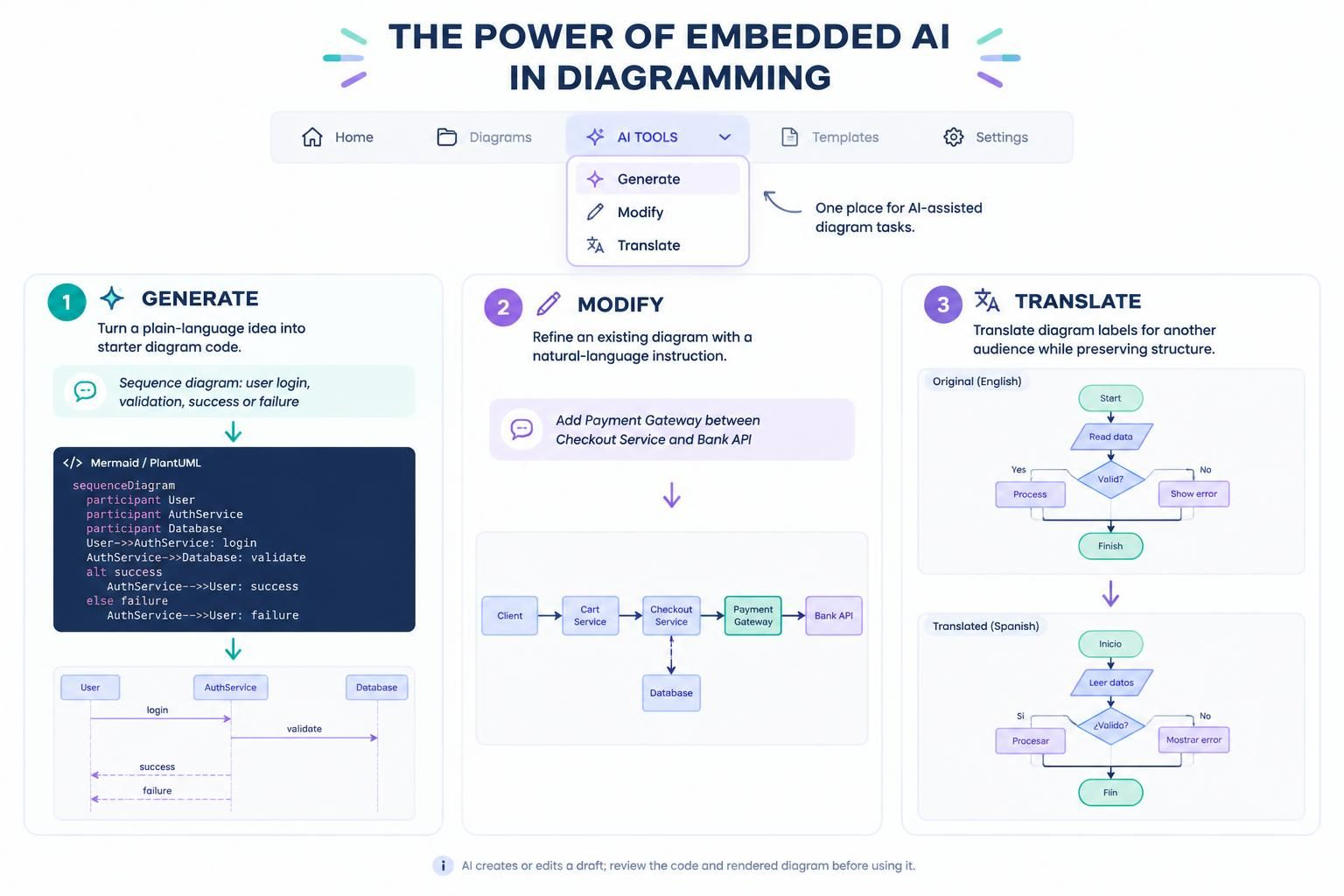
In the rapidly evolving landscape of software architecture and system design, the gap between conceptual thinking and visual documentation is often bridged by text-based diagramming languages. Visual Paradigm’s VPasCode has long offered a unique solution by bringing text-based diagramming into a browser-based workspace. This approach allows users to write code and instantly visualize the resulting diagram, streamlining the design process.
With the latest update, VPasCode takes this efficiency a significant step further by consolidating its powerful AI capabilities into a single, intuitive interface. This tutorial explores how the new AI Tools menu simplifies the diagramming workflow, making AI-assisted generation, modification, and translation more accessible than ever before.
The Architecture of the AI Workflow
The core innovation in this update is not merely the addition of AI features, but their centralization. By grouping AI actions into a dedicated drop-down menu within the application bar, VPasCode reduces cognitive load and creates a seamless user experience. This central hub connects the user’s natural language intent directly to the underlying structural logic of the diagram.
The workflow is built upon three fundamental pillars:
- AI Diagram Generation: Transforming natural language ideas into structured diagram code.
- AI Diagram Modification: Iteratively refining existing diagrams using natural language commands.
- AI Diagram Translation: Breaking language barriers by translating diagram text for global audiences.
1. AI Diagram Generation: From Idea to Structure
The first pillar addresses the “blank canvas” problem. Traditionally, starting a complex sequence diagram or architecture map requires the user to know specific syntax rules and structural conventions. With AI Generation, the focus shifts entirely to the logic and intent of the system.
The Concept
Instead of manually typing out participants, lifelines, and messages, users can describe their intent in plain English. The AI interprets this description and generates the initial diagram code, providing a solid foundation for further refinement.
Step-by-Step Execution
- User Input: The user enters a prompt describing the desired interaction. For example: “Create a sequence diagram for a user logging into a system, including steps for entering credentials, server validation, and either success or failure responses.”
- AI Processing: The AI analyzes the request to identify key entities (User, AuthService, Database) and their interactions.
- Code Generation: VPasCode renders the corresponding Mermaid or PlantUML code.
- Visualization: The code is instantly rendered into a visual sequence diagram with all specified actors and messages.
Generated Code Example
Below is the code structure the AI generates based on the prompt above, illustrating how natural language maps to technical syntax.
sequenceDiagram
participant User
participant AuthService
participant Database
User->>AuthService: login
AuthService->>Database: validate
alt success
    AuthService-->>User: success
else failure
    AuthService-->>User: failure
end
2. AI Diagram Modification: Iterative Refinement
Software systems are rarely static. As projects evolve, diagrams must change to reflect new requirements. The Modification feature allows users to edit complex diagrams without manually hunting for specific lines of code to change.
The Concept
Users can instruct the AI to make specific adjustments using natural language. This is particularly useful for adding new components, changing relationships, or reorganizing layout structures without disrupting the existing code integrity.
Step-by-Step Execution
- User Input: The user identifies a gap in the current architecture. Example: “Add a new ‘Payment Gateway’ component between the ‘Checkout Service’ and the ‘Bank API’ in my current component diagram.”
- AI Processing: The AI locates the relevant nodes in the existing diagram structure and calculates the necessary connections.
- Code Update: The underlying code is updated to include the new component and its connections.
- Instant Refresh: The visual diagram updates immediately to show the new ‘Payment Gateway’ bridging the two services.
Visual Result Logic
This process transforms a linear flow into a more complex, distributed architecture, ensuring the documentation remains accurate to the system’s current state.
node[Client]
node[Cart Service]
node[Checkout Service]
node[Payment Gateway]
node[Bank API]
node[Database]
Client -> Cart Service
Cart Service -> Checkout Service
Checkout Service -> Payment Gateway
Payment Gateway -> Bank API
Checkout Service -.- Database
3. AI Diagram Translation: Global Accessibility
For teams working across different regions or presenting to international stakeholders, language consistency is crucial. AI Translation allows users to convert labels, notes, and descriptions within the diagram into another language without altering the structural logic.
The Concept
This feature decouples the visual structure from the text content. The AI translates the semantic meaning of the nodes and edges while preserving the mathematical or logical relationships defined in the code.
Step-by-Step Execution
- User Input: The user issues a translation command. Example: “Translate all labels in this flowchart from English to Spanish.”
- AI Processing: The AI identifies text nodes such as “Start”, “Read data”, and “Process”.
- Content Conversion: The text content is translated (e.g., “Start” becomes “Inicio”, “Read data” becomes “Leer datos”).
- Structure Preservation: The decision diamonds and flow lines remain exactly where they were, ensuring the diagram’s logic is intact.
Comparison of Original vs. Translated
Original (English):
Start -> Read data
Read data -> Valid?
Valid? -- Yes --> Process
Valid? -- No --> Show error
Process -> Finish

Translated (Spanish):
Inicio -> Leer datos
Leer datos -> ¿Valido?
¿Valido? -- Si --> Procesar
¿Valido? -- No --> Mostrar error
Procesar -> Fin
Best Practices for AI-Assisted Diagramming
While VPasCode’s AI capabilities are powerful, the quality of the output depends heavily on the clarity of the user’s input. When working with the AI Tools menu, remember to be specific about the actors involved and the specific relationships you wish to visualize. This ensures the generated code adheres to your architectural standards.
Conclusion
By centralizing AI capabilities into the AI Tools menu, Visual Paradigm VPasCode is redefining how developers and architects create documentation. Whether you are generating a diagram from scratch, modifying a complex system map, or translating a presentation for a global team, this integrated workflow saves time and reduces the friction between thinking and drawing.