
Automate Use Case Diagrams with VP OpenDocs and the VPasCode Pipeline
In modern software engineering and enterprise architecture, the gap between creating a model and publishing the final documentation is often filled with manual, error-prone processes. Traditionally, an architect might design a Use Case Diagram in a desktop environment, export it as a static image, and then manually paste it into a Word document or Wiki. This breaks the link between the model and the documentation; if the system changes, the documentation becomes outdated.
The solution lies in the Three-Tier Ecosystem architecture. By integrating Visual Paradigm Desktop with the Pipeline and OpenDocs, you transform a static diagram into a living asset. This tutorial explains how to leverage the “Send to OpenDocs Pipeline” feature to create a seamless, automated workflow.
1. The Generation Tier: Creating the Asset
The process begins in the Generation Tier. This is the environment where raw diagrams are created. In the context of the provided image, we are working within the Visual Paradigm Desktop application. This tier is ideal for complex, enterprise-grade modeling that requires deep customization and detailed diagramming.
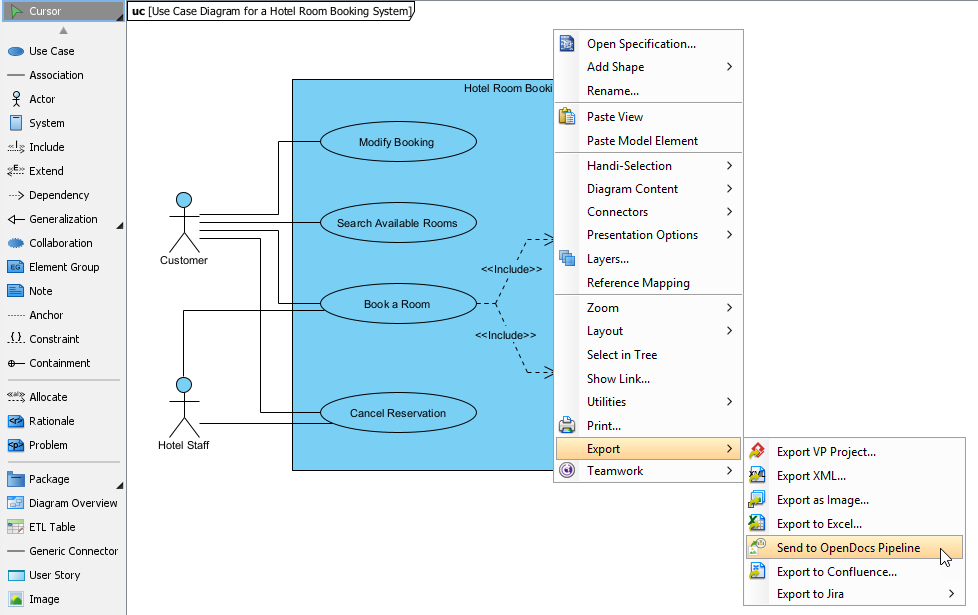
In the screenshot, we see a standard Use Case Diagram for a “Hotel Room Booking System.” Key elements include:
- Actors: The stick figures representing the Customer and Hotel Staff.
- Use Cases: The ovals representing specific functionalities like Modify Booking, Search Available Rooms, and Book a Room.
- Relationships: The lines connecting actors to use cases, and the dashed lines with open arrowheads indicating
<<Include>>dependencies (e.g., “Book a Room” includes “Search Available Rooms”).
2. The Pipeline: The Central Nervous System
The Pipeline (or Transit Tier) acts as the secure bridge between your modeling tool and your documentation workspace. It is the central hub that handles storage, versioning, and access control securely in the cloud.
By utilizing the Pipeline, you ensure that your diagram is not just a local file on your hard drive, but a version-controlled artifact that can be accessed by anyone with permission. This architecture ensures that data flows seamlessly from creation to consumption without manual intervention.
3. The Documentation Tier: OpenDocs
The final destination is the Documentation Tier, specifically OpenDocs. This is an AI-powered workspace where teams build comprehensive manuals. The magic happens here: visual assets are embedded directly from the Pipeline.
Because the diagram is linked via the Pipeline, OpenDocs ensures that the image displayed in your documentation is always up-to-date. If the Hotel Staff adds a new use case in Visual Paradigm and saves to the Pipeline, the documentation in OpenDocs automatically reflects that change. It transforms static content into interactive, living documents.
Step-by-Step: Executing the Workflow
Based on the interface shown in the image, here is how you execute the transfer from the Generation Tier to the Documentation Tier.
Step 1: Right-Click on the Diagram
Navigate to your diagram tab (e.g., “Use Case Diagram for a Hotel Room Booking System”). Right-click anywhere on the diagram canvas to open the context menu. This menu provides access to various diagram operations.
Step 2: Navigate to the Export Options
In the context menu, locate the Export option. Visual Paradigm provides multiple export formats such as “Export VP Project,” “Export XML,” or “Export as Image.”
Step 3: Select “Send to OpenDocs Pipeline”
Within the Export submenu, you will see a specific option highlighted in the image: Send to OpenDocs Pipeline.
Clicking this option initiates the following backend process:
- The system packages the diagram artifacts.
- It transmits the data securely to the cloud-based Pipeline.
- The Pipeline logs the comment and manages the revision history.
- The asset becomes immediately available to be embedded in OpenDocs.
By selecting this specific workflow, you bypass the need to manually save an image file and upload it elsewhere. The integration handles the entire lifecycle.
Conclusion
The architecture of the Three-Tier Ecosystem is designed to eliminate silos. By connecting the Generation Tier (Visual Paradigm Desktop), the Pipeline (Transit Tier), and the Documentation Tier (OpenDocs), teams can maintain a single source of truth. This ensures that your Use Case Diagrams are not just pictures in a document, but dynamic representations of your system that evolve with your project.