
Mastering BPMN Associations: A Guide to Contextual Documentation in Visual Paradigm
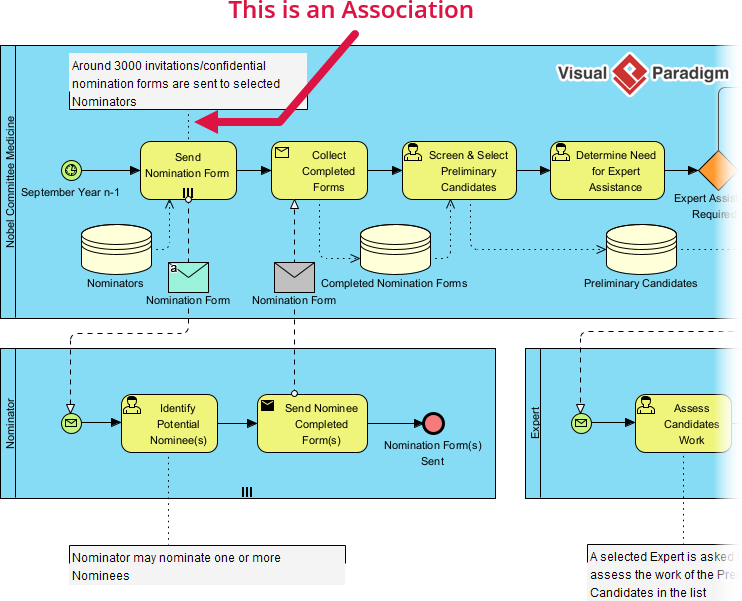
In the realm of Business Process Model and Notation (BPMN), clarity is often as critical as logic. While sequence flows dictate the exact order of execution, there are instances where a process needs a “voice” to explain the context, provide historical data, or attach supplementary notes without altering the engine’s behavior. This is where the Association comes into play. This tutorial explores how to effectively use Associations in Visual Paradigm to enrich your process diagrams with high-value information.
Understanding the Role of Associations
An Association is a unique connector in BPMN. Unlike Sequence Flows, which represent the flow of control (what happens next), or Message Flows, which represent communication between pools, Associations are purely informational. They link process elements—such as tasks, gateways, or data objects—to supplementary information.
Think of an Association as a digital sticky note or a hyperlink within your diagram. It allows you to attach:
- Text annotations (e.g., “Around 3000 invitations are sent…”).
- Comments from stakeholders.
- Visual artifacts that provide context.
- Links to external documentation.
Crucially, Associations have no impact on the process engine. The workflow proceeds exactly as defined by the sequence flows; the association merely sits alongside it to aid human understanding.
Visualizing Associations in Visual Paradigm
When working within Visual Paradigm, the Association is represented by a dashed line. Its behavior is flexible, allowing you to communicate the relationship in two distinct ways:
1. Directed Associations
These associations feature an arrowhead. They are typically used to point from a process element to a specific piece of information, or vice versa. In the provided diagram, notice the red arrow pointing from a text annotation to the “Send Nomination Form” task. This directed association explicitly tells the reader: “The text regarding the 3000 invitations is specifically about this task.”
2. Undirected Associations
These associations appear as a simple dashed line without arrowheads. They are useful when the relationship is mutual or when the connection is implied by proximity. In the diagram, you can see dashed lines connecting the database icons (data stores) to the tasks above them, indicating that those tasks interact with that specific data.
Best Practices for Contextual Modeling
To maintain a professional and readable process model, it is essential to distinguish between the logic of the process and the context of the process. By using Associations, you can keep your sequence flows clean and linear, avoiding the clutter of long text blocks or complex branching logic just to explain a step.
Visual Paradigm streamlines this process, allowing you to drag and drop associations to link any element to a text box or comment. This ensures that your diagrams remain visually intuitive while still being packed with the necessary details for auditors, developers, and business analysts.
Conclusion
By mastering the Association connector, you transform a static flowchart into a dynamic, informative blueprint. It empowers you to answer the “Why” and “What” of a process step without confusing the “How” of the execution. Whether you are documenting the “Nobel Committee Medicine” workflow or a complex financial transaction, Associations are your key to comprehensive documentation.