
Mastering BPMN: Building a Robust Online Order Fulfillment System with Visual Paradigm AI
In the fast-paced world of e-commerce, efficiency is not just a goal; it is a survival metric. A single delay in order fulfillment can lead to customer churn and reputational damage. To optimize these critical workflows, businesses rely on Business Process Model and Notation (BPMN) to visualize, analyze, and automate their operations.
This tutorial guides you through the architecture of a comprehensive Online Order Fulfillment Process. We will demonstrate how to leverage the Visual Paradigm AI Diagram Generator to rapidly prototype complex logic, and then refine it using advanced BPMN constructs like Timer Events and Escalations to meet strict Service Level Agreements (SLAs).
1. The Core Architecture: Pools and Lanes
Before diving into the logic, it is essential to understand the structural canvas. In BPMN, the “Pool” represents the organization or system, while “Lanes” divide the process by specific roles or departments. For an e-commerce scenario, a single process pool typically contains the following lanes:
- Customer: Initiates the request and receives the final product.
- Order Management System (OMS): The digital interface handling the transaction.
- Inventory Management: Verifies stock availability.
- Finance/Payment Gateway: Handles financial authorization.
- Warehouse & Logistics: Executes the physical fulfillment.
Visual Paradigm’s AI tool automatically recognizes the context of your prompt and suggests a structure that separates these distinct responsibilities, ensuring that the flow of information between the customer and the backend systems is clearly defined.
2. The AI-Driven Workflow Generation
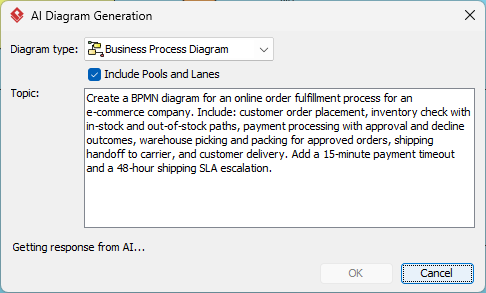
Traditionally, modeling a process requires dragging and dropping hundreds of shapes. With Visual Paradigm’s AI Diagram Generator, you can describe the process in natural language, and the engine constructs the initial draft instantly.
Step-by-Step Generation
- Access the Generator: Open Visual Paradigm and select Create > Business Process Diagram > AI Diagram Generation.
- Define the Topic: Input a detailed description of the process. The more specific your requirements, the higher the accuracy of the generated model.
- Review and Refine: The AI will generate a BPMN diagram based on standard logic. You can then use the editor to tweak shapes, labels, and connections.
3. Advanced Modeling: Handling Time and Exceptions
A robust process diagram is not just about the “Happy Path” (when everything goes right). It must account for time constraints, timeouts, and failures. This is where standard BPMN shapes become powerful business rules.
Implementing a Payment Timeout
In an online checkout, customers often abandon carts or take too long to enter credit card details. To model a 15-minute payment timeout, you must use a Timer Intermediate Catch Event.
- Locate the Gateway: Find the decision point where the system waits for payment confirmation.
- Add the Timer: Place a Timer Event on the outgoing path that handles the “Timeout” scenario. This represents a specific time duration (e.g., 15 minutes).
- Define the Outcome: Connect this timer to a “Cancel Order” or “Send Reminder” task. If the timer triggers before payment is approved, the process flow diverts automatically.
SLA Escalation Logic
Businesses often have Service Level Agreements (SLAs) regarding shipping. If an order is not shipped within 48 hours, management must be notified. This requires an Escalation Event.
- Trigger Condition: The escalation is triggered if the “Pick and Pack” activity exceeds the 48-hour threshold.
- Notification Path: Instead of stopping the process, the escalation notifies a supervisor lane. The original process continues, but now it carries the flag of a breached SLA.
4. Comprehensive Process Logic
Below is the breakdown of the logical flow derived from the AI-generated model, illustrating how the system handles various states.
The Decision Logic
- Order Placement: The process begins when the customer submits an order.
- Inventory Check (Gateway):
- In Stock: Proceed to Payment.
- Out of Stock: Trigger a notification to the customer offering a backorder.
- Payment Processing:
- Approved: The order moves to Warehouse Picking.
- Declined: Notify customer to update payment method.
- Timeout (15 mins): Cancel order or send reminder.
- Fulfillment: Warehouse picks and packs the item, and the carrier collects it.
- Delivery & Returns: Customer receives the order. If items are damaged, a Return Process is initiated.
5. Optimization with Auto-Layout
As you add complex logic like the timeout and escalation events, diagrams can become cluttered. Visual Paradigm includes a powerful Auto-Layout feature.
After generating your diagram or making manual edits, simply select the entire process and click the Auto-Layout button. This tool instantly reorganizes the nodes to optimize spacing, ensure readability, and prevent line crossings, adhering to standard visual hierarchy rules.
Conclusion
By combining the speed of AI generation with the precision of manual BPMN modeling, Visual Paradigm empowers analysts to build production-ready process diagrams in minutes rather than days. Whether you are defining a simple fulfillment flow or a complex, multi-system orchestration, mastering these concepts ensures your business processes are transparent, compliant, and efficient.