
Accelerate BPMN Modeling with Visual Paradigm’s Integrated AI Engine
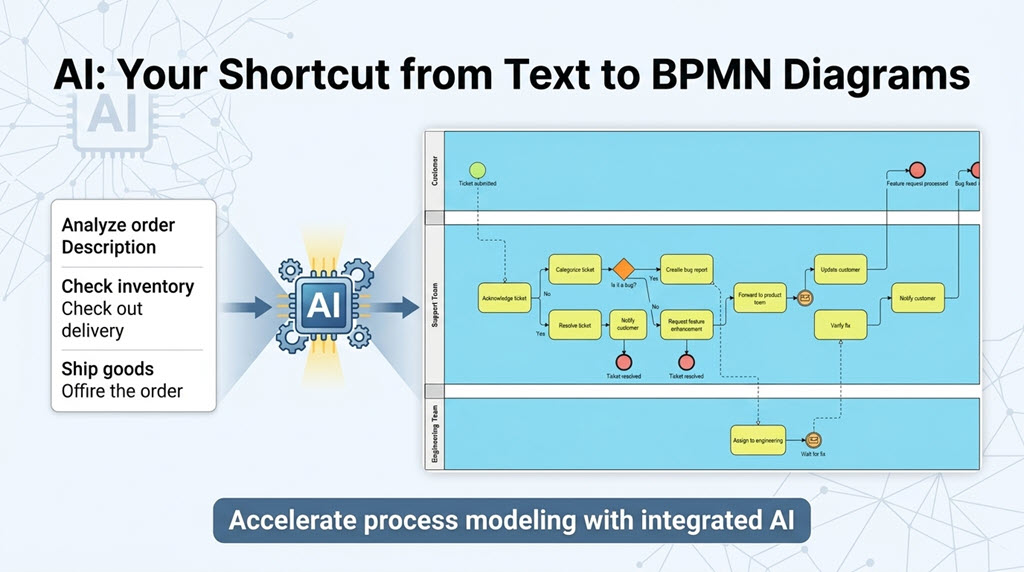
In the rapidly evolving landscape of business process management, the gap between business strategy and technical execution often leads to bottlenecks. Traditionally, creating a standard-compliant BPMN 2.0 diagram required deep expertise in notation, manual drawing of symbols, and rigorous adherence to flow rules. However, the integration of Artificial Intelligence into Visual Paradigm has fundamentally shifted this paradigm, allowing organizations to convert natural language descriptions directly into professional-grade process models.
The Architecture of AI-Assisted Modeling
Visual Paradigm’s AI Generator is not merely a text-to-image converter; it is a sophisticated logic engine designed to interpret intent and translate it into structured process architecture. When a user inputs a description of a process, the system operates on four distinct architectural layers:
1. Natural Language Interpretation
The process begins with the user’s prompt. Whether it is a simple sentence or a complex paragraph describing a workflow, the AI engine parses the input to identify semantic entities. It looks for:
- Actors: Who is performing the actions? (e.g., “Customer,” “HR Manager,” “System”).
- Activities: What is happening? (e.g., “Submit ticket,” “Approve loan,” “Ship goods”).
- Triggers: What initiates the flow? (e.g., “Upon receipt,” “At 9 AM”).
- Decisions: Are there conditions that branch the flow? (e.g., “If approved,” “If rejected”).
2. Structural Mapping & Swimlane Assignment
Once the entities are identified, the engine maps them to BPMN structural elements. This is the most critical step for ensuring the diagram is readable. The AI automatically assigns swimlanes to the identified actors. If the input mentions a “Customer” and a “Support Team,” the engine creates two distinct lanes and maps the relevant tasks to the correct swimlane, ensuring that the division of labor is visually represented correctly.
3. Logic & Gateway Resolution
The AI does not just place boxes; it understands the flow of logic. If the prompt mentions “check inventory,” the engine recognizes this as a decision point. It automatically places a Gateway (typically an Exclusive Gateway) and generates the corresponding Sequence Flows labeled “Yes” and “No.” It applies BPMN 2.0 best practices, ensuring that every gateway has a valid entry and exit path.
4. Visual Compliance
The final layer ensures that the generated diagram is visually compliant with the BPMN 2.0 specification. The AI selects the correct icons (e.g., using a Message Flow for interactions between lanes and a Sequence Flow for internal tasks) and positions them to avoid overlapping elements, creating a clean, standards-compliant diagram.
From Concept to Production: The Workflow
The transition from a text prompt to a production-ready model in Visual Paradigm follows a logical, iterative path. It moves beyond simple generation into a cycle of validation and refinement.
Step 1: The AI Draft
Upon entering a prompt such as “A customer support ticket resolution process for a SaaS company”, the AI generates an initial draft. This draft is typically created within 30 to 60 seconds. At this stage, the diagram contains the skeleton of the process: the major steps, the primary actors, and the basic flow logic. It is a “best-effort” model based on general industry standards.
Step 2: Logic Validation
A raw AI draft is rarely perfect. It is the responsibility of the modeler to validate the logic using Visual Paradigm’s simulation tools. You should walk through the diagram to check for:
- Dead Ends: Are there paths where the process stops without an end event?
- Infinite Loops: Are there cycles that have no exit condition?
- Missing Paths: Did the AI miss an exception path or an error handling scenario?
Step 3: Refinement & Enrichment
Once the logic is sound, the model is enriched with organizational context. This involves:
- Adding Data Objects: Linking specific forms or data inputs to tasks.
- Defining Business Rules: Using the expression builder to define complex gateway conditions (e.g.,
amount > 5000). - Adding Annotations: Including text notes to explain specific business rules or compliance requirements.
Complexity Spectrum in AI Modeling
The capabilities of the AI engine scale with the complexity of the input. Visual Paradigm’s AI handles processes across a wide spectrum:
- Simple Processes: Linear workflows with few decisions (e.g., Employee Onboarding). The AI effectively maps sequential tasks to a single lane or a few parallel lanes.
- Moderate Complexity: Processes with multiple decision points and external interactions (e.g., Support Ticket Resolution). The AI correctly identifies the need for multiple lanes and handles message flows between internal and external actors.
- High Complexity: Processes involving parallel assessments, regulatory requirements, and complex risk logic (e.g., Loan Approval). While the AI generates the structure, these models often require more human intervention to define the specific regulatory gateways and data dependencies.
Best Practices for AI Prompt Engineering
To maximize the efficiency of the AI generator, the quality of the input prompt is paramount. Vague prompts yield vague diagrams. To get the best results, follow these guidelines:
- Be Specific About Context: Instead of “A loan process,” use “A personal loan application and approval process in a retail bank for amounts up to $50,000.”
- Mention Key Actors: Explicitly list the roles involved. For example, “An employee onboarding process involving HR, IT, hiring manager, and the new employee.”
- Specify Decision Criteria: Don’t just say “a process with escalations.” Specify the trigger: “A support process that escalates tickets unresolved after 24 hours.”
- Note Special Requirements: Mention compliance needs (like GDPR), integration points, or SLA constraints directly in the prompt so the AI can suggest appropriate events.
Conclusion
By integrating AI into the modeling workflow, Visual Paradigm transforms the process diagram from a static drawing into a dynamic, interactive asset. It shifts the role of the business analyst from a drafter to an architect, allowing them to focus on the logic and value of the process rather than the mechanics of drawing symbols. As the technology matures, the ability to “talk” to your process models will become a standard requirement for agile organizations.