
Mastering Flowcharts with VP AI Ecosystem in Visual Paradigm OpenDocs
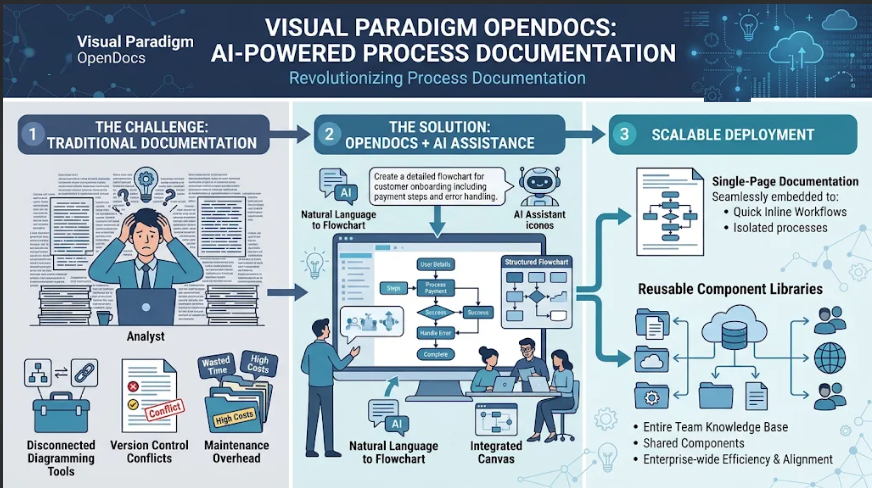
In the modern enterprise landscape, the gap between business strategy and operational execution is often widened by poor documentation. Traditional methods of defining workflows—relying on lengthy text descriptions or disconnected spreadsheet tools—frequently lead to version control conflicts, high maintenance overhead, and critical misunderstandings among stakeholders.
Visual Paradigm OpenDocs revolutionizes this dynamic by integrating a powerful AI-driven ecosystem directly into the documentation workspace. This tutorial explores how to leverage this technology to transform natural language prompts into professional, scalable process diagrams.
The Challenge: The Friction of Traditional Documentation
Before adopting a new solution, it is essential to understand the pain points that Visual Paradigm OpenDocs addresses. As illustrated in the ecosystem comparison, traditional workflows suffer from three primary inefficiencies:
- Disconnected Diagramming Tools: Analysts often have to switch between word processors for text and separate CAD or drawing tools for diagrams. This fragmentation breaks the creative flow and creates silos of information.
- Version Control Conflicts: When a process changes, updating a static image or a disconnected file often leads to multiple versions circulating. Stakeholders may unknowingly reference outdated procedures.
- Maintenance Overhead: As business logic evolves, the effort required to redraw and re-align diagrams creates significant costs and delays in deployment.
The Solution: AI-Powered Natural Language to Flowchart
Visual Paradigm OpenDocs bridges this gap through an integrated canvas and an AI Assistant. The core innovation lies in the ability to generate structured diagrams directly from text. This is not merely a text-to-image generator; it is a logic-to-diagram engine.
Step 1: Leveraging the AI Assistant
The process begins with a natural language prompt. Instead of manually dragging and dropping shapes to define logic, the analyst describes the business intent. The AI Assistant interprets this intent and constructs the necessary flowchart components, including decision diamonds, process rectangles, and connector lines.
Example Scenario:
Imagine a customer onboarding process. Rather than drawing the steps, the user inputs the following prompt:
"Create a detailed flowchart for customer onboarding. Include steps for data entry, payment verification, and error handling. If payment fails, route to the support team."The system analyzes the keywords “onboarding,” “payment verification,” and “error handling” to construct a logic tree that matches standard BPMN (Business Process Model and Notation) conventions.
Step 2: Integrated Canvas Editing
Once the AI generates the initial draft, the user moves to the Integrated Canvas. Here, the diagram is not a static image but a live object within the documentation. You can:
- Refine the visual layout instantly.
- Adjust the logic flow without redrawing.
- Embed the diagram directly into the surrounding text for context.
Scalable Deployment: From Single Pages to Knowledge Bases
Perhaps the most critical architectural advantage of Visual Paradigm OpenDocs is its approach to scalability. The system supports two distinct deployment models for flowcharts:
1. Single-Page Documentation
For isolated processes, such as a specific workflow for a single-page report or a quick inline workflow guide, the diagram is embedded directly into the content. This ensures that the visual context is always preserved alongside the instructional text.
2. Reusable Component Libraries
For enterprise-wide efficiency, the system utilizes a Reusable Component Library. This allows teams to create a “Master” diagram for a standard process (e.g., “Standard Employee Onboarding”).
- Shared Components: If the “Payment Verification” step changes in the library, that change propagates automatically to every document using that component.
- Entire Team Knowledge Base: This ensures that the “Single Source of Truth” remains consistent across the organization, eliminating version conflicts.
Conclusion
By moving away from static, disconnected tools and embracing the Visual Paradigm OpenDocs ecosystem, organizations can achieve true operational alignment. The combination of AI-assisted generation and scalable component libraries ensures that process documentation is not just a static record, but a dynamic, living asset that evolves with the business.