
Mastering VPasCode: Transforming Markdown Checklists into Interactive Visual Maps
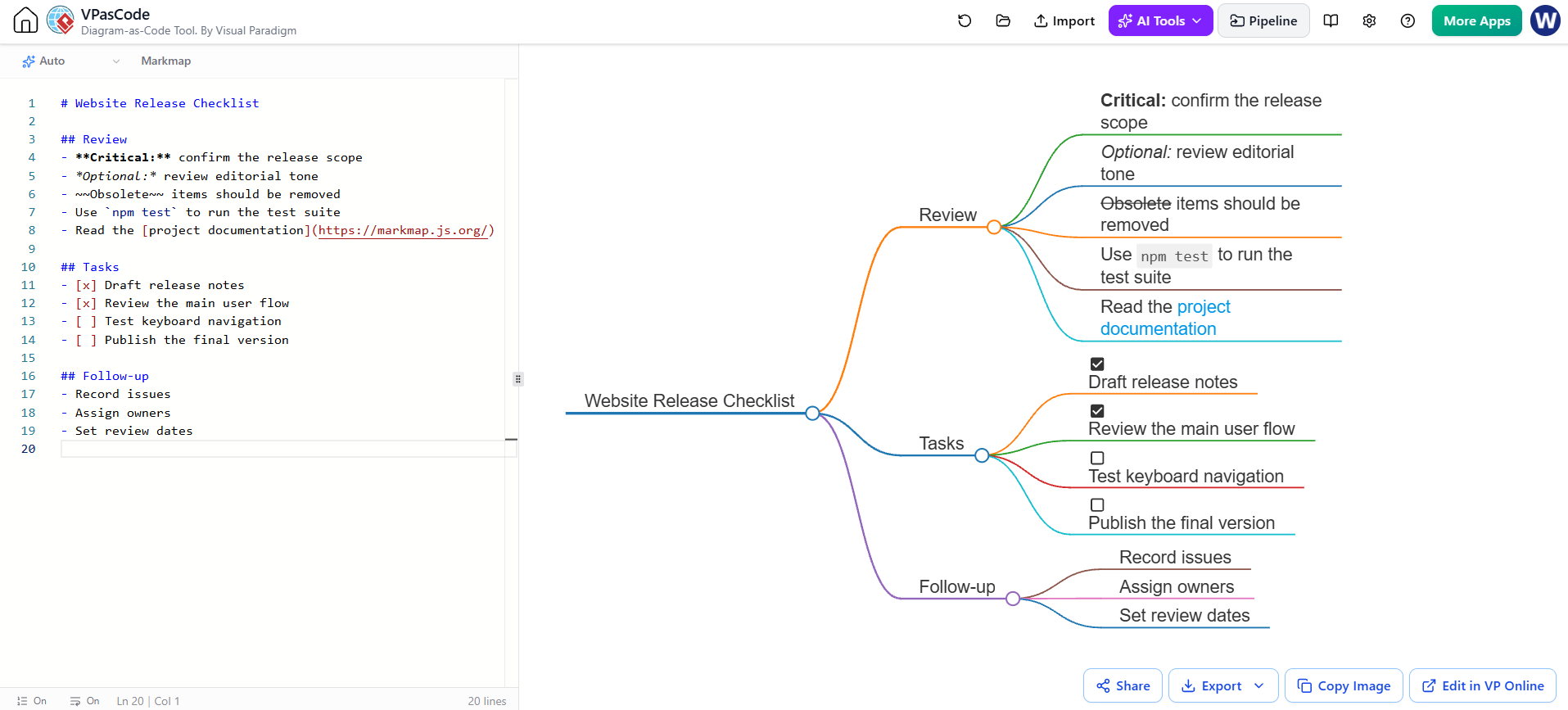
In modern software development and project management, the gap between documentation and visualization is often bridged by tools that automate the process. VPasCode, Visual Paradigm’s diagram-as-code tool, exemplifies this approach by allowing users to define complex visual structures using simple text. The specific example provided demonstrates the power of Markmap syntax within this environment, converting a static text checklist into a dynamic, color-coded mind map.
The Core Concept: Diagram-as-Code
The image displays a split view: on the left, a raw text editor containing Markdown syntax, and on the right, the rendered visual output. This workflow relies on the principle that text is easier to version control and edit than drag-and-drop diagrams. By defining the structure in Markdown, developers can:
- Ensure Consistency: The visual structure strictly follows the hierarchy defined in the text.
- Enable Collaboration: Teams can review the “code” of the diagram in pull requests before it is rendered.
- Automate Updates: Changing a single line of text instantly updates the entire node in the map.
Deconstructing the Syntax
To replicate the architecture shown in the screenshot, one must understand the specific Markdown features VPasCode interprets. The example breaks down into three distinct categories: emphasis, code formatting, and task tracking.
1. Structural Hierarchy and Emphasis
The foundation of the mind map is the header syntax. In the code, # denotes the root node, while ## creates the first level of branches. VPasCode automatically maps these headers to the visual nodes.
# Website Release Checklist
## Review
## Tasks
## Follow-up
Beyond structure, text formatting is used to add semantic meaning. The example uses bolding to denote criticality and italics for optional items. This allows the visualizer to apply different colors or weights to the nodes, making critical path items stand out immediately.
- **Critical:** confirm the release scope
- *Optional:* review editorial tone
2. Semantic Elements: Code and Links
One of the most powerful features of VPasCode is its ability to render technical elements directly within the node text. The system recognizes inline code blocks, wrapping them in the appropriate visual style (usually a monospaced font with a background color).
Additionally, the tool supports hyperlinks. By wrapping text in square brackets and enclosing the URL in parentheses, the tool creates a clickable node that links to external resources, such as documentation.
- Use `npm test` to run the test suite
- Read the [project documentation](https://markmap.js.org/)
3. Interactive Task Lists
Perhaps the most distinct feature in this architecture is the use of checkboxes. Unlike standard bullet points, VPasCode parses the checkbox syntax - [ ] (unchecked) and - [x] (checked) to render interactive UI elements directly on the mind map nodes.
This transforms the mind map from a static document into a living dashboard where project managers can track progress without leaving the visualization.
## Tasks
- [x] Draft release notes
- [ ] Test keyboard navigation
Visual Logic and Rendering
When the VPasCode engine processes the text, it assigns visual properties based on the hierarchy and content type. Notice how the “Review” branch splits into specific sub-nodes, each retaining its formatting. The “Tasks” branch displays the checkmarks, and the “Follow-up” branch serves as a grouping for remaining action items. This logical grouping ensures that the visual complexity matches the textual organization.
Conclusion
The combination of VPasCode and Markmap syntax offers a robust solution for managing project workflows visually. By leveraging standard Markdown features like emphasis, code, and checkboxes, users can build comprehensive, interactive architecture diagrams that serve as both documentation and tracking tools. This approach bridges the gap between textual planning and visual execution, streamlining the release process.