
NotesKeep Workflow: An AI Enterprise Solution for Transforming Raw Data into Models
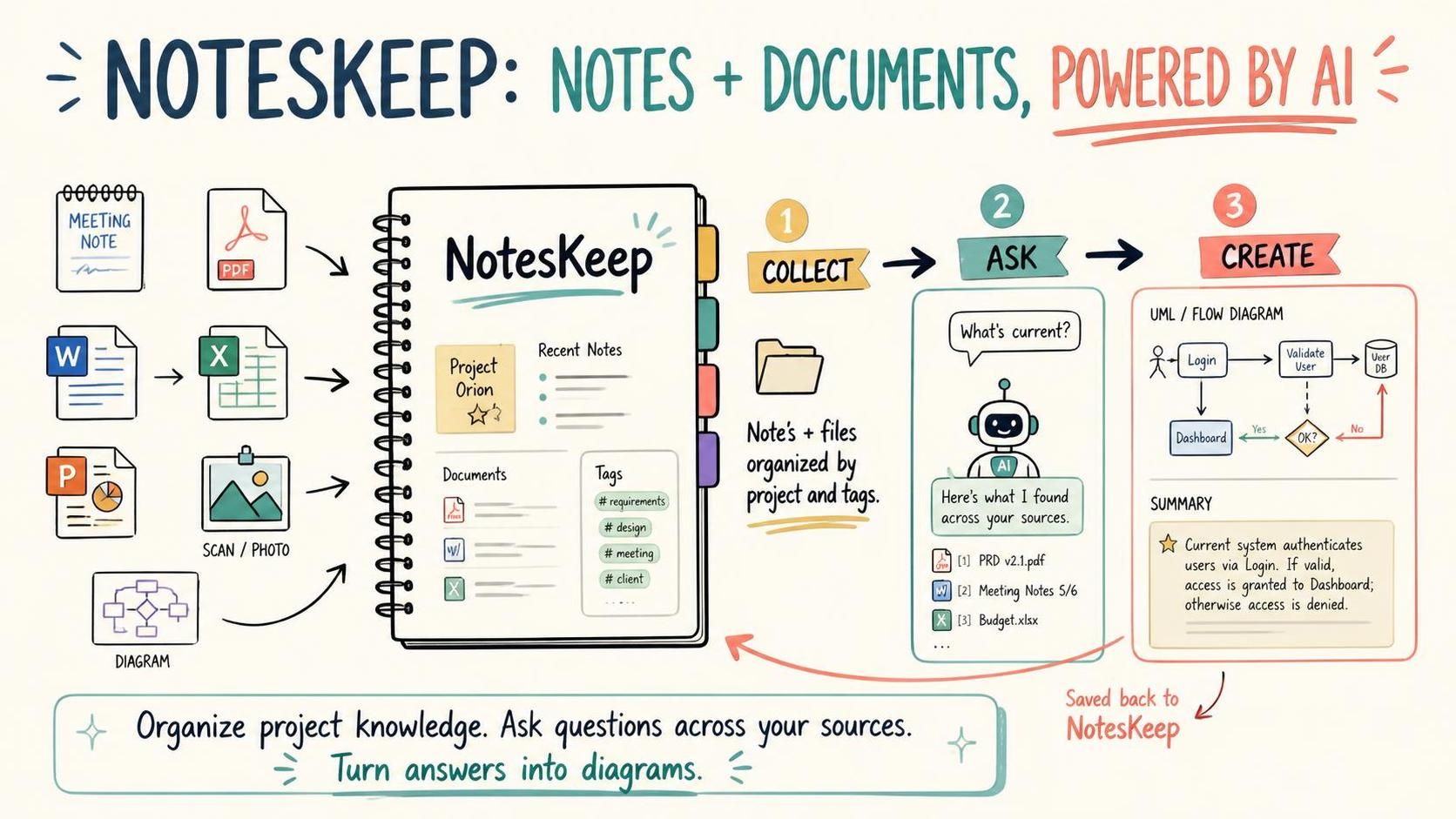
In the rapidly evolving landscape of enterprise knowledge management, the gap between unstructured data (like meeting minutes and PDFs) and structured technical models (like UML diagrams) often leads to bottlenecks. Visual Paradigm’s NotesKeep ecosystem bridges this divide. This tutorial dissects the “Collect, Ask, Create” workflow depicted in the system architecture, demonstrating how to transform scattered corporate assets into actionable, AI-driven visual models.
Phase 1: The Aggregation Layer (Collect)
The foundation of the NotesKeep solution is its ability to ingest diverse data sources without requiring complex coding or rigid formatting. Unlike traditional systems that demand structured databases, NotesKeep functions as a central repository for the “messy” reality of business operations.
Key Ingestion Points:
- Textual Documents: Word (.docx) and Excel (.xlsx) files are parsed to extract specific data points, such as project requirements or budget figures.
- Informal Notes: Handwritten meeting notes or text-only memos are indexed for semantic search, ensuring that tacit knowledge isn’t lost.
- Visual Assets: The system accepts scanned photos, PDFs, and existing diagrams, treating them as first-class citizens in the knowledge graph.
- Tagging & Organization: Data is automatically grouped by project (e.g., “Project Orion”) and semantic tags (e.g., #design, #meeting, #client).
This phase creates a unified “Knowledge Lake,” where disparate file types are normalized into a searchable, context-aware format.
Phase 2: The AI Interaction Layer (Ask)
Once the data is aggregated, the AI Core acts as an intelligent intermediary. Instead of a user manually searching through folders, they engage in a natural language conversation with the system. This is the “Ask” phase.
The Query Mechanism:
When a user asks a question like “What’s current?” or “How does the user login process work?”, the AI performs the following backend operations:
- Context Retrieval: It scans the “Project Orion” folder and associated tags to find relevant files (e.g., PRD v2.1.pdf, Meeting Notes 5/6, Budget.xlsx).
- Synthesis: It aggregates the findings across these different sources to form a coherent answer.
- Citation: It references the specific source files, ensuring traceability and trust.
Step-by-Step: Formulating the Right Query
To maximize the utility of the AI engine, queries should be specific to the lifecycle stage of your project. For example:
- Bad Query: “Show me files.”
- Good Query: “Based on the meeting notes from last week and the PRD, how is the user validation logic defined?”
Phase 3: The Generative Modeling Layer (Create)
The most powerful capability of this architecture is the transition from Information Retrieval to Visual Generation. The AI does not just summarize text; it constructs technical diagrams directly from the synthesized knowledge.
Example: Generating a UML Flow Diagram
If the AI detects a process flow in the text (e.g., “Users must login, then validate against the DB”), it automatically renders a visual representation. The diagram includes:
- Actors: Representing the User.
- Process Steps: Login and Validate User.
- Data Stores: The User Database (DB).
- Logic Paths: Decision diamonds showing the “Yes/No” flow for validation.
Once the diagram is generated, the system offers a “Save back to NotesKeep” function. This closes the loop, ensuring that the newly created visual model is stored alongside the source text, creating a living documentation system.
Conclusion: A Unified Workflow for SMEs and Enterprises
The Visual Paradigm ecosystem, powered by the AI Core, transforms the traditional modeling process. It moves away from the “blank canvas” problem, where users struggle to start, and replaces it with an “AI-assisted” workflow where the system suggests structure based on existing corporate knowledge. By integrating Collect, Ask, and Create into a single loop, organizations can ensure that their documentation is always up-to-date, searchable, and visually accessible.
Whether you are managing complex enterprise requirements or simple project updates, NotesKeep ensures that your knowledge is not just stored—it is active and ready to be visualized.