
AI-Driven Project Scheduling: Mermaid Gantt & PERT Charts in VPasCode
Project management requires more than just good intentions; it demands precise visualization of timelines, dependencies, and resource allocation. In the realm of modern documentation and diagram-as-code tools, Mermaid has emerged as a powerful standard for generating charts directly from text. This tutorial explores how to leverage VPasCode to design professional, fully runnable project schedules using the Gantt chart syntax.
Whether you are defining a simple weekly sprint or a complex multi-phase product launch, mastering the four key components of the Gantt chart—timeline configuration, task declarations, section grouping, and milestone markers—is essential for creating clear, actionable roadmaps.
1. Initializing the Gantt Timeline
Every Gantt chart begins with the gantt keyword. However, simply declaring the chart type is not enough to produce a usable schedule. You must explicitly define the temporal context, including the title, the date format for parsing, and how dates should appear on the horizontal axis.
The following syntax establishes the foundation of your chart:
gantt
    title Project Alpha Schedule
    dateFormat YYYY-MM-DD
    axisFormat %Y-%m-%d
    excludes weekends
Here, the title property sets the header for your chart, providing immediate context for stakeholders. The dateFormat directive is critical; it defines how the tool parses your input dates (e.g., YYYY-MM-DD). Finally, the axisFormat controls the visual representation of dates on the timeline, utilizing standard strftime syntax. The excludes directive is an optional but highly recommended feature that allows you to skip non-working days, such as weekends or specific holidays, ensuring your schedule reflects realistic working hours.
2. Defining Tasks and Durations
Tasks are the building blocks of your Gantt chart. Each task requires a display label (the text seen by the user), an internal ID (used for referencing dependencies), and a duration or date range. In the Mermaid syntax used by VPasCode, tasks are defined using a specific comma-separated structure.
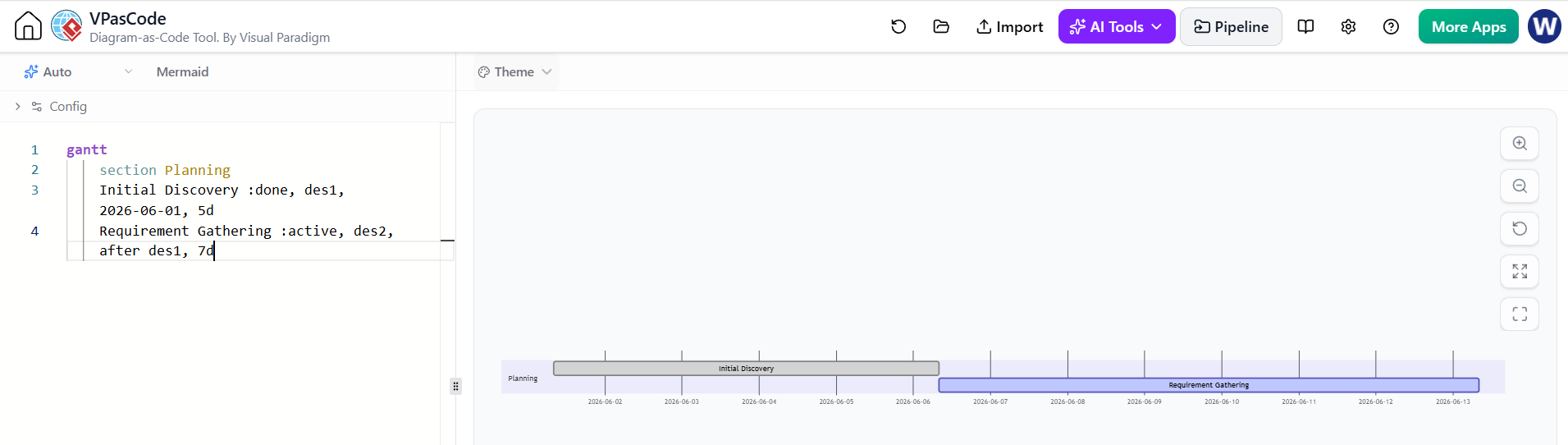
Consider the following example which defines a “Planning” section:
gantt
    section Planning
    Initial Discovery :done, des1, 2026-06-01, 5d
    Requirement Gathering :active, des2, after des1, 7d
Let’s break down the syntax components:
- Display Label: “Initial Discovery” is what the user sees on the bar.
- Status: The keyword
:donemarks completed work packages (often rendered in gray), while:activehighlights current, in-progress work. - ID:
des1anddes2are unique identifiers. These are crucial for linking tasks together. - Start Date & Duration: The chart can be driven by specific start dates (e.g.,
2026-06-01) or relative durations (e.g.,5dfor 5 days). - Dependencies: The keyword
after des1creates a logical dependency, ensuring that “Requirement Gathering” (des2) starts only after “Initial Discovery” (des1) finishes.
3. Implementing Milestones and Dependencies
As projects grow in complexity, you must distinguish between tasks with duration and milestones, which are zero-duration points marking significant achievements like a launch or an approval gate.
In the code snippet below, we see how to implement a milestone and a critical path task:
gantt
    section Release
    Beta Launch :milestone, m1, 2026-07-15, 0d
    Final QA :crit, qa1, after m1, 10d
Notice the use of :milestone and a duration of 0d. This visually signals a specific point in time rather than a duration. Furthermore, the :crit status is applied to the “Final QA” task. This renders the task in a distinct highlight color (usually red), drawing immediate attention to critical path items that could delay the project if not completed on time.
Conclusion
By combining these syntax elements—configuration, task definitions, and status markers—you can construct robust, fully runnable project schedules directly within VPasCode. This approach ensures your documentation remains version-controlled, readable, and easily updatable alongside your codebase.