
Architecting Live BPMN & AI Documentation with OpenDocs
In the modern software engineering landscape, documentation is no longer a static byproduct of the development process; it is a living artifact. The integration of Visual Paradigm Desktop with the OpenDocs Pipeline represents a paradigm shift from manual screenshot management to a fully dynamic, cloud-native documentation infrastructure. This tutorial explores how organizations can leverage this architecture to create self-updating, AI-assisted, and version-controlled documentation systems.
1. The Architecture of Integration
The core value proposition of the OpenDocs ecosystem lies in its ability to treat modeling diagrams as “first-class cloud assets.” Unlike traditional workflows where a diagram is exported as a static image (PNG/JPG) and inserted into a document, this system maintains a live link between the model and the documentation.
Visual Paradigm as the Source of Truth
Modelers create visual elements—such as UML, BPMN, ERD, or ArchiMate diagrams—using the familiar Visual Paradigm desktop or web interface. These are not merely drawings; they are structured data objects.
- Direct Ingestion: Diagrams are sent directly into the documentation editor without manual file saving or image exporting.
- Versioning: Because they are cloud assets, every change to the source model is tracked automatically.
The OpenDocs Pipeline: The Central Transit Hub
The OpenDocs Pipeline acts as the secure backbone of this ecosystem. It functions as a repository that handles the heavy lifting of asset management in the background. Its responsibilities include:
- Automatic Asset Tracking: It monitors the status of diagrams across the project.
- Change Management: It detects when a source model changes.
- Synchronization: It pushes updates to the documentation immediately.
This infrastructure ensures that documentation remains synchronized with the system design. If a developer updates a class diagram in Visual Paradigm, the documentation updates automatically, eliminating the “broken image” or “outdated screenshot” problem.
2. Accelerating Design with AI Generators
The system introduces a powerful layer of generative intelligence. Users can bypass the tedious manual drawing of initial structures by using Natural Language Processing (NLP) to generate diagrams instantly.
From Prompt to Diagram
The AI subsystem allows users to provide simple text prompts to create complex visualizations. For instance, a user might type:
Create a flowchart for a refund process
The AI instantly constructs a professionally structured diagram within the workspace. This accelerates the initial documentation phase, allowing teams to visualize concepts and requirements rapidly before refining the details.
3. Distribution and Collaboration
Once the documentation is compiled, the ecosystem offers flexible distribution layers to ensure stakeholders can access information in the most suitable format.
Interactive Formats
Instead of static PDFs, finished documentation sets can be compiled into:
- Visual Paradigm Flipbooks: Dynamic, interactive reading experiences.
- Web-based Bookshelves: Broadly shareable digital repositories.
These formats ensure that whether a stakeholder needs to review a process internally or present a deliverable to a client, the content is accessible, interactive, and up-to-date.
Technical Implementation Example
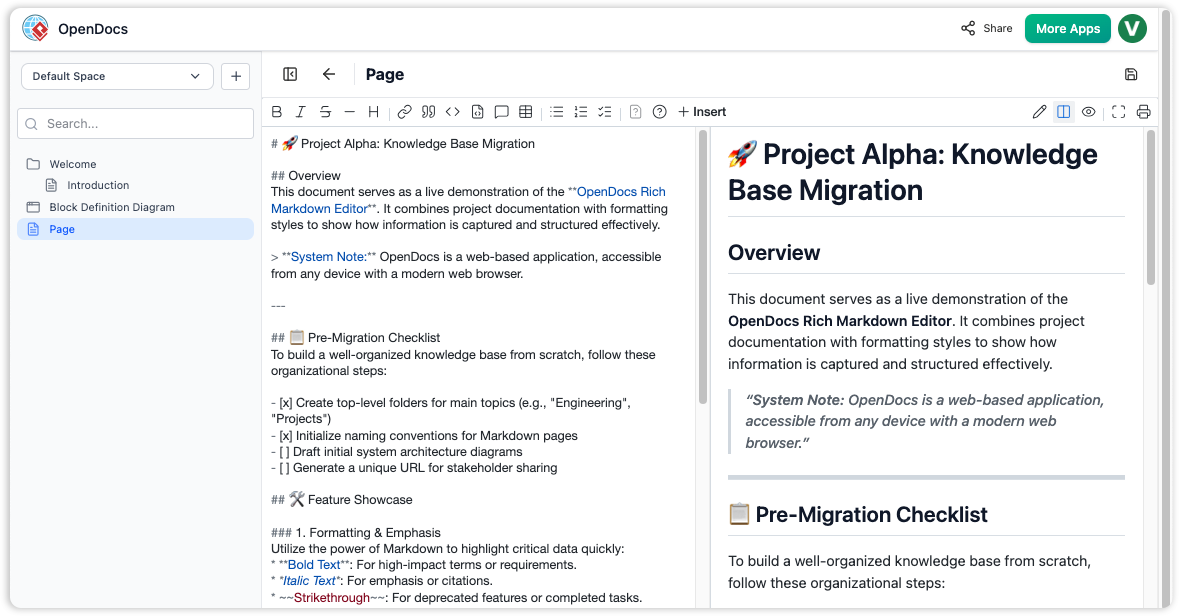
While the integration is largely handled through the UI, understanding the underlying structure helps in managing complex documentation projects. Below is a conceptual representation of how the documentation structure (Markdown) interacts with the diagram assets.
# Project Alpha: Knowledge Base
## Overview
This document serves as a live demonstration of the **OpenDocs Rich Markdown Editor**.
### System Architecture
This diagram maintains a live connection to the Visual Paradigm source model.

### Workflow
1. User initiates request.
2. **System** validates input.
3. **Pipeline** triggers update.
Notice how the documentation editor treats the diagram as a dynamic block rather than a static file. When the source model changes, the src link remains valid, but the content rendered by the browser updates to reflect the latest version.
Conclusion
By combining the robust modeling capabilities of Visual Paradigm with the intelligent automation of OpenDocs, organizations can achieve a “Single Source of Truth” architecture. This approach eliminates the friction of manual updates, accelerates design through AI, and ensures that documentation is always a reflection of the current system reality.