
Mastering BPMN Readability: 10 Essential Modeling Practices for Clearer Business Processes
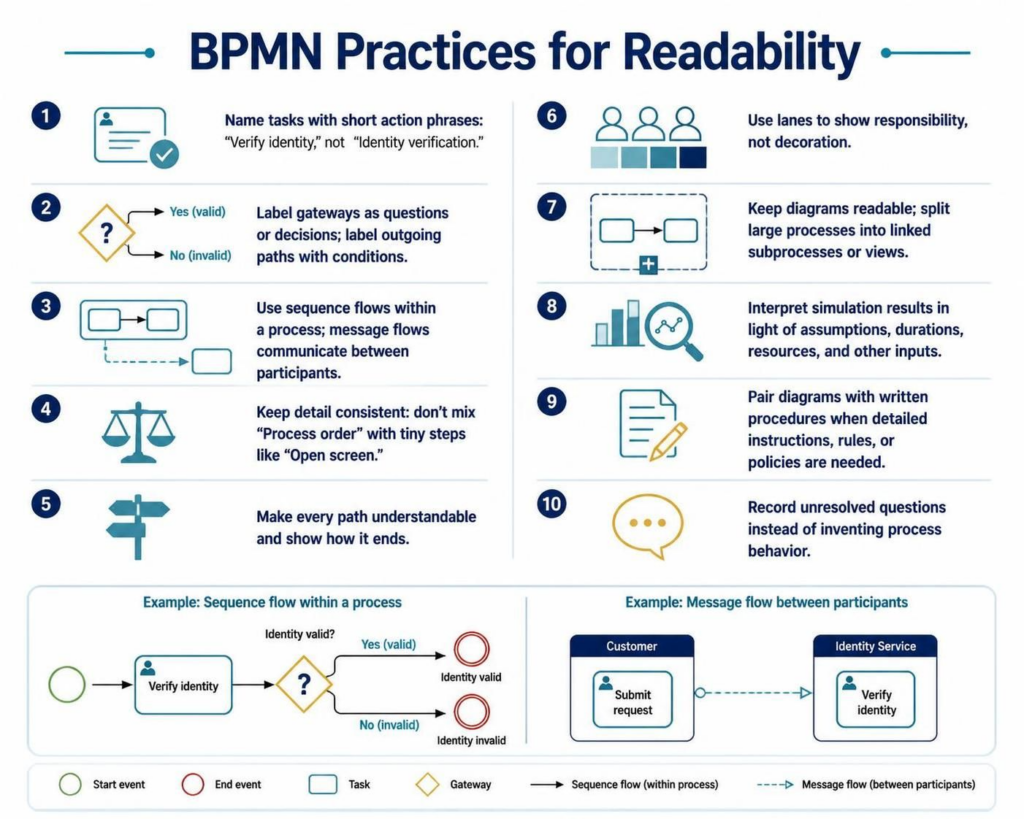
Business Process Model and Notation (BPMN) is a powerful standard for visualizing workflows, but a diagram that is too complex or ambiguous defeats its primary purpose: communication. Whether you are using Visual Paradigm or another modeling tool, applying specific readability practices is crucial for creating diagrams that stakeholders can actually understand and execute.
1. The Power of Action-Oriented Naming
One of the most common mistakes in process modeling is using abstract nouns for task names. This creates a static, passive feel that doesn’t convey movement or ownership. Instead, adopt the “Action Verb + Object” pattern.
For example, rather than labeling a task Identity Verification, label it Verify identity. This simple shift transforms a static concept into a dynamic step in the process, making it immediately clear what needs to happen next.
2. Mastering Gateways and Paths
Gateways are the decision points of your process. To ensure clarity, always label the gateway itself as a question or a decision point (e.g., Identity Valid? or Order Received?). The outgoing paths should then represent the conditions or answers to that question (e.g., Yes (valid) or No (invalid)).
Visualizing Flow Types
It is vital to distinguish between the internal mechanics of a process and the external communication between actors. BPMN provides two distinct types of flows for this:
- Sequence Flows (Solid Arrows): Use these for the internal flow of activities within a single process or lane. They dictate the order of operations.
- Message Flows (Dashed Arrows): Use these strictly for communication between different participants or pools. They represent information passing between boundaries.
3. Balancing Granularity and Consistency
A common pitfall is mixing high-level activities with microscopic steps. If your process includes a high-level task like Process Order, you should not immediately break it down into tiny steps like Open Screen unless you are willing to detail every single click. Keep the level of detail consistent across your diagram to maintain a high-level overview, or use subprocesses to drill down into the details.
4. Structural Integrity: Lanes and Subprocesses
Visual Paradigm allows for sophisticated layouts, but remember that Lanes are functional, not decorative. They represent responsibility. Ensure every lane has a clear owner, and every task within it belongs to that specific role.
Furthermore, readability dictates that you should not crowd a single page. If a process becomes too complex or large, do not hesitate to split it. Use linked subprocesses or create separate views to break the process into digestible chunks.
5. Simulation and Documentation
When you run simulations on your model, the results are dependent entirely on your inputs—assumptions, durations, and resources. Treat these results as a reflection of those specific inputs, not absolute truth. Additionally, never rely solely on the diagram. If readers need detailed instructions, rules, or policies, pair the diagram with a written description or procedure document.
Example: Sequence Flow vs. Message Flow
Understanding the distinction between flow types is best demonstrated through a concrete example. Below is a representation of how a valid identity check is handled internally versus how it is communicated externally.
Scenario: Identity Verification
In the example below, notice how the Sequence Flow handles the internal decision logic for the “Verify identity” task, while the Message Flow handles the handoff of the request from the Customer to the Service.
@startuml
title BPMN Example: Sequence Flow vs Message Flow

' Define Participants
participant "Customer" as Customer
participant "Identity Service" as Service

' --- Sequence Flow Example (Internal) ---
note right of Customer : Internal Process Logic
start
:Verify identity;
diamond("Identity Valid?") as gw
gw :yes --> (End Valid)
gw :no --> (End Invalid)

' --- Message Flow Example (External) ---
note right of Customer : Communication Logic
Customer -> Service : Submit request
Service --> Customer : Verify identity

@enduml
Key Takeaways from the Diagram
- Internal Logic: The diamond shape represents a gateway. It asks a question, and the paths branching out are labeled with the conditions (Yes/No).
- External Communication: The dashed line indicates that the “Customer” is sending a message to the “Identity Service” to initiate the verification. This crosses the boundary of the participant, hence the dashed line.
Conclusion
By adhering to these ten principles—ranging from action-oriented naming to the proper use of lanes and flow types—you can create BPMN diagrams that are not just technically correct, but genuinely readable and useful for business analysis.