
Building an Online Order Process Context Diagram with VPasCode
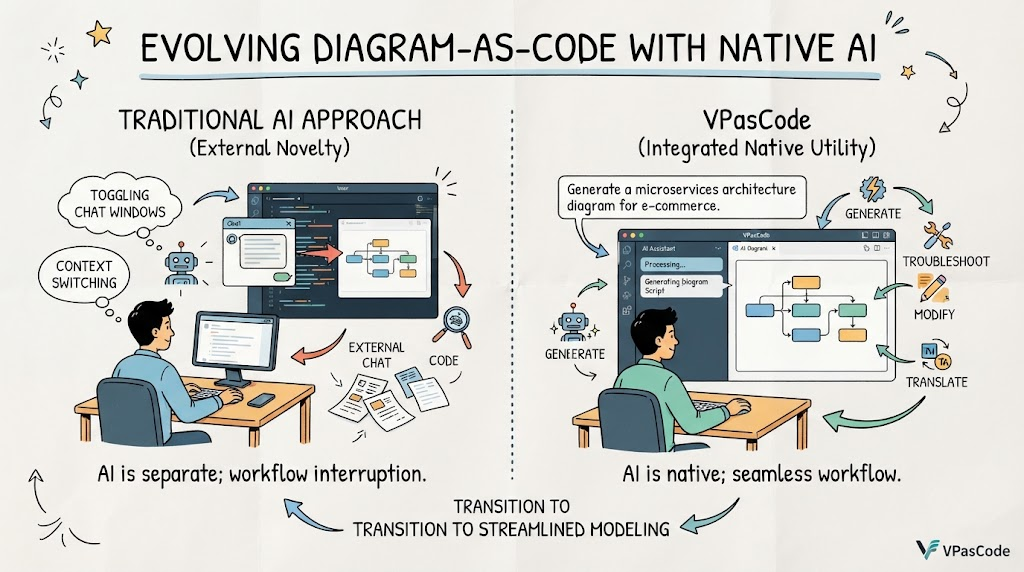
In the modern era of software architecture, the transition from static, image-based diagrams to Diagram-as-Code (DaC) has revolutionized how we document system complexity. However, the true power of DaC is often hindered by a fragmented workflow where AI tools exist in external chat windows, requiring constant context switching.
This tutorial demonstrates how to leverage the Visual Paradigm VPasCode platform to build a professional Online Order Process Context Diagram. Unlike traditional methods, VPasCode integrates AI directly into the modeling environment, allowing you to generate, troubleshoot, and modify your architectural scripts without leaving your canvas.
Understanding the Paradigm Shift
Before diving into the code, it is crucial to understand the architectural advantage of VPasCode over traditional AI integration.
- Traditional Approach: Users must toggle between a chat interface and a code editor. If the AI generates a syntax error, the user must copy-paste the code, receive a fix in the chat, and paste it back. This breaks the “flow state” of modeling.
- VPasCode Native Approach: The AI assistant is embedded. You type a natural language prompt like “Generate a microservices architecture diagram for e-commerce,” and the system renders the diagram script directly on the canvas. You can then request modifications or translations in place.
Step-by-Step: Generating a Context Diagram
We will construct a Context Diagram for an Online Order Process. This diagram will define the boundaries of the system, identifying external entities (like Customers and Payment Gateways) and the core data flows.
1. The Natural Language Prompt
In the VPasCode interface, you can initiate the generation process using natural language. The system’s AI interprets your intent and translates it into structured modeling code.
Example Prompt:
“Create a context diagram for an Online Order System. Include an external Actor ‘Customer’, a ‘Payment Gateway’, and an ‘Inventory Database’. The customer places an order, the system processes payment, and updates inventory.”
2. The Generated Script
VPasCode translates this intent into PlantUML syntax. Below is the raw code structure that the AI generates. Notice how the entities are defined and the flows are connected.
@startuml
title Online Order Process Context Diagram

left to right direction

actor Customer
database InventoryDB
participant OrderSystem as "Order Processing System"
entity PaymentGateway

Customer --> OrderSystem : Place Order
OrderSystem --> PaymentGateway : Process Payment
PaymentGateway --> OrderSystem : Payment Confirmation
OrderSystem --> InventoryDB : Update Stock
InventoryDB --> OrderSystem : Stock Availability

@enduml
Advanced Features: Troubleshooting and Modification
The power of VPasCode lies in its ability to handle errors and iterative changes natively. If the diagram fails to render due to a syntax error, or if you need to add a new entity, you do not need to manually debug the code.
Troubleshooting
Simply ask the AI to “Troubleshoot this script.” The system analyzes the code, identifies the missing brackets or incorrect syntax, and applies the fix directly to the editor.
Modifying the Workflow
To add a “Shipping Service” to your diagram, you can issue a follow-up command:
Add a new entity "ShippingService" connected to "OrderProcessingSystem" with a flow "Dispatch Items".Translating Diagrams
VPasCode also supports translation, allowing you to adapt your diagrams for different audiences or languages without losing the structural integrity of the code.
Conclusion
By moving AI from an external novelty to a native utility, VPasCode streamlines the modeling process. You can focus on the architecture itself rather than the syntax or the tool switching, resulting in precise, renderable technical diagrams generated entirely through natural language intent.