
VP Unified Platform: Architecting a Unified Software Engineering Ecosystem
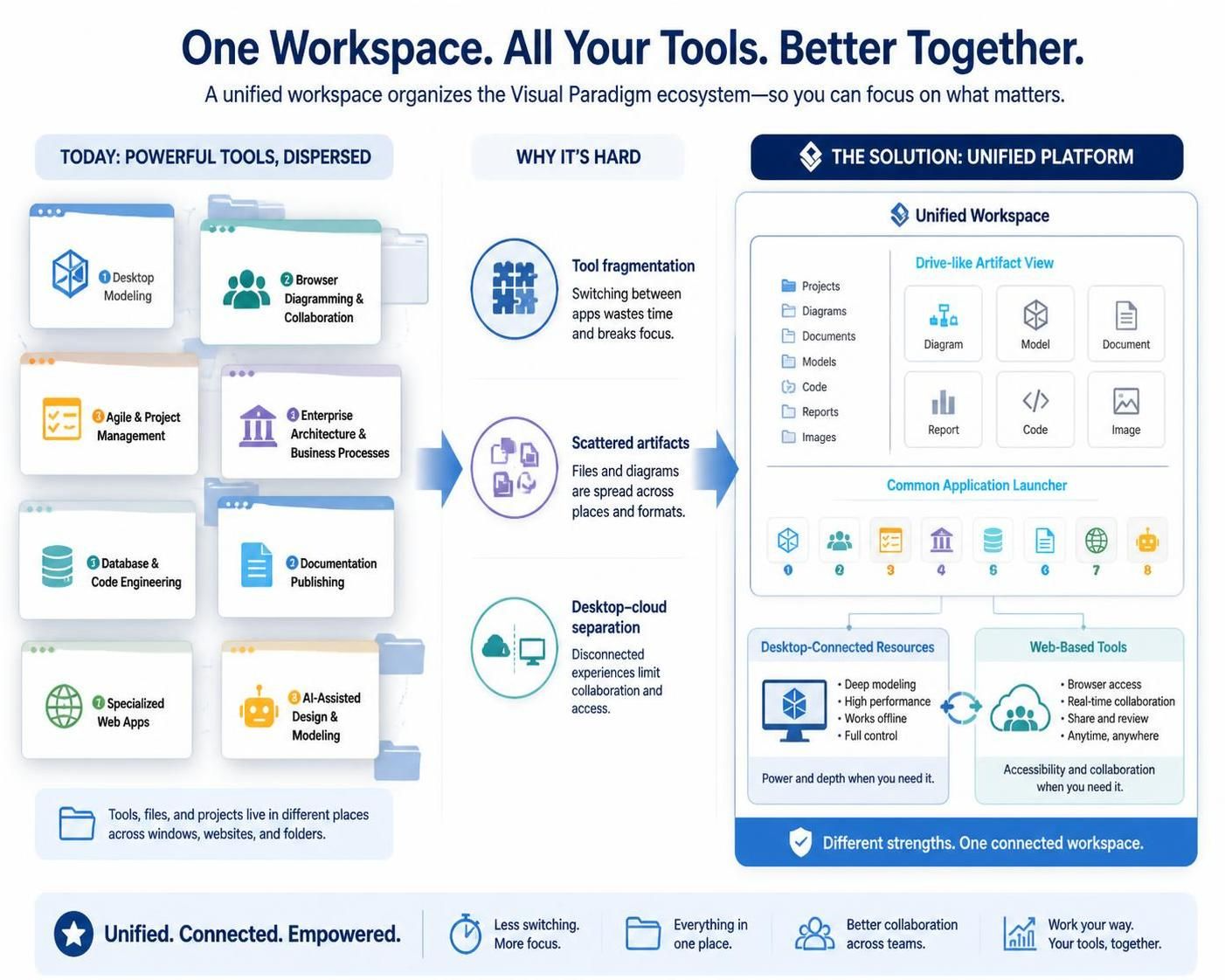
In the modern landscape of software engineering and enterprise architecture, the diversity of tools required to build a system is vast. From high-level UML modeling and database design to agile project management and code generation, engineers often find themselves juggling a fragmented ecosystem of applications. This tutorial explores the architectural solution to this complexity: the Visual Paradigm Unified Platform (VPUP).
This guide will break down the system architecture presented in the “One Workspace. All Your Tools. Better Together” concept, explaining how the platform acts as a coordination layer to bridge the gap between deep-dive desktop modeling and agile cloud-based collaboration.
The Architecture of Fragmentation
Before understanding the solution, we must define the problem. Historically, the Visual Paradigm ecosystem consisted of distinct product areas, each designed to solve specific, powerful problems. These included:
- Desktop Modeling: A robust environment for deep system analysis.
- Browser-based Tools: Agile and project management applications.
- Enterprise Architecture: Business process and EA tools.
- Code Engineering: Database and reverse-engineering features.
- AI-Assisted Design: Automated modeling capabilities.
While these tools are individually powerful, their isolation creates three critical architectural problems for the user:
- Tool Fragmentation: Users are forced to switch between multiple applications, websites, and windows, breaking their focus and cognitive flow.
- Scattered Artifacts: Diagrams, documents, project plans, and code repositories are stored in disparate locations, making version control and retrieval difficult.
- Desktop-Cloud Separation: There is often a “disconnect” where powerful desktop models exist offline, while web-based collaboration tools exist online, with no seamless bridge between them.
The Solution: The Unified Platform Architecture
The Visual Paradigm Unified Platform serves as the “front door” and the central coordination layer for the entire ecosystem. It is not merely a new interface; it is a system architecture designed to unify the user experience while preserving the distinct capabilities of the underlying core components.
1. The Unified Workspace (Central Dashboard)
The core of the platform is the Unified Workspace. Instead of a generic folder tree, this acts as a central dashboard. It provides a Drive-like Artifact View, organizing all projects, diagrams, documents, models, code, reports, and images into a single, unified file system.
2. The Common Application Launcher
One of the most significant architectural changes is the implementation of a common launcher. Rather than searching for specific executables or URLs, the platform provides a unified entry point for all Visual Paradigm applications. This ensures that regardless of whether the user is launching a deep modeling tool or a quick wireframing app, the entry point remains consistent.
3. The Bridge: Desktop vs. Web
The platform functions as a critical bridge between two distinct computing paradigms:
- Desktop-Connected Resources: These tools provide depth, high performance, and offline capabilities. They are the “deep professional” environments for heavy lifting like complex UML or SQL generation.
- Web-Based Tools: These provide browser access, real-time collaboration, and “anytime, anywhere” accessibility.
The Unified Platform synchronizes these two worlds. It allows a user to start a model on their desktop and seamlessly transition to the web for team review, or vice versa, without losing context or artifacts.
Workflow Implementation
How does this architecture translate into a daily workflow? The platform standardizes the “Create” workflow. When a user initiates a new project, they are not choosing between “Desktop” or “Online”; they are choosing a project type within the unified environment. The system then handles the routing of artifacts to the appropriate storage and tooling.
This architecture supports a path from Models to Documentation. A diagram created in the desktop environment can be instantly published or linked to a document generated by the platform, eliminating the manual copy-pasting of static images.
Visualizing the Connection
The relationship between the Unified Platform and the core components can be visualized as follows:
graph TD
    User[User Interface] --> UP[Unified Platform]

    subgraph "Core Components"
        Desktop[Desktop Modeling]
        Web[Web/Collaboration]
        AI[AI Tools]
    end

    UP -->|Launches & Syncs| Desktop
    UP -->|Launches & Syncs| Web
    UP -->|Access| AI

    Desktop -.->|Offline/Deep| Sync[Sync Engine]
    Web -.->|Real-time/Cloud| Sync

    Sync <-->|Artifact View| UP
Conclusion
The Visual Paradigm Unified Platform represents a shift from a suite of isolated tools to a cohesive ecosystem. By addressing tool fragmentation, centralizing artifacts, and bridging the desktop-cloud divide, it allows engineers to focus on what matters: building better systems. It empowers teams to work their way—using the deep power of the desktop when needed and the agility of the web when collaboration is required—all within one connected workspace.