
Mastering C4 Context Diagrams in the VP AI Ecosystem
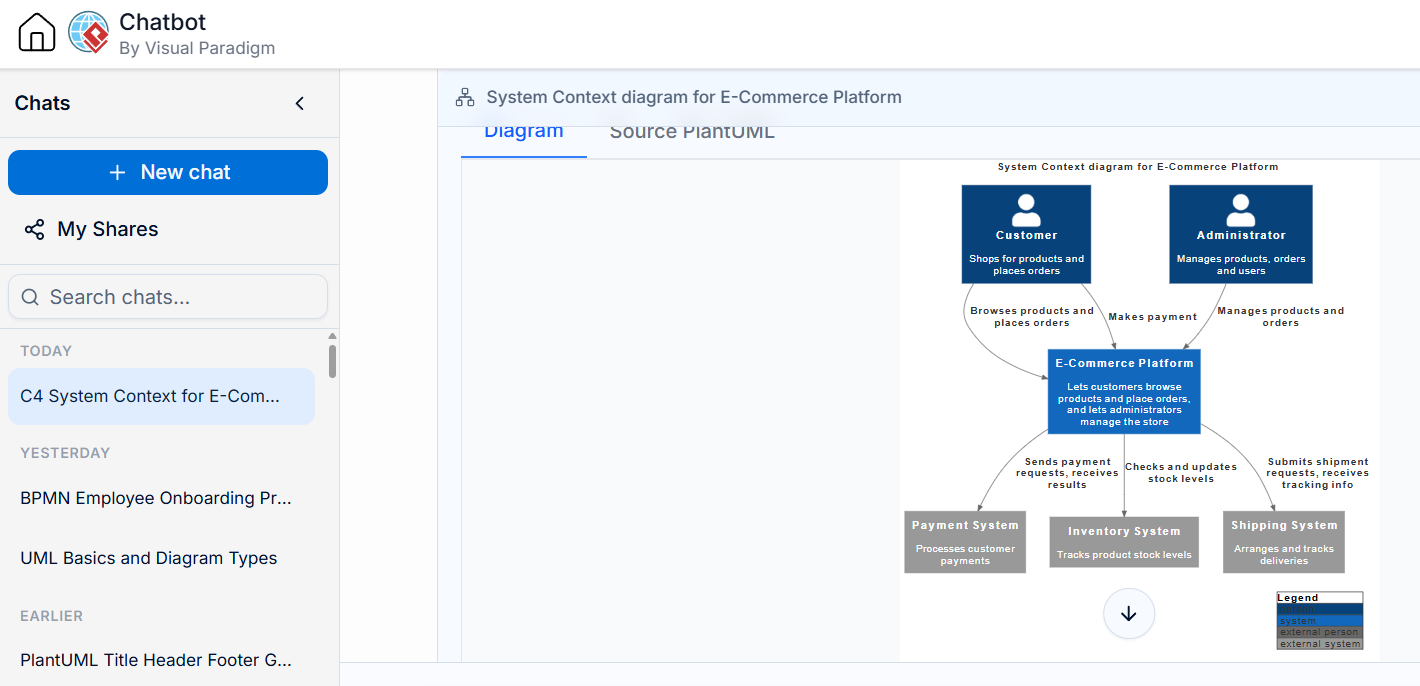
In modern software engineering, the gap between an abstract idea and a concrete architectural plan is often bridged by rapid prototyping. The screenshot provided illustrates a powerful workflow where an AI chatbot, specifically Visual Paradigm’s AI Chatbot, is used to instantly generate a C4 System Context Diagram for an E-Commerce Platform.
This tutorial breaks down how to leverage this workflow to move from a raw problem statement to a validated architectural baseline, ensuring your system design is robust, accurate, and ready for development.
1. The AI-First Modeling Workflow
The core philosophy presented in the visual context is “Generate and Iterate.” Instead of manually drawing boxes and arrows in a modeling tool, you begin by conversing with an AI agent to turn your problem statement into a visual draft.
Step 1: The Initial Prompt
Your journey starts by asking the chatbot to create a specific type of diagram. In the example shown, the user requested a C4 System Context Diagram. This is the highest level of architectural abstraction, answering the question: “What is the system, and who uses it?”
Step 2: Iterative Refinement
Once the AI generates the first draft, the process enters an iterative loop. You review the visual output and request focused changes. This mimics the role of a senior architect reviewing a junior’s draft.
Based on the provided context, here are examples of effective refinement prompts:
- Add Roles: “Add an administrator who can reset passwords.”
- Define Logic: “Show a retry path after an invalid one-time password, with a maximum of three attempts.”
- Define Concurrency: “After payment succeeds, show customer notification and inventory update happening in parallel.”
- Clarify Boundaries: “Separate the failure path from the successful path.”
2. Validating the AI’s Draft
While AI is excellent for rapid exploration, it is not infallible. The text emphasizes a critical step: Check the result against the system facts you know.
Before accepting the AI’s work, you must verify the following:
- Participants: Are all necessary actors (Customer, Admin, Third-party) included?
- Responsibilities: Do the boxes accurately describe what the system does?
- Boundaries: Is the system clearly separated from the external world?
- Data Flows: Do the arrows correctly represent the direction of data movement?
- Conditions & Exceptions: Have the AI’s assumptions about error handling (like retries) matched your business rules?
Crucial Rule: Treat generated relationships and details as suggestions until a knowledgeable reviewer confirms them.
3. Implementing the C4 Model
The diagram in the image utilizes the C4 Model, a technique for software architecture documentation. The screenshot specifically shows a Level 1 (System Context) diagram. The C4 model builds inward from the environment, with each layer answering a distinct question:
- Level 1 (Context): The system and its users (as seen in the image).
- Level 2 (Container): The technical building blocks (e.g., Web App, Microservices, Databases).
- Level 3 (Component): The internal structure of the containers.
- Level 4 (Code): The actual code structure (classes, functions).
In the provided diagram, we see the “E-Commerce Platform” (The System) interacting with:
- External Persons: Customer, Administrator.
- External Systems: Payment System, Inventory System, Shipping System.
4. From Draft to Living Documentation
Once the AI-generated draft is validated and stable, it shouldn’t just sit in a chat window. The workflow advocates moving it into a structured environment for long-term value.
Exporting and Versioning
The final step is to export the diagram to the OpenDocs Pipeline. This ensures your architecture is treated as living documentation rather than a static image. When exporting, you should add a descriptive comment that identifies the artifact’s purpose and version.
For example, a good comment format is:
Authentication flow baseline — design review draft
Summary
This workflow demonstrates a shift in how we approach architecture. By using AI to handle the “boring” part of drawing the boxes and connecting the lines, architects can focus their cognitive energy on logic, validation, and business rules. The result is a faster iteration cycle and a clearer system context.