Q&A:学生がプロファイル図の基礎についてよく質問する上位15の質問

複雑なシステムのアーキテクチャを理解するには、箱と線を描くだけでは不十分です。ドメイン固有のニュアンスを表現できる言語が必要です。ここにプロファイル図の役割が現れます。システム工学やソフトウェアアーキテクチャに取り組む学生にとって、これらの図はしばしば概念的な障壁となります。以下のガイドでは、これらの図に関する最も頻繁な質問に答えるとともに、理論、応用、構造的要件を解説します。

試験準備中であっても、カスタムモデリング拡張を設計中であっても、基礎の明確な理解は不可欠です。特定の商用ツールを参照せずに、スタereotype、タグ付き値、制約のメカニズムを検討します。焦点は、あらゆるモデリング環境における理論的枠組みと実践的応用にあります。
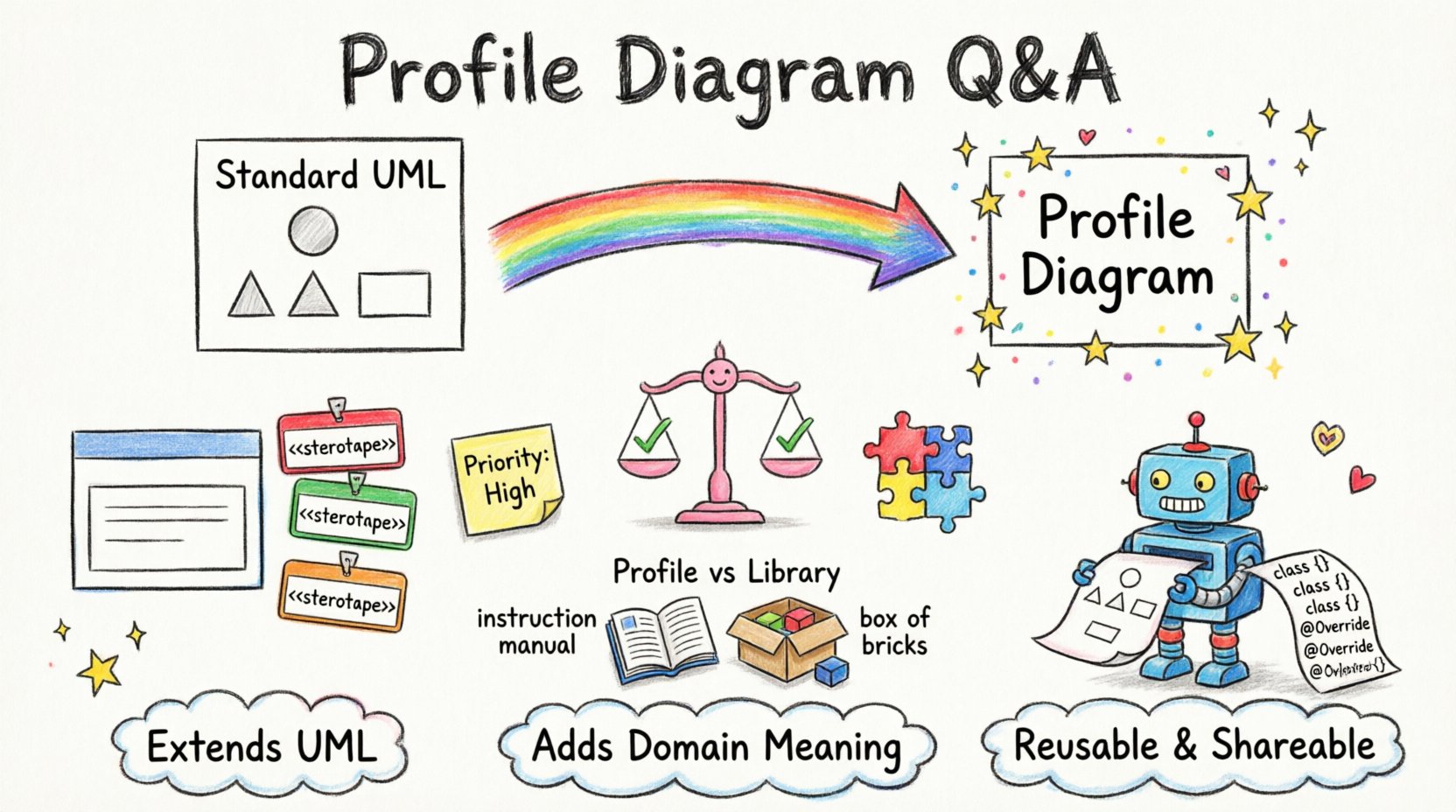
A playful child's drawing style infographic explaining UML Profile Diagram fundamentals with colorful hand-drawn illustrations showing stereotypes as name tags with << >> symbols, tagged values as sticky notes, constraints as friendly balance scales, and metaclasses as interlocking puzzle pieces, all connected with wobbly crayon arrows demonstrating how profiles extend standard UML for domain-specific modeling in aerospace, medical, or automotive fields, with simple comparison visuals for Profile vs Class Diagram and Profile vs Library, plus key takeaways about reusability, code generation, and validation presented in a fun, accessible visual format for students and learners”/></figure>
</div>

<h2>1. What exactly is a Profile Diagram? 🤔</h2>

<p>A Profile Diagram is a specialized type of diagram used to extend the Unified Modeling Language (UML) to suit specific application domains. Standard UML provides a general-purpose set of notations. However, industries like aerospace, medical devices, or automotive engineering have unique requirements that standard symbols cannot capture efficiently.</p>

<ul>
<li><strong>Extension Mechanism:</strong> It allows users to define new metaclasses.</li>
<li><strong>Domain Specificity:</strong> It tailors the modeling language to a specific context.</li>
<li><strong>Reusability:</strong> Profiles can be packaged and reused across multiple projects.</li>
</ul>

<p>Think of a Profile as a dictionary of terms added to the base language. It does not replace the standard UML but augments it with new semantics.</p>

<h2>2. How does a Profile differ from a standard Class Diagram? 📊</h2>

<p>Students often confuse the two because both involve classes and attributes. The distinction lies in intent and scope.</p>

<table>
<thead>
<tr>
<th>Feature</th>
<th>Profile Diagram</th>
<th>Standard Class Diagram</th>
</tr>
</thead>
<tbody>
<tr>
<td>Primary Purpose</td>
<td>Define extensions to the language</td>
<td>Model system structure and behavior</td>
</tr>
<tr>
<td>Scope</td>
<td>Metamodel level (defines rules)</td>
<td>Model level (defines instances)</td>
</tr>
<tr>
<td>Usage</td>
<td>Used to create other diagrams</td>
<td>Used to document the application</td>
</tr>
<tr>
<td>Components</td>
<td>Stereotypes, Tagged Values, Constraints</td>
<td>Classes, Associations, Inheritance</td>
</tr>
</tbody>
</table>

<h2>3. What is a Stereotype? 🏷️</h2>

<p>A stereotype is the core building block of a profile. It is a way to classify elements within the model. When you apply a stereotype to a standard UML element, you change its meaning.</p>

<ul>
<li><strong>Notation:</strong> Typically displayed in guillemets like <code><<Component>></code>.</li>
<li><strong>Function:</strong> It adds semantic meaning without changing the underlying structure.</li>
<li><strong>Example:</strong> Applying <code><<Entity>></code> to a class might indicate it maps directly to a database table.</li>
</ul>

<p>Without stereotypes, a class is just a generic container. With them, it becomes a specific domain object.</p>

<h2>4. What are Tagged Values and why are they needed? 📝</h2>

<p>Tagged values allow you to store additional data associated with a model element. They function like custom attributes for the model itself.</p>

<ul>
<li><strong>Metadata Storage:</strong> They hold information that is not part of the visual diagram but is crucial for processing.</li>
<li><strong>Code Generation:</strong> Values can drive the generation of source code or configuration files.</li>
<li><strong>Customization:</strong> You define the tags when creating the profile.</li>
</ul>

<p>For instance, a profile might define a tag named <code>Priority</code>. Any class in the system can then have a <code>Priority</code> value assigned to it, which might influence scheduling logic.</p>

<h2>5. How do Constraints work within a Profile? ⚖️</h2>

<p>Constraints are rules that restrict how elements can be used. In a profile, you can define specific rules that apply to the stereotypes you create.</p>

<ul>
<li><strong>OCL:</strong> Object Constraint Language is often used to formalize these rules.</li>
<li><strong>Validation:</strong> They ensure model integrity before code generation.</li>
<li><strong>Logic:</strong> They define relationships, such as “A <code><<Server>><<ロードバランサー>>.

制約は、無効なアーキテクチャがモデル化されるのを防ぎ、設計段階の初期段階でエラーを検出します。

6. 標準プロファイルから継承することは可能ですか? 🔄

はい。プロファイルはオブジェクト指向プログラミングと同様の継承メカニズムをサポートしています。これにより、階層的なプロファイル開発が可能になります。

  • ベースプロファイル:一般的なプロファイルで、共通の拡張を含んでいます。
  • 派生プロファイル:ベースを拡張し、ドメイン固有の機能を追加する特定のプロファイルです。
  • 利点:共有される論理を1か所に保持することで、重複を削減します。

汎用的な「セキュリティ」プロファイルを作成した場合、基本ルールを再定義せずに、それを拡張して「エンタープライズセキュリティ」プロファイルを作成できます。

7. この文脈におけるメタクラスとは何ですか? 🧩

メタクラスとは、他のクラスの構造を定義するクラスです。プロファイルでは、新しい要素の外観を指定するためにメタクラスを定義します。

  • 定義: ステレオタイプのプロパティを記述します。
  • 構造: 属性、操作、関係性を含みます。
  • 例: ステレオタイプを定義した場合、<<データベース>>、メタクラスは、そのステレオタイプが持つべき属性(たとえば、テーブル名)を定義します。

これにより、モデル内のそのステレオタイプのすべてのインスタンスにおいて一貫性が保たれます。

8. プロファイルを再利用可能にするにはどうすればよいですか? 📦

プロファイルをパッケージ化するには、すべての定義——ステレオタイプ、タグ付き値、制約——を1つの単位にまとめる必要があります。

  • ポータビリティ:パッケージ化されたプロファイルは、他のモデルにインポートできます。
  • バージョン管理:チームがモデリング標準の更新を管理できるようにします。
  • インストール:ほとんどのモデリング環境では、パッケージファイルを読み込むだけでプロファイルを有効化できます。

これは、複数のチームが同じ標準を使用する可能性がある大規模な組織にとって不可欠です。

9. プロファイルとライブラリの違いは何ですか? 📚

似ているように見えますが、モデリングエコシステムでは異なる目的を果たします。

側面 プロファイル ライブラリ
焦点 言語構文を拡張する 再利用可能なモデル要素を提供する
出力 新しいステレオタイプとルール クラス、インターフェース、コンポーネント
使用法 どのようにモデリングするかを定義する 何をモデリングするかを定義する

ライブラリはブロックを提供します。一方、プロファイルはそのブロックを特定の目的で使う方法を教えてくれます。

10. プロファイルはコード生成にどのように影響しますか? 💻

コード生成エンジンは、モデル要素の意味を理解するためにプロファイルを読み取ります。

  • ステレオタイプのマッピング: A <<Service>>ステレオタイプはJavaインターフェースにマッピングされることがあります。
  • タグ付き値のマッピング: タグ インターフェース_バージョン生成されたコード内で定数になる可能性があります。
  • 検証:コードジェネレーターは、ファイルを書き込む前に制約を確認することが多いです。

適切に定義されたプロファイルがないと、コード生成は汎用的になります。プロファイルがあることで、出力は特定のフレームワークやアーキテクチャに合わせてカスタマイズされます。

11. 標準UMLプロファイルを変更できますか? ⚙️

一般的には、UML仕様で提供される標準プロファイルを変更すべきではありません。代わりに、それらをインポートして拡張する新しいプロファイルを作成します。

  • 安定性:標準プロファイルは標準化団体によって維持されています。
  • 互換性:標準を変更すると、他のツールとの互換性が失われます。
  • ベストプラクティス:置き換えるのではなく、拡張する。

これにより、標準に準拠した他のソフトウェアがモデルを読み取れる状態を保証します。

12. プロファイルを表示する際に使用される表記法は何ですか? ✍️

プロファイル図は、他の図と区別するために特定の視覚的レイアウトを使用することが多いです。

  • パッケージアイコン:プロファイルはしばしばパッケージとして表現されます。
  • ステレオタイプ一覧:図は、プロファイル内で定義されたステレオタイプを一覧表示しています。
  • 依存関係:矢印は、プロファイルと標準UMLメタクラスとの関係を示しています。

視覚的な表現により、モデラーは特定のビューで有効なプロファイルをすばやく識別できます。

13. 使用前にプロファイルを検証するにはどうすればよいですか? ✅

検証により、展開前にプロファイルの論理が妥当であることが保証されます。

  • 構文チェック:すべてのステレオタイプとタグが正しく定義されていることを確認してください。
  • 論理チェック:制約が衝突しないことを確認してください。
  • テスト実行: プロファイルを小さなサンプルモデルに適用して、動作を検証します。

プロファイル内のエラーは、それを使用するすべてのモデルに伝搬する可能性があるため、厳密なテストが必須です。

14. プロファイル図は最終納品物の一部ですか? 📄

通常はいいえ。プロファイル図はメタモデルのアーティファクトです。

  • 文書化: プロジェクトで使用する基準を文書化します。
  • 実行時: 実行されたりデプロイされたりしません。
  • 参照: 他のモデラーが準拠を確保できるようにする参照資料です。

最終システムではないものの、設計文書パッケージの重要な構成要素です。

15. プロファイルを時間とともにどのように維持しますか? 🛠️

プロファイルの維持にはバージョン管理とコミュニケーションが必要です。

  • 変更履歴: ステレオタイプの追加または削除をすべて文書化します。
  • 通知: プロファイルが更新されたときに、すべてのユーザーに通知します。
  • 後方互換性: 新バージョンで破壊的変更を避ける。

維持されないプロファイルは陳腐化し、組織全体でモデルの整合性が保てなくなる。

主要なコンセプトの要約 📌

これらの質問から得られる重要なポイントをまとめます:

  • プロファイルはUMLを拡張する: 領域固有の意味を追加する。
  • ステレオタイプは型を定義する: 要素を分類する。
  • タグ付き値はデータを追加する: メタデータを格納する。
  • 制約はルールを強制する: 完全性を維持する。
  • 再利用性が鍵です:プロファイルをパッケージ化して共有しましょう。

これらの基礎を習得することで、プロジェクトの正確なニーズに合わせてモデリング言語をカスタマイズできるようになり、システム設計における明確さと正確さを確保できます。