


Enterprise Architecture (EA) relies heavily on structured information. Without a robust framework to organize data, strategy, and design, organizations struggle to maintain alignment between business goals and IT capabilities. The Open Group Architecture Framework (TOGAF) provides the methodology to manage this complexity. At the heart of this methodology lie two critical components: the Architecture Repository and the Content Metamodel. Understanding these elements is essential for building a resilient architecture capability.
This guide explores the structural components of these frameworks. We examine how assets are stored, categorized, and governed. The goal is to provide a clear understanding of how TOGAF facilitates the management of architecture artifacts without relying on specific software tools.
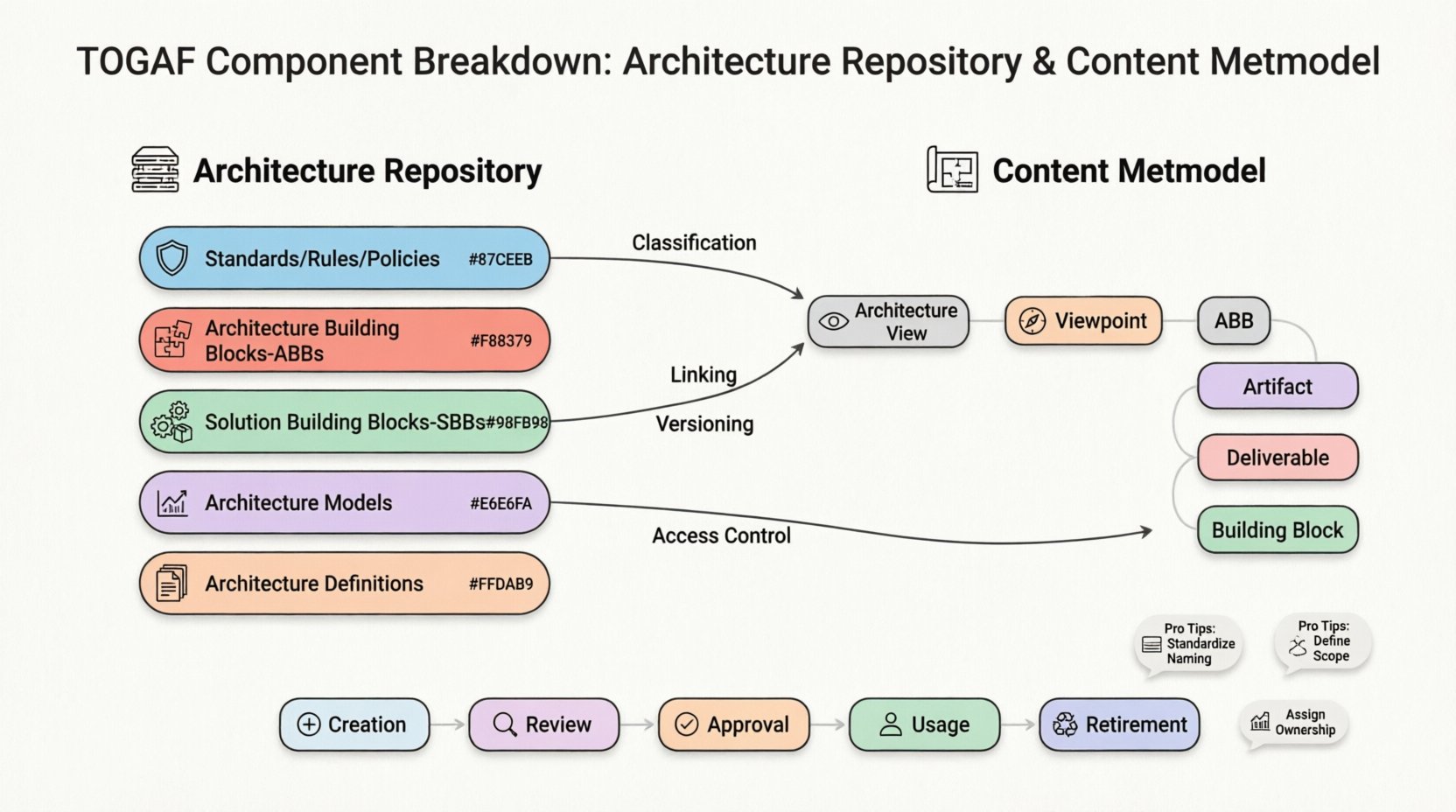
📦 The Architecture Repository Defined
The Architecture Repository is the central storage mechanism for all architecture assets. It is not merely a file server or a database; it is a logical concept that defines how information is organized and accessed. Think of it as the library of an organization’s architectural knowledge. It houses everything from high-level principles to detailed technical specifications.
Key characteristics of the Architecture Repository include:
- Centralization: All architecture-related information converges in one logical location.
- Accessibility: Authorized personnel can retrieve assets when needed for decision-making.
- Preservation: Historical data is maintained to track the evolution of the enterprise architecture.
- Integration: It connects with other repositories, such as standards repositories or information repositories.
The repository supports the Architecture Development Method (ADM). As teams move through the phases of the ADM cycle, they produce artifacts that must be stored for future reference. The repository ensures these artifacts are not lost and can be reused across different projects.
🧩 Core Components of the Repository
To function effectively, the repository is divided into specific sections. Each section serves a distinct purpose in the architecture lifecycle. Below are the primary components that populate the repository.
1. Standards, Rules, and Policies
This section contains the guardrails for the organization. It defines what is acceptable and what is prohibited in terms of technology and process.
- Technical Standards: Approved programming languages, database types, and communication protocols.
- Design Principles: High-level guidelines that influence decision-making.
- Regulatory Requirements: Legal or compliance mandates that must be adhered to.
2. Architecture Building Blocks (ABBs)
ABBs are reusable components that can be used to design solutions. They are often abstract and focus on functionality rather than specific implementation.
- Business ABBs: Organizational structures or business functions.
- Information System ABBs: Data structures or application functions.
- Technical ABBs: Infrastructure components or security services.
3. Solution Building Blocks (SBBs)
While ABBs are abstract, SBBs are specific implementations. These represent the actual software, hardware, or services deployed to meet business needs.
- Commercial Off-The-Shelf (COTS) Products: Licensed software solutions.
- Custom Developments: Code written specifically for the organization.
- Services: Cloud services or third-party integrations.
4. Architecture Models
Models are representations of the architecture in a specific view. They help stakeholders understand complex systems.
- Process Models: Workflows and business activities.
- Data Models: Entity relationships and data flows.
- Application Models: Software architecture diagrams.
- Infrastructure Models: Network and hardware topology.
5. Architecture Definitions
This component holds the documentation produced during the ADM phases. It includes the Architecture Vision, Requirements, and the final deliverables.
- Phase Deliverables: Specific outputs from each ADM cycle.
- Architecture Contracts: Agreements between stakeholders regarding the scope of work.
- Implementation Governance Records: Logs of how projects align with the architecture.
📐 The Content Metamodel Structure
If the Repository is the building, the Content Metamodel is the blueprint. It defines the structure of the data stored within the repository. It establishes the types of objects that can exist and how they relate to one another. Without a metamodel, the repository would be a chaotic collection of files.
The TOGAF Content Metamodel provides a standardized vocabulary. This ensures that everyone in the organization speaks the same language when discussing architecture components.
Key Metamodel Elements
The metamodel organizes architecture content into logical categories. Understanding these categories is vital for populating the repository correctly.
| Element | Description | Example |
|---|---|---|
| Architecture View | A representation of a system from a specific perspective. | Security View, Data Flow View |
| Architecture Viewpoint | Convention for creating views. Defines the audience and purpose. | Stakeholder View, Implementation View |
| Architecture Building Block | Specification of a building block. | Enterprise Identity Management |
| Artifact | Physical representation of information (e.g., documents, diagrams). | PDF Specification, UML Diagram |
| Deliverable | Any output produced during the ADM. | Requirements Document |
| Building Block | Reusability of a component (logical or physical). | Cloud Storage Service |
🔗 Relationship Dynamics
The interaction between the Repository and the Metamodel is symbiotic. The Metamodel dictates the rules of engagement, while the Repository provides the space for execution. When new artifacts are created, they must conform to the Metamodel definitions.
How They Work Together
- Classification: The Metamodel classifies an artifact. The Repository stores the instance.
- Linking: Relationships defined in the metamodel allow the repository to link related artifacts. For example, linking a Requirement to a Design Document.
- Versioning: The metamodel supports version control attributes. The repository manages the actual version history.
- Access Control: The metamodel defines permissions based on the type of content. The repository enforces these restrictions.
🛡️ Governance and Lifecycle
Managing the repository requires active governance. Assets do not remain static; they evolve. The lifecycle management process ensures that outdated information is archived or retired.
Asset Lifecycle Stages
- Creation: An architect defines a new building block or model.
- Review: The asset is checked for accuracy and compliance with standards.
- Approval: The asset is officially released for use.
- Usage: Projects reference the asset in their designs.
- Retirement: The asset is deprecated when no longer relevant.
Governance bodies are responsible for overseeing this process. They ensure that the repository remains clean and relevant. This prevents “architecture debt,” where outdated designs clutter the system and confuse stakeholders.
🚀 Practical Implementation Strategies
Implementing the repository and metamodel requires a strategic approach. It is not a one-time setup but an ongoing discipline.
1. Define the Scope
Start by determining what data is critical. Not every diagram needs to be stored. Focus on high-value assets that impact business decisions.
2. Standardize Naming Conventions
Consistency is key. Use a standard naming convention for all artifacts. This makes searching and retrieval significantly easier.
- Format: [Type]-[Project]-[Version]-[Date]
- Example: ARQ-Fin-001-20231025
3. Establish Retrieval Processes
Ensure that users know how to find information. A repository that is hard to navigate is useless. Implement search functions and clear categorization.
4. Integrate with the ADM
Make repository usage part of the ADM workflow. Architects should be required to upload deliverables to the repository before a phase is closed.
⚠️ Common Challenges
Organizations often face hurdles when adopting these TOGAF components. Recognizing these pitfalls early can save significant time and resources.
1. Over-Categorization
Creating too many categories in the metamodel can make the repository complex. Keep the structure simple and intuitive.
2. Lack of Ownership
Who is responsible for updating the repository? If no one owns it, the data becomes stale. Assign clear roles for maintenance.
3. Ignoring Metadata
Metadata provides context. Without it, artifacts are just files. Ensure every item in the repository has descriptive tags, authors, and dates.
4. Physical vs. Logical Confusion
The repository is logical. It does not have to be a single physical database. It can span multiple systems. Communicate this distinction clearly to avoid implementation errors.
📈 Future Proofing the Architecture Capability
The landscape of enterprise technology changes rapidly. The repository must be flexible enough to adapt.
Adapting to Change
- Agility: Ensure the metamodel allows for new types of building blocks as technology evolves (e.g., AI services).
- Integration: Plan for integration with other management systems like IT Service Management or Project Management.
- Automation: Where possible, automate the ingestion of data into the repository to reduce manual entry errors.
💡 Final Considerations
The Architecture Repository and Content Metamodel are foundational to successful Enterprise Architecture. They provide the structure needed to manage complexity. By understanding their components and relationships, organizations can build a more agile and responsive IT environment.
Implementation requires discipline. It is not enough to simply store files. The data must be structured, governed, and maintained according to the metamodel standards. This effort pays dividends in clarity, decision-making speed, and alignment between business and technology.
As you move forward, focus on the value these components bring. They are not just administrative overhead; they are the bedrock of architectural integrity. Regular reviews of the repository content and metamodel structure will ensure they remain effective tools for your organization.
Start by auditing your current assets. Identify gaps in your current storage and categorization. Then, apply the TOGAF principles to structure them. With a well-maintained repository and a clear metamodel, your architecture capability will be robust and ready for the challenges ahead.