Scrum relies on transparency, inspection, and adaptation to deliver value effectively. At the heart of this framework lie the Scrum artifacts. These items are not merely administrative requirements; they represent the work itself, the progress toward goals, and the value delivered to stakeholders. Understanding these artifacts is essential for any team aiming to operate with clarity and efficiency.
There are three primary artifacts in Scrum: the Product Backlog, the Sprint Backlog, and the Increment. Supporting these are specific tools like User Stories and Burndown Charts, which provide granular insight into the workflow. This guide explores each component in detail, explaining their purpose, mechanics, and how they interact to drive successful product development.
The Three Core Scrum Artifacts 🏗️
The Scrum Guide defines three specific artifacts. Each one serves a distinct purpose, yet they are interconnected. Together, they form the backbone of the Scrum process.
1. The Product Backlog 📋
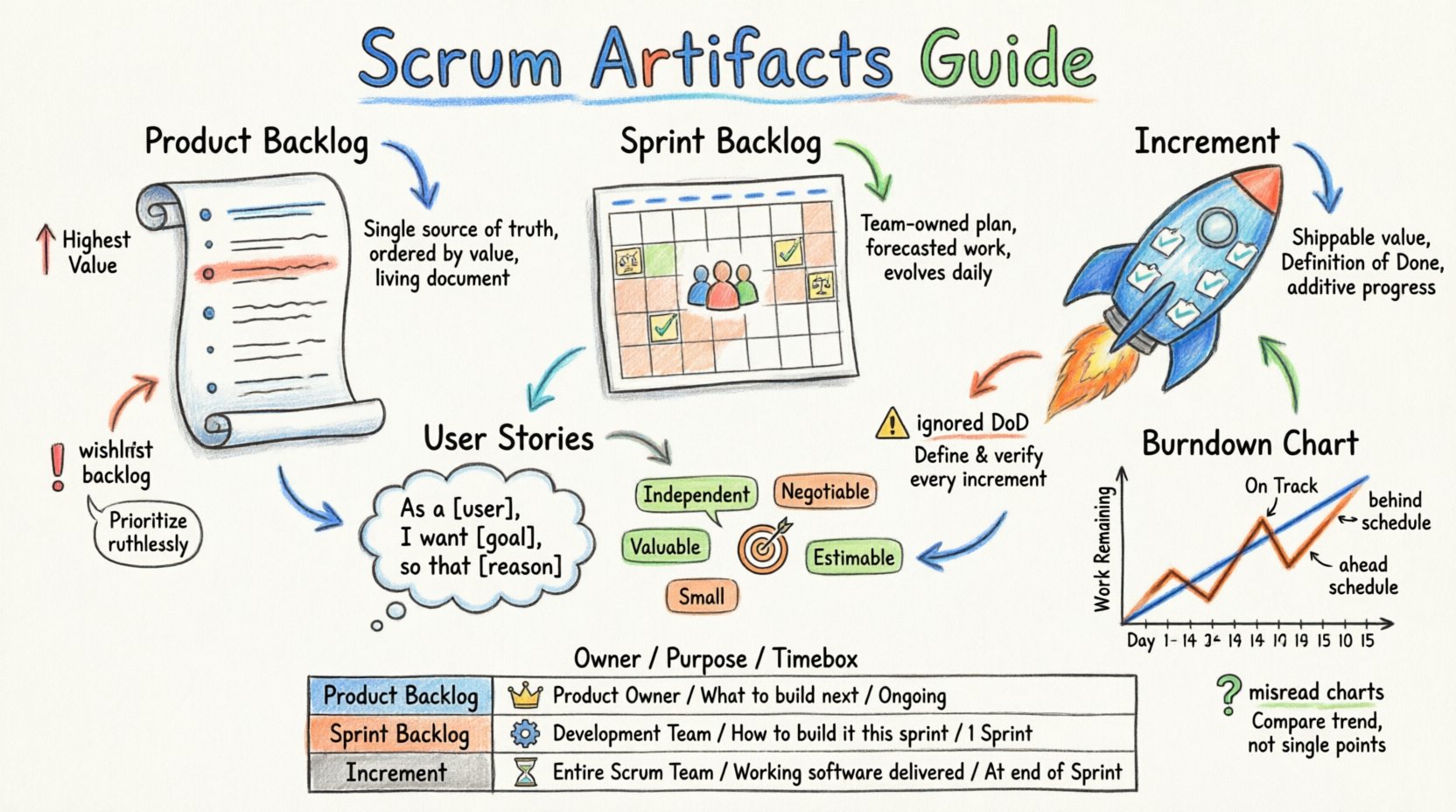
The Product Backlog is the single source of truth for all work that needs to be done. It is an ordered list of everything that is known to be needed in the product. This list is never complete and evolves as the product and its environment evolve.
- Dynamic Nature: The Product Backlog changes regularly. New items are added, existing items are clarified, and priorities shift based on market feedback or technical requirements.
- Ordered by Value: Items at the top are more clear and have higher priority. This ordering allows the team to focus on the most important work first.
- Transparency: Everyone in the organization can see the backlog. This openness fosters trust and allows stakeholders to understand what is being built and why.
- Living Document: It is not a static list created at the start of a project. It is maintained throughout the lifecycle of the product.
2. The Sprint Backlog 🗓️
The Sprint Backlog is a set of Product Backlog items selected for the Sprint, plus a plan for delivering the Increment and achieving the Sprint Goal. It is a forecast by the Development Team for the Sprint. The Sprint Backlog is the Development Team’s plan, and the plan changes as the Sprint progresses.
- Team Ownership: Only the Development Team can change the Sprint Backlog during the Sprint.
- Forecasting: It represents what the team believes they can complete within the Sprint timeframe.
- Commitment: While the Product Owner orders the Product Backlog, the team commits to the work in the Sprint Backlog.
- Evolution: As the team learns more about the work, the plan is refined. New tasks may be added, or existing ones may be broken down further.
3. The Increment 🚀
An Increment is a concrete stepping stone toward the Product Goal. Each Increment is additive to all prior Increments and thoroughly verified, ensuring that all Increments work together. One might think of an Increment as a bundle of completed work items.
- Quality Assurance: An Increment must meet the Definition of Done. If it does not, it cannot be considered part of the Increment.
- Shippability: The Increment must be in a usable condition, regardless of whether the Product Owner decides to release it.
- Value Delivery: The purpose of Scrum is to deliver value. The Increment is the tangible manifestation of that value.
User Stories: The Building Blocks 📝
User Stories are the primary format for describing requirements in Agile environments. They capture the perspective of the end user and focus on the value being delivered. A User Story is not a specification; it is a placeholder for a conversation.
Understanding the Structure
A standard User Story follows a simple template. This structure ensures that the team considers who the user is, what they need, and why it matters.
- Format: As a [type of user], I want [some goal] so that [some reason].
- Example: As a customer, I want to filter search results by price so that I can find products within my budget.
- Clarity: This format forces the writer to consider the context and the value, rather than just the feature.
The INVEST Model
To ensure quality, User Stories should adhere to the INVEST criteria. This acronym serves as a checklist for well-formed stories.
- I – Independent: Stories should be self-contained. Dependencies between stories can slow down progress, so they should be minimized.
- N – Negotiable: Details are discussed with the team. The story is not a contract but a commitment to discuss requirements.
- V – Valuable: Every story must deliver value to the user or the business. If it does not, it should not be prioritized.
- E – Estimable: The team must be able to estimate the effort required to complete the story.
- S – Small: Stories should be small enough to be completed within a single Sprint.
- T – Testable: There must be clear criteria to verify when the story is complete.
Acceptance Criteria
Acceptance Criteria define the conditions that must be met for a User Story to be considered complete. They are written from the perspective of the user and provide a clear boundary for the work.
- Verification: They act as a checklist for testing.
- Shared Understanding: They ensure the Product Owner and the Development Team agree on what “done” looks like.
- Examples: They often include specific examples of expected behavior.
Burndown Charts: Tracking Progress 📉
The Burndown Chart is a visual representation of work remaining over time. It is one of the most common tools used in Scrum to track the progress of a Sprint. This chart helps the team and stakeholders see if they are on track to complete the Sprint Goal.
Components of the Chart
A standard Burndown Chart consists of two lines plotted against a time axis.
- Time Axis: The horizontal axis represents the days of the Sprint.
- Work Axis: The vertical axis represents the amount of work remaining, often measured in hours or story points.
- Baseline: The ideal line shows the amount of work that should be completed each day to finish on time.
- Actual: The actual line shows the real amount of work remaining at the end of each day.
Interpreting the Data
Reading the chart requires context. A line above the baseline indicates the team is behind schedule, while a line below suggests they are ahead.
- Steady Decline: A smooth downward slope indicates consistent progress.
- Flat Line: If the line remains flat, no work is being completed. This signals a blockage or a lack of focus.
- Upward Movement: If the actual line moves up, new work was added to the Sprint. This can happen if the scope changes or if the initial estimates were incorrect.
- End of Sprint: Ideally, the actual line meets the baseline at the end of the Sprint. If it does not, the Sprint Goal may not be achieved.
Benefits of Using the Chart
- Early Warning: It highlights trends early in the Sprint, allowing the team to adjust before the deadline.
- Focus: It keeps the team focused on the remaining work.
- Communication: It provides a simple visual for stakeholders to understand progress without technical jargon.
Comparison of Scrum Artifacts 📋
To clarify the differences and relationships between the artifacts, consider the following comparison.
| Artifact | Owner | Purpose | Timebox |
|---|---|---|---|
| Product Backlog | Product Owner | Source of requirements | Product Lifecycle |
| Sprint Backlog | Development Team | Sprint plan | Sprint Duration |
| Increment | Development Team | Value delivered | End of Sprint |
| Burndown Chart | Development Team | Progress tracking | Daily (Sprint) |
Common Pitfalls and Challenges ⚠️
Even with clear definitions, teams often struggle with implementing these artifacts correctly. Recognizing these pitfalls helps in maintaining a healthy Scrum process.
1. The Product Backlog Becomes a Wish List
When the Product Backlog contains too many items without clear priority, it loses its value. It becomes a dumping ground for ideas rather than a plan for delivery.
- Solution: Regularly refine the backlog. Remove items that are no longer relevant.
- Solution: Ensure only a few items are fully detailed. Keep high-level descriptions for items further down the list.
2. Ignoring the Definition of Done
If the Increment is not truly finished, it creates technical debt and confusion. An Increment that does not meet the Definition of Done is not an Increment.
- Solution: Define clear criteria for “Done” that include testing, documentation, and integration.
- Solution: Review the Definition of Done at the end of every Sprint to ensure it is still valid.
3. Misinterpreting the Burndown Chart
Teams often panic when the line goes up. However, adding work is sometimes necessary if the scope changes or if new risks are discovered.
- Solution: Use the chart to start a conversation, not to assign blame.
- Solution: Discuss the variance during the Daily Scrum to understand the cause.
4. Lack of Transparency
If artifacts are hidden or updated only at the end of the Sprint, they fail to provide the necessary transparency.
- Solution: Update the artifacts in real-time as work progresses.
- Solution: Make the artifacts visible to all stakeholders during reviews.
Maintaining Artifact Integrity 🔒
Maintaining the quality of Scrum artifacts requires discipline and continuous effort. It is not a one-time setup but an ongoing practice.
Product Backlog Refinement
Refinement is the process of adding details, estimates, and order to Product Backlog items. This activity ensures that the backlog remains useful for planning.
- Frequency: This should happen regularly, often weekly.
- Participants: The Product Owner leads, but the Development Team provides input on technical feasibility.
- Outcome: The top of the backlog should be ready for selection in the next Sprint Planning.
Continuous Improvement
The Scrum team should reflect on how they are using artifacts during the Sprint Retrospective.
- Feedback Loop: Ask what is working and what is hindering progress.
- Adjustment: Change the way artifacts are used if it is not adding value.
- Training: Ensure new team members understand the importance of these artifacts.
The Role of the Product Owner 🧑💼
The Product Owner plays a critical role in managing the Product Backlog. They are accountable for effective Product Backlog management.
- Ordering: They order the items to best achieve goals and missions.
- Clarity: They ensure the items are clear and understood by the team.
- Visibility: They ensure the Product Backlog is visible, transparent, and understood.
- Stakeholder Management: They communicate the backlog status to stakeholders.
The Role of the Development Team 👥
The Development Team is responsible for managing the Sprint Backlog and creating the Increment.
- Self-Management: They decide how to turn Product Backlog items into Increments.
- Execution: They execute the plan and update the Sprint Backlog daily.
- Quality: They ensure the Increment meets the Definition of Done.
- Collaboration: They collaborate on the Burndown Chart to track progress.
Conclusion on Scrum Artifacts 🏁
Scrum artifacts are the tangible evidence of the Scrum process. They provide the necessary transparency to inspect progress and adapt plans. When used correctly, the Product Backlog, Sprint Backlog, and Increment form a powerful system for delivering value. Tools like User Stories and Burndown Charts enhance this system by adding detail and visibility.
Success in Scrum does not come from following a rigid script. It comes from understanding the purpose of these artifacts and using them to facilitate communication and focus. Teams that invest in maintaining high-quality artifacts will find it easier to navigate complexity and deliver high-quality products consistently.
Remember, the goal is not to create paperwork. The goal is to create value. These artifacts are the means to that end. By keeping them accurate, transparent, and up-to-date, teams ensure that everyone is aligned and moving in the same direction.