Creating a Product Backlog is one of the most critical responsibilities within the Scrum framework. It serves as the single source of truth for what needs to be built, refined, and delivered. Unlike a simple to-do list, a Product Backlog is a dynamic, evolving artifact that reflects the changing needs of the market and the users.
This guide provides a comprehensive walkthrough on constructing your initial Product Backlog. We will move beyond basic definitions to explore the mechanics of prioritization, story writing, and refinement. By the end of this tutorial, you will understand how to maintain a backlog that drives value and supports agile delivery.
Understanding the Product Backlog 📋
The Product Backlog is an ordered list of everything that might be needed in the product. It is the primary artifact used to track progress and plan work. In Scrum, the Product Owner is accountable for the effectiveness of the Product Backlog. This means they are responsible for ordering the items to optimize value.
Key characteristics of a healthy Product Backlog include:
- Ordered: Items are sorted by value, risk, priority, or necessity.
- Emergent: It evolves as the product and the environment evolve.
- Refined: Items at the top are clear and ready for selection during Sprint Planning.
- Transparent: Anyone can see what is being considered and why.
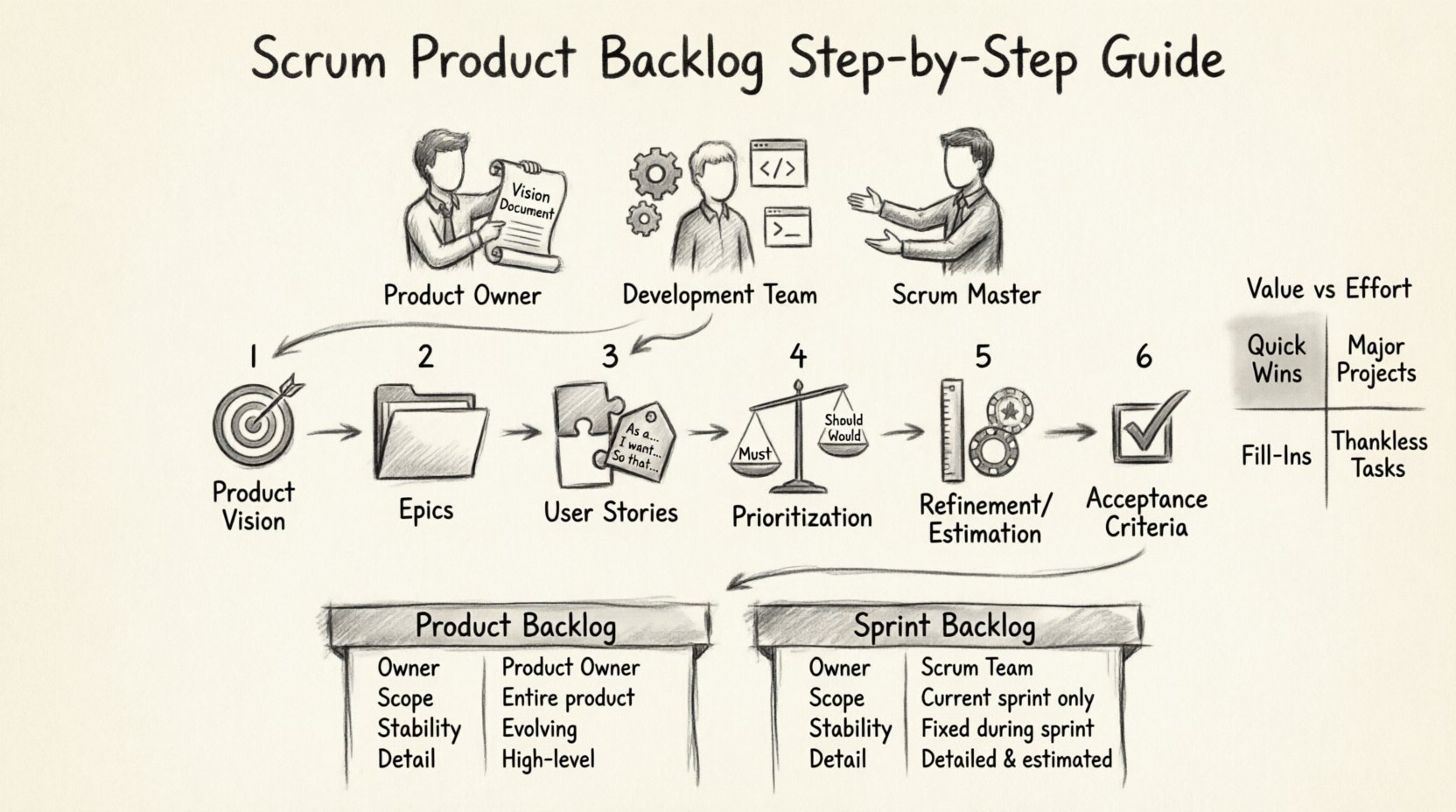
Prerequisites: Roles and Responsibilities 👥
Before populating the list, it is essential to understand who is involved and what their input looks like. The Product Backlog is not created in a vacuum.
The Product Owner
The Product Owner owns the content and the order. They act as the voice of the customer and the business. They decide what goes into the backlog and when it should be addressed.
The Development Team
The team provides the technical perspective. They help estimate effort, identify technical risks, and clarify acceptance criteria. Their input ensures that the items are feasible.
The Scrum Master
The Scrum Master facilitates the process. They help ensure that the backlog is transparent and that refinement sessions run smoothly. They coach the team on agile practices.
Step 1: Define the Product Vision 🎯
Before adding the first item, you need a destination. The Product Vision describes the future state of the product. It provides a clear direction for the backlog.
To establish this:
- Identify the target audience.
- Define the problem you are solving.
- Outline the unique value proposition.
- Set high-level goals for the next 6 to 12 months.
This vision acts as a filter. When considering a new item, ask: “Does this align with our vision?” If the answer is no, the item does not belong in the backlog.
Step 2: Gather Requirements and Create Epics 📝
Epics are large bodies of work that are too big to be completed in a single Sprint. They act as containers for smaller pieces of work. Think of Epics as chapters in a book.
To create Epics:
- Review the Product Vision.
- Identify major themes or functional areas.
- Write high-level descriptions for each theme.
- Ensure there is a clear goal for each Epic.
Example Epic: “User Authentication System”. This is too large to build in one go. It will need to be broken down further.
Step 3: Draft User Stories 🧩
User Stories are the primary unit of work in a Product Backlog. They describe a feature from the perspective of the user. A standard format helps maintain clarity.
The User Story Format
Use the following template to write your stories:
As a [type of user],
I want to [perform an action],
So that [I can achieve a goal].
This structure forces you to focus on value rather than technical implementation. It ensures the team understands the why behind the work.
Example User Stories
- As a registered user, I want to reset my password, so that I can regain access to my account if I forget it.
- As a manager, I want to view a weekly report, so that I can track team performance.
- As a guest, I want to browse the catalog, so that I can find products before signing up.
Step 4: Prioritization Techniques ⚖️
Ordering the backlog is a continuous activity. You cannot build everything at once. You must prioritize based on value, cost, and risk. Here are three common frameworks.
1. MoSCoW Method
This method categorizes items into four groups:
- Must have: Critical for the release. Without this, the product fails.
- Should have: Important but not vital. Can be delayed if necessary.
- Could have: Desirable features. Nice to have if time permits.
- Won’t have: Items explicitly excluded from the current scope.
2. Weighted Shortest Job First (WSJF)
This is useful in scaled environments. It calculates value by considering:
- Business Value
- Time Criticality
- Risk Reduction
- Opportunity Enablement
Items with the highest score are placed at the top of the backlog.
3. Value vs. Effort Matrix
Plot items on a 2×2 grid. Prioritize high value/low effort items first (Quick Wins). High value/high effort items are major initiatives. Low value items are deprioritized.
Step 5: Refinement and Estimation 📏
Refinement (formerly grooming) is the process of adding detail, estimates, and order to the backlog items. This happens throughout the Sprint, not just before planning.
Refinement Checklist
- Is the story clear and concise?
- Are the Acceptance Criteria defined?
- Is the technical approach understood?
- Is the story small enough for a Sprint?
Estimation Techniques
Teams often use relative sizing rather than hours. This reduces anxiety about accuracy.
- Planning Poker: The team discusses the story and votes on complexity using cards.
- T-Shirt Sizing: Label items as XS, S, M, L, XL based on effort.
- Story Points: Assign a numerical value representing complexity and effort.
Step 6: Defining Acceptance Criteria ✅
A User Story without Acceptance Criteria is incomplete. These criteria define the conditions that must be met for the story to be considered done.
Effective Acceptance Criteria should be:
- Specific: Clear and unambiguous.
- Testable: A tester should be able to verify the condition.
- Independent: Each criterion can be tested separately.
Example:
Story: Login Screen
- System accepts valid username and password.
- System redirects to dashboard upon success.
- System displays error message for invalid credentials.
- Password field is masked during entry.
Maintaining the Backlog 🧹
A backlog that is not maintained becomes a graveyard of unfinished work. Regular maintenance is required to keep it healthy.
Backlog Health Metrics
| Metric | Why It Matters | Target |
|---|---|---|
| Age of Top Items | Ensures recent priority changes are reflected | Less than 2 Sprints |
| Refinement Rate | Measures how much work is ready for planning | 20% of Sprint Capacity |
| Story Size | Ensures items are deliverable in a Sprint | 10-20 Story Points |
Common Pitfalls to Avoid ⚠️
Many teams struggle with the Product Backlog due to common mistakes. Be aware of these traps.
1. Too Many Items
Keeping thousands of items creates noise. Focus on the top 20% of items that drive 80% of the value.
2. Vague Descriptions
Items like “Improve performance” are not actionable. Break them down into specific tasks or stories.
3. Ignoring Technical Debt
Do not hide technical debt in a separate bucket. Include it as a backlog item so it can be prioritized alongside features.
4. Static Ordering
The backlog must change. If market conditions shift, the order must shift. Do not treat the top of the list as permanent law.
Backlog vs. Sprint Backlog
It is vital to distinguish between the Product Backlog and the Sprint Backlog. Confusing the two leads to scope creep and planning failures.
| Feature | Product Backlog | Sprint Backlog |
|---|---|---|
| Owner | Product Owner | Development Team |
| Scope | Entire Product | Current Sprint Only |
| Stability | Fluid (Changes anytime) | Stable (No changes during Sprint) |
| Detail | Variable (Top items detailed) | High (All items detailed) |
Frequently Asked Questions ❓
How many items should be in the Product Backlog?
There is no fixed number. It depends on the product lifecycle. However, ensure that the top 10-20 items are fully refined and ready for the next Sprint.
Can the Development Team add items to the backlog?
Yes. While the Product Owner orders the list, the Development Team can suggest items based on technical needs or user feedback. They will review these suggestions with the Product Owner.
What happens to items not selected in a Sprint?
They remain in the Product Backlog. They will be re-prioritized during the next planning session. They do not expire or disappear.
Should we estimate every item in the backlog?
No. Estimating everything is a waste of time. Only estimate items that are near the top and likely to be worked on soon. Use rough estimates for lower-priority items.
How often should we refine the backlog?
Refinement should be an ongoing activity. A dedicated session once per Sprint is common practice. This ensures the team is prepared for the next planning meeting.
Wrapping Up 🏁
Building a Product Backlog is an iterative process. It requires constant communication, prioritization, and refinement. By following the steps outlined in this tutorial, you can create a backlog that serves as a reliable roadmap for your product.
Remember, the goal is not to create a perfect list immediately. The goal is to create a living document that guides your team toward delivering value. Start small, iterate often, and keep the focus on the user needs.
With a well-maintained backlog, your Scrum team can navigate complexity with confidence and deliver high-quality products consistently.