Introduction to Agile in Academics
In the modern landscape of higher education, particularly within computer science and engineering programs, the transition from traditional waterfall methodologies to agile frameworks has become a critical learning objective. Students often enter university with a theoretical understanding of software development but lack practical exposure to iterative workflows. This gap can lead to friction when managing complex capstone projects or group assignments. Scrum provides a structured yet flexible framework that addresses these challenges effectively.
This article details a comprehensive case study of a university team that successfully developed a mobile application using Scrum principles. The focus is not on the technology stack used, but on the processes, communication strategies, and organizational structures that enabled the team to deliver value consistently. By examining the specific steps taken, the obstacles encountered, and the solutions implemented, we can understand how Scrum translates from corporate environments to student-led initiatives.
The Project Scenario
The case study centers on a group of five undergraduate students enrolled in a final-year software engineering module. Their task was to design, develop, and deploy a functional mobile application aimed at solving a specific problem within the university campus community. The scope was significant enough to require months of work but constrained by academic deadlines.
The project goal was to create a tool that allowed students to locate available study spaces in real-time. The team consisted of individuals with varying skill levels, ranging from those with prior coding experience to those new to the field. This mix of abilities is common in academic settings and adds complexity to the management of the project.
To succeed, the team needed a method to:
- Manage competing priorities and deadlines.
- Ensure all team members contributed equitably.
- Adapt to changing requirements as the project evolved.
- Maintain a sustainable pace of work amidst exam schedules.
Defining Scrum Roles for a University Team
One of the first hurdles was assigning roles. In a corporate setting, roles are often specialized. In a student team, members often wear multiple hats. However, to adhere to Scrum principles, the team agreed to distinct responsibilities. This clarity helped prevent confusion regarding who was accountable for what.
The following table outlines how the team mapped Scrum roles to their student counterparts.
| Scrum Role | Student Responsibility | Key Focus Area |
|---|---|---|
| Product Owner | Team Lead | Defining features, prioritizing the backlog, liaising with instructors. |
| Scrum Master | Project Coordinator | Removing blockers, facilitating meetings, ensuring process adherence. |
| Development Team | Developers & Designers | Building the app, writing code, creating UI mockups, testing. |
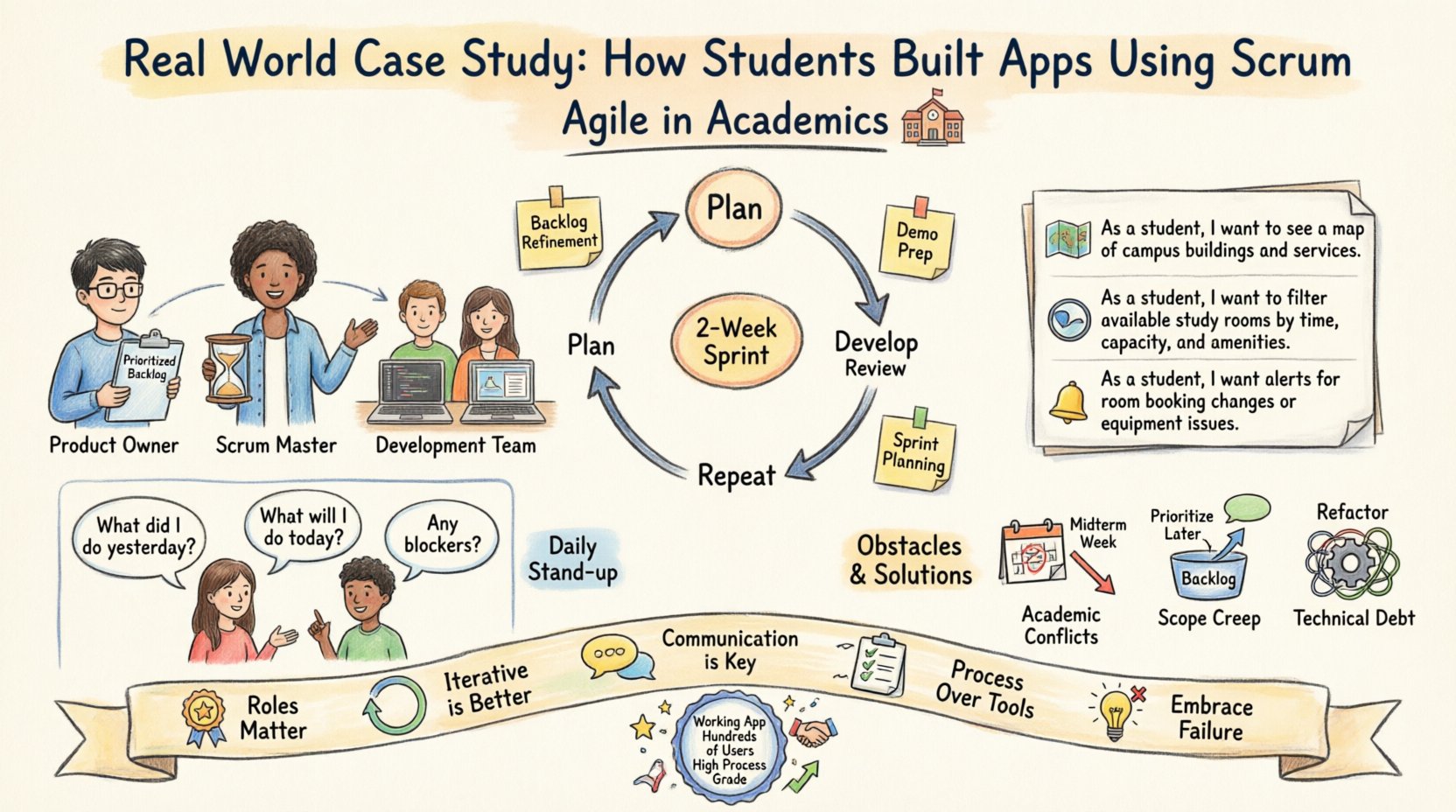
The Product Owner was responsible for the vision. They gathered feedback from potential users (other students) and translated it into a list of desired features. The Scrum Master ensured the team had the time and space to work without unnecessary interruptions. The Development Team was self-organizing, meaning they decided how to technically achieve the goals set by the Product Owner.
The Planning Phase: Creating the Backlog
The foundation of the project was the Product Backlog. This is a prioritized list of work items that the team aims to complete. Unlike a static requirement document, this list was dynamic and evolved as the team learned more about the problem space.
The team spent the first week creating the initial backlog. They used a technique called User Stories to describe features. A user story follows a simple format: As a [type of user], I want [some goal] so that [some reason]. This format forced the students to think about the end-user value rather than just technical specifications.
Examples of initial backlog items included:
- As a student, I want to see a map of buildings so that I can navigate the campus easily.
- As a student, I want to filter rooms by capacity so that I can find quiet study spots.
- As a student, I want to receive alerts when a room becomes free so that I can secure a seat.
- As an administrator, I want to update room status so that the data remains accurate.
Each item was then estimated for effort. The team used story points rather than hours. This approach focuses on the relative complexity of the task rather than predicting exact timeframes, which is often inaccurate in academic projects where life events interfere with work schedules.
Executing Sprint 1: The First Two Weeks
The project was divided into two-week cycles called Sprints. The first sprint was critical because it established the rhythm of the team. The goal was to produce a potentially shippable increment, even if it was just a basic version of the app.
Sprint Planning
The sprint began with a planning meeting. The Product Owner presented the top-priority items from the backlog. The Development Team then selected the items they believed they could complete within the two-week timeframe. This commitment was vital for accountability.
During this session, the team broke down high-level stories into smaller tasks. For example, the Map story was split into:
- Integrate a map API.
- Create a database schema for room locations.
- Design the map interface.
- Write code to fetch room data.
These tasks were distributed among team members based on interest and skill. The Scrum Master facilitated the discussion to ensure everyone understood the acceptance criteria.
Daily Stand-ups
Communication was managed through a daily meeting held at a fixed time. This meeting lasted no more than fifteen minutes. Each member answered three questions:
- What did I do yesterday?
- What will I do today?
- Are there any impediments blocking my progress?
This practice kept the team aligned. In the first week of Sprint 1, one developer reported a blocker: they could not access the map API documentation. The Scrum Master immediately stepped in to find alternative resources and resolve the access issue, allowing the work to continue without delay.
Handling Obstacles During Development
No project proceeds without challenges. In this case study, the team faced several common issues that are typical in student groups.
Academic Conflicts
Midway through Sprint 1, two team members had major exams scheduled. This threatened the velocity of the team. Instead of cancelling the sprint or letting the work pile up, the team adjusted the plan. The affected members reduced their workload for that sprint and focused on documentation and testing, while the other members took on the development load. This demonstrated the flexibility of the framework.
Scope Creep
After the first sprint review, the Product Owner received feedback suggesting a feature for booking rooms directly. While valuable, this was not part of the current sprint goal. Adding it would have risked the timeline. The Product Owner placed this request into the backlog for future consideration. This discipline prevented the project from becoming unmanageable.
Technical Debt
To meet the deadline, the team initially chose a quick solution for data storage that was not scalable. During the retrospective, they acknowledged this decision. They allocated time in the next sprint to refactor the code. Acknowledging technical debt openly is essential for long-term project health.
Sprint 2 Deep Dive: Refinement and Stability
The second sprint focused on stability and user experience. With the core functionality established in Sprint 1, the team could focus on refining the interface and ensuring reliability.
Sprint Goals
The primary goal for Sprint 2 was to ensure the application could handle concurrent users without crashing. The secondary goal was to polish the visual design.
Work Distribution
Tasks for this sprint were more complex. The team had to coordinate their work more closely. One member worked on the backend API, while another worked on the frontend. They met frequently to ensure the data formats matched. This coordination is often more difficult in a student project than in a corporate environment due to less experience with integration.
Testing Protocols
The team implemented a peer review process. Before any code was merged, another team member had to review it. This practice caught errors early and helped junior members learn from senior ones. It also ensured that the codebase remained consistent, even as different people wrote different modules.
Sprint Review and Retrospective
At the end of each sprint, two distinct ceremonies took place: the Sprint Review and the Sprint Retrospective. These are often confused, but they serve different purposes.
The Sprint Review
The Review was a demonstration of the work to stakeholders (instructors and invited students). The team showed the functional app. Feedback was gathered on usability. The Product Owner updated the backlog based on this feedback. This cycle ensures the product remains aligned with user needs.
The Sprint Retrospective
The Retrospective was an internal meeting for the team. The goal was to improve the process, not the product. The team discussed what went well, what went wrong, and what could be improved. In the first retrospective, the team identified that meetings were running too long. In response, they implemented a strict timer for the next sprint. In the second retrospective, they noted that communication via email was too slow. They shifted to a dedicated messaging channel for urgent updates.
This continuous improvement loop is the heart of Scrum. It allows the team to evolve their working methods as they gain experience.
Final Outcomes and Academic Integration
By the end of the semester, the team had delivered a working application that was used by hundreds of students on campus. The grading process was different from traditional projects. Instead of a single final submission, the instructors evaluated the team based on their process documentation, the quality of the code, and the effectiveness of their collaboration.
The use of Scrum provided tangible evidence of progress. The team could show the instructors the backlog, the sprint logs, and the daily stand-up notes. This transparency made it easier to demonstrate the value of their work throughout the semester rather than just at the end.
The final grade reflected the effort and the process. The team received high marks for their ability to adapt to changes and maintain a sustainable pace. The instructors noted that the students who engaged deeply with the Scrum framework produced higher quality software than those who attempted a traditional approach.
Key Takeaways for Future Projects
Reflecting on this case study offers several insights for students and educators looking to adopt agile methodologies.
- Roles Matter: Even in a small team, defining who is responsible for what prevents confusion. A designated Product Owner ensures the team builds the right thing.
- Iterative is Better: Waiting until the end to show work is risky. Showing progress every two weeks allows for early correction.
- Communication is Key: Daily stand-ups keep everyone informed without requiring long meetings.
- Process Over Tools: The team did not rely on expensive software to manage the project. They used simple, accessible tools. The focus was on the rules of engagement, not the technology.
- Embrace Failure: When things went wrong, the team used it as a learning opportunity. The retrospective turned problems into actionable improvements.
Conclusion on Agile Learning
The journey of building an app using Scrum in an academic setting highlights the value of iterative development. It teaches students that software is not just code, but a collaboration between people. The framework provides the structure needed to manage complexity while allowing the creativity required for innovation.
For educators, integrating Scrum into the curriculum prepares students for the professional world. For students, it offers a practical framework to manage their own learning and project outcomes. The case study demonstrates that with clear roles, consistent ceremonies, and a focus on value, student teams can deliver professional-grade results.
The success of this project was not due to a specific technology or a genius idea. It was due to the discipline of the process. By sticking to the Scrum framework, the team maintained focus, managed their workload, and delivered a product that met the needs of their community. This approach is replicable for any group project facing similar challenges.