In the landscape of modern business operations, the distinction between a static diagram and a dynamic engine is often defined by the structure of the underlying process model. As organizations transition from manual execution to automated workflows, the foundational architecture of Business Process Model and Notation (BPMN) becomes critical. This guide outlines the structural requirements necessary to ensure process models remain viable, scalable, and ready for automation technologies.
Building a process model today requires foresight for tomorrow. A well-structured model acts as a single source of truth, bridging the gap between human decision-making and system execution. Without proper structuring, automation initiatives often stall at the integration layer, requiring costly rework. The following sections detail the architectural principles, modeling standards, and governance strategies required to build robust process definitions.
📐 The Foundation: Understanding BPMN Standards
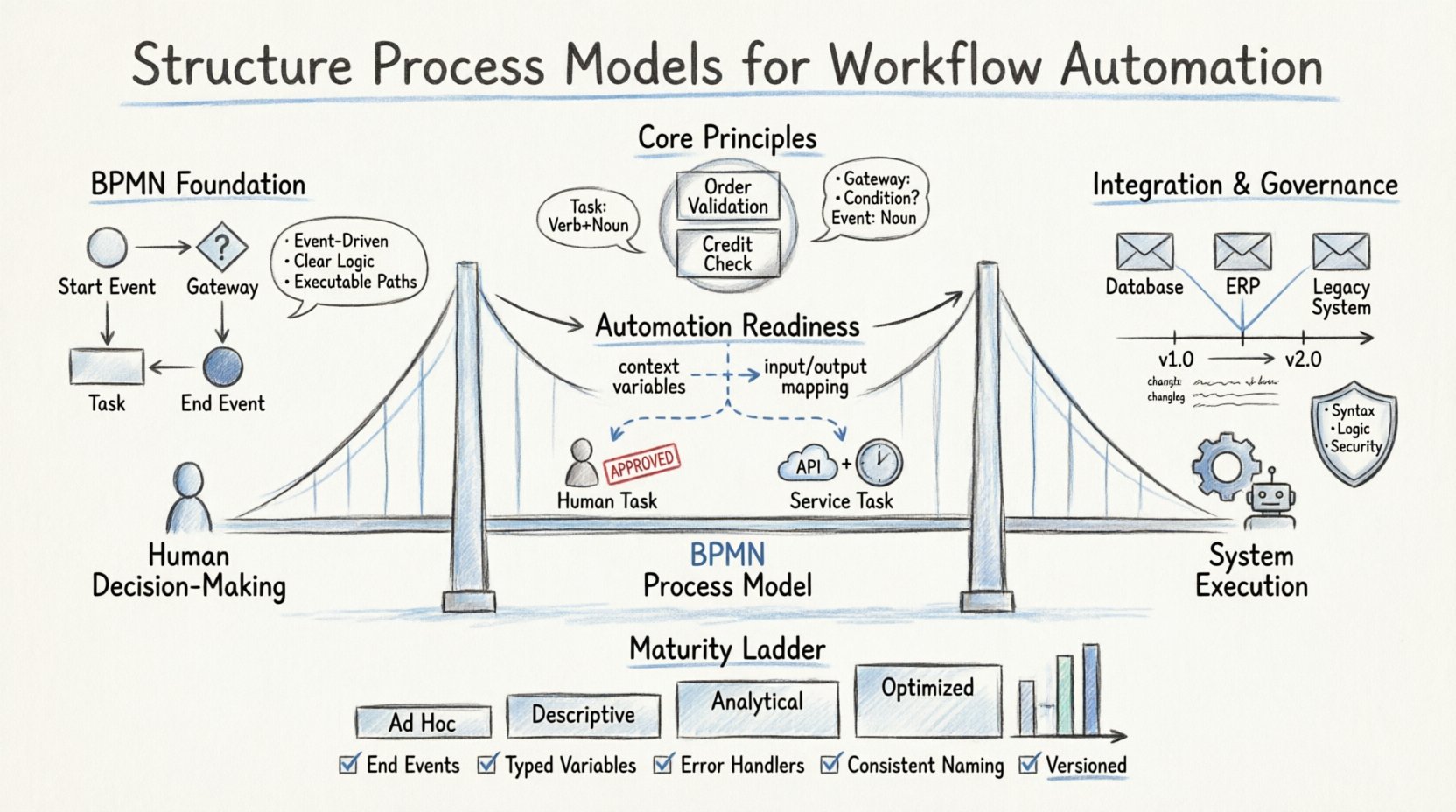
BPMN serves as the lingua franca for process documentation. However, adhering to the standard syntax is only the first step. To support automation, the model must strictly follow the rules of execution. This means understanding how events, gateways, and tasks interact within a runtime engine.
- Event-Driven Architecture: Every process must have a clear start and end. Events trigger the flow. Automations rely on these triggers to initiate actions.
- Gateways for Logic: Gateways determine the path of execution. Exclusive gateways handle binary decisions, while parallel gateways manage concurrency. Automation engines interpret these as conditional code.
- Task Types: Human tasks require user interfaces. Service tasks trigger external systems. Message tasks handle asynchronous communication.
When modeling for automation, clarity is paramount. Ambiguity in the model leads to ambiguity in the code. Every path must be executable. Dead ends and unreachable loops are common errors that break automation logic.
🚀 Core Principles for Scalable Modeling
Scalability is not just about handling volume; it is about handling complexity without breaking the model. A process that works for a single transaction often fails when scaled to thousands. Structural integrity ensures that the logic remains sound under load.
1. Modular Design Patterns
Instead of creating monolithic diagrams, use sub-processes to encapsulate logic. This improves readability and allows teams to work on specific areas without affecting the whole.
- Reusable Sub-Processes: Create standard blocks for common activities like “Order Validation” or “Credit Check”.
- Separation of Concerns: Keep the orchestration flow separate from the detailed implementation logic.
- Interface Consistency: Ensure inputs and outputs for sub-processes remain consistent across different parent processes.
2. Naming Conventions
Consistent naming reduces cognitive load for both developers and business stakeholders. A clear naming convention prevents confusion during audits or troubleshooting.
| Element Type | Naming Convention | Example |
|---|---|---|
| Pool/Lane | Business Role or System | Customer Service, ERP System |
| Task | Verb + Noun (Past or Present) | Approve Invoice, Validate User |
| Event | Noun (Start/End) | Order Received, Payment Completed |
| Gateway | Condition Question | Is Amount > 500? Is Stock Available? |
🤖 Designing for Automation Readiness
Automation requires specific data structures and logic triggers. A process model designed for manual review often lacks the necessary hooks for robotic execution. To prepare models for automation, specific design adjustments are required.
1. Data Payload Definition
Automation engines require structured data to function. Every task in the model should be associated with specific data objects. This ensures that when a task is triggered, the necessary context is available.
- Context Variables: Define variables at the process level that persist throughout the lifecycle.
- Input/Output Mapping: Clearly map external API responses to internal variables.
- Error Handling: Define what happens when data is missing or invalid. Automation cannot guess; it must follow defined rules.
2. Human vs. System Handoffs
Clear boundaries between human and system work prevent bottlenecks. When a task is assigned to a human, the system waits. When assigned to a service, the system proceeds.
- Service Tasks: Use these for API calls, database updates, and file processing.
- User Tasks: Use these for approvals, data entry, and complex judgment calls.
- Timer Events: Use these to enforce SLAs or trigger recurring automated checks.
🔗 Data Flow and Integration Points
Processes do not exist in a vacuum. They interact with various systems. The model must explicitly represent these integration points to ensure data integrity. A missing connection in the diagram often results in a broken pipeline in production.
1. External References
When a process interacts with an external system, model this interaction as a message or service task. Do not abstract this away. The integration logic is part of the process flow.
- Synchronous Calls: The process waits for a response before continuing.
- Asynchronous Calls: The process continues and listens for a callback event.
- File Interfaces: Represent file drops or uploads as events or tasks.
2. State Management
Maintaining state is crucial for long-running processes. The model must track where the process is in its lifecycle. This allows for recovery if a system fails.
| Scenario | Modeling Approach | Automation Implication |
|---|---|---|
| System Crash | Transaction Boundaries | Engine must resume from last checkpoint |
| Timeout | Timer Intermediate Events | Trigger retry logic or escalation |
| Exception | Error Boundary Events | Catch errors at task level, not process level |
🛡️ Governance and Versioning Strategies
As processes evolve, the models must evolve with them. Governance ensures that changes are controlled and documented. Without versioning, it is impossible to track which logic is currently running in production.
1. Version Control
Every change to a process model should create a new version. This allows for A/B testing of process changes and rollback capabilities.
- Version Numbers: Use semantic versioning (Major.Minor.Patch).
- Deprecation Policies: Define when old versions are retired.
- Documentation: Include change logs within the model metadata.
2. Validation Rules
Before a model is deployed, it must pass validation checks. This ensures that the model is syntactically correct and logically sound.
- Syntax Check: Are all connections valid? Are all elements named?
- Logic Check: Are there infinite loops? Are all paths covered?
- Security Check: Are sensitive data points protected?
🚫 Common Pitfalls to Avoid
Even experienced modelers can introduce structural weaknesses. Recognizing these pitfalls early saves significant time during the implementation phase.
- Over-Engineering: Do not model every single edge case in the primary flow. Use error handlers for exceptions.
- Hardcoded Values: Avoid embedding specific values (like dates or IDs) directly into the model. Use variables instead.
- Missing Error Paths: Every task should have a defined path for failure. Automation needs to know how to recover.
- Complex Gateways: Too many nested gateways make the logic difficult to debug. Simplify conditions where possible.
📊 Measuring Model Health
Once a process is active, the model itself becomes a metric. You can analyze the execution data to identify structural inefficiencies. This feedback loop helps refine the process definition over time.
- Execution Time: Are certain tasks taking longer than expected? This may indicate a need for optimization.
- Bottleneck Identification: Where do processes stop? Gateways or human tasks are common choke points.
- Path Frequency: Are certain branches rarely taken? This might indicate unnecessary complexity.
🔍 Maturity Levels in Process Modeling
Organizations progress through different stages of modeling maturity. Understanding your current level helps set realistic goals for automation readiness.
| Level | Characteristics | Automation Potential |
|---|---|---|
| Level 1: Ad Hoc | Informal diagrams, no standard notation. | None. Requires full redesign. |
| Level 2: Descriptive | BPMN notation used, but logic is vague. | Low. Requires significant cleanup. |
| Level 3: Analytical | Clear logic, defined data flows, error handling. | Medium. Ready for basic services. |
| Level 4: Optimized | Modular, versioned, governed, and monitored. | High. Ready for complex orchestration. |
🧩 Implementation Checklist
Before deploying a process model to an automation environment, run through this checklist to ensure structural integrity.
- ✅ Does every path lead to an End Event?
- ✅ Are all variables defined and typed correctly?
- ✅ Are error boundary events attached to service tasks?
- ✅ Are integration points clearly labeled?
- ✅ Is the naming convention consistent across the diagram?
- ✅ Are sub-processes used to manage complexity?
- ✅ Is the model versioned and documented?
- ✅ Have all business rules been translated into gateways or scripts?
🔄 Continuous Improvement
Process modeling is not a one-time activity. It is a continuous cycle of design, execution, and analysis. As business requirements change, the models must adapt. The structure you build today should accommodate these future changes without requiring a complete rebuild.
By focusing on modularity, clear data flows, and strict adherence to BPMN standards, you create a foundation that supports automation now and in the future. The goal is not just to document what happens, but to define how it should happen in a way that machines can understand and execute reliably.
Start with the basics. Ensure the flow is logical. Add the data. Define the errors. Then, automate. This disciplined approach yields the most stable and maintainable workflow solutions.