In the world of business process management, clarity is not just a preference; it is a necessity. When models grow in size and complexity, the risk of misinterpretation increases exponentially. Stakeholders often struggle to see the forest for the trees, especially when faced with a single, sprawling diagram containing hundreds of activities. This is where the structural power of sub-processes becomes essential. By utilizing collapsed and expanded states, you can control the level of detail presented to different audiences without duplicating data or breaking the integrity of the model.
This guide explores how to leverage the hierarchical capabilities of BPMN to manage cognitive load, improve communication, and maintain a clean, navigable process architecture. We will examine the technical distinctions, strategic applications, and best practices for organizing your process models effectively.
🧩 The Challenge of Process Complexity
As business operations evolve, so do the processes that support them. A simple linear flow might eventually branch into parallel tasks, loops, and conditional paths. When these elements accumulate on a single page, the diagram becomes a labyrinth. Visual clutter leads to:
- Reduced Readability: Users struggle to trace the path of execution.
- Cognitive Overload: Too many nodes at once overwhelm the human brain’s working memory.
- Communication Gaps: Executives may not need operational details, while developers cannot work without them.
- Performance Issues: Rendering large diagrams can slow down modeling tools and browsers.
The solution lies in abstraction. BPMN provides a standard mechanism to group activities together. This mechanism is the sub-process. It allows you to encapsulate a detailed sequence of tasks within a single, manageable container. This container can then be toggled between two primary states: collapsed and expanded.
📦 Defining the Sub-Process in BPMN
Before diving into the visual states, it is important to understand the underlying definition. In BPMN 2.0, a sub-process is a specific type of activity that contains its own internal logic. It is distinct from a simple task because it has an entry point and an exit point, but internally, it is a mini-process.
There are several types of sub-processes defined by the standard:
- Standard Sub-Process: The most common form, containing a sequence of tasks and events.
- Transaction Sub-Process: Indicates that the contained activities must complete successfully or not at all.
- Event Sub-Process: Triggered by specific events rather than sequential flow.
- Ad-hoc Sub-Process: Allows for unordered execution of contained tasks.
Regardless of the type, the visual representation allows for a hierarchical view. This is the core feature that enables diagram simplification. The sub-process acts as a black box at one level and a white box at another, depending on the viewer’s needs.
🔒 The Collapsed State: Abstraction and Clarity
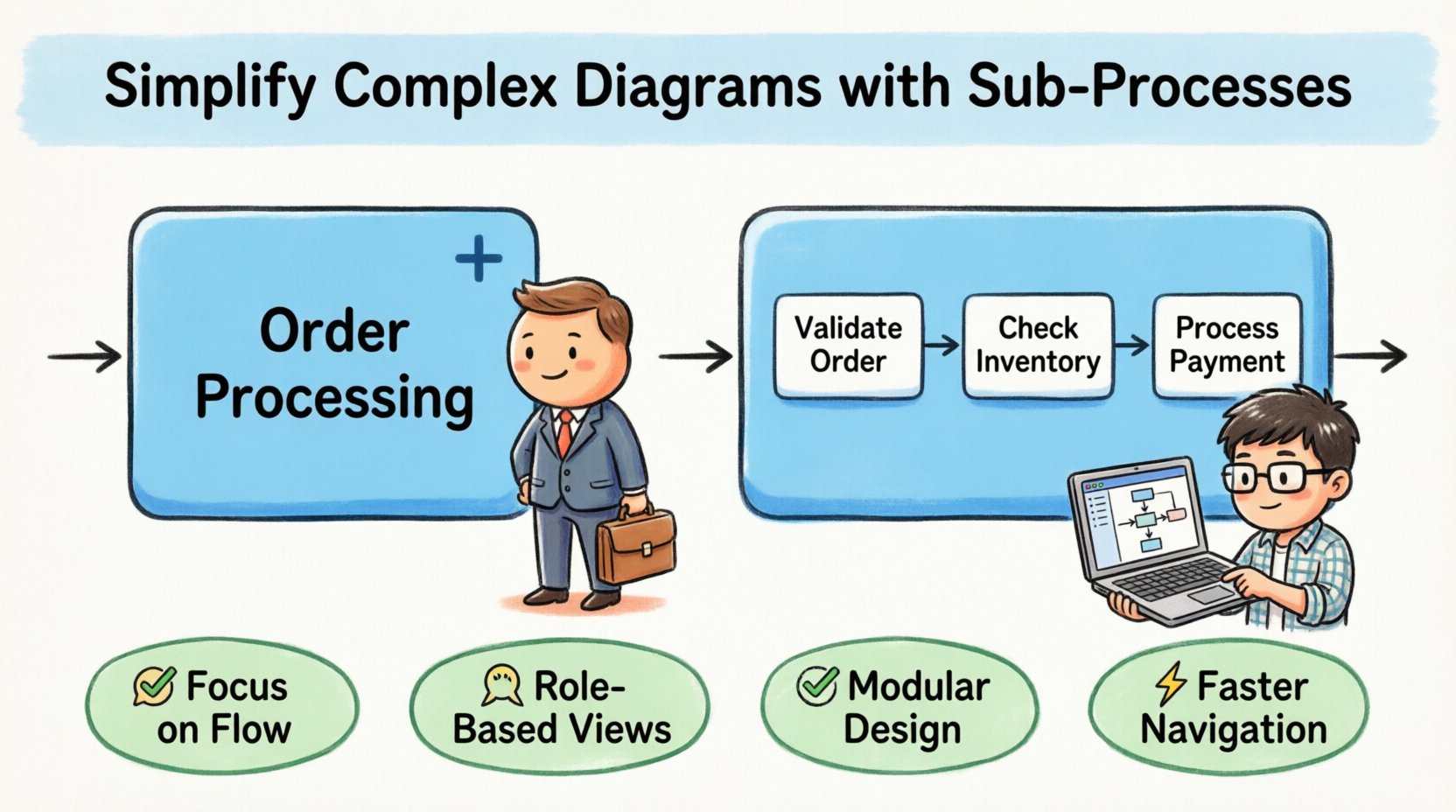
The collapsed sub-process is the primary tool for high-level visualization. When a sub-process is collapsed, the internal details are hidden. The diagram displays only the outer boundary of the sub-process, typically marked by a small plus sign (+) in the bottom center corner.
This state serves several critical functions in process modeling:
- Focus on Flow: It allows the reader to understand the sequence of major steps without getting bogged down in the mechanics of each step.
- Role-Based Visibility: Management can view the strategic flow while ignoring operational minutiae.
- Diagram Size Reduction: A diagram with ten collapsed sub-processes takes up significantly less space than a flat diagram with the same logical content.
- Modularity: It encourages thinking in modules. If a sub-process is well-defined, it can be treated as a single unit of work.
From a technical standpoint, the collapsed state implies that the internal logic is separate from the surrounding context. This separation is vital for maintenance. If the internal logic of a sub-process changes, the surrounding process flow often remains unaffected. This modularity reduces the risk of breaking dependencies when updates occur.
🔓 The Expanded State: Detail and Execution
Conversely, the expanded sub-process reveals the internal structure. When clicked or toggled, the sub-process opens up to show the tasks, gateways, and events contained within. The plus sign disappears, and the internal flow becomes visible.
This state is essential for:
- Operational Execution: System administrators and developers need to see the specific logic to configure automation rules.
- Troubleshooting: When a process fails, the expanded view allows for pinpointing the exact activity where the error occurred.
- Training: New employees require the detailed view to understand exactly what actions are required for each step.
- Compliance Auditing: Regulators often need to see the granular steps to verify adherence to policy.
Expanding a sub-process does not duplicate the logic; it simply renders it within the context of the parent diagram. This ensures that there is only one source of truth. If you update the logic inside the expanded view, the change is reflected everywhere the sub-process is used.
⚖️ Comparison: Collapsed vs. Expanded Views
To better understand when to apply each state, consider the following comparison table. This outlines the functional differences and appropriate use cases for each.
| Feature | Collapsed Sub-Process | Expanded Sub-Process |
|---|---|---|
| Visual Complexity | Low. Single container with a plus sign. | High. Shows internal tasks, gateways, and flows. |
| Primary Audience | Executives, Managers, High-level Stakeholders. | Analysts, Developers, Operators, Auditors. |
| Detail Level | Abstract. Focuses on inputs and outputs. | Concrete. Focuses on specific actions and decisions. |
| Navigation | Fast. Quickly scan the macro flow. | Slow. Requires drilling down into details. |
| Editing Scope | Cannot edit internal logic directly. | Can modify tasks and connections inside. |
| Best Use Case | Process overview, high-level reporting. | Process implementation, debugging, training. |
🚀 Strategic Implementation for View States
Deciding when to collapse or expand is not merely a cosmetic choice; it is a strategic decision about information architecture. You must consider the audience’s need for detail versus their need for context.
1. The Executive Dashboard View
For high-level reporting, all sub-processes should be collapsed. Executives care about the start time, end time, and the major milestones. Showing them the 15 tasks inside a “Payment Processing” sub-process is unnecessary noise. Keep the diagram clean.
2. The Operational Workflow View
For the teams actually doing the work, specific sub-processes need to be expanded. If a sub-process represents a specific department’s responsibility, that department needs to see the internal steps clearly. Other departments can view their own sub-processes as expanded and others as collapsed.
3. The Hybrid Approach
In complex models, a hybrid approach is often best. Some sub-processes can be expanded while others remain collapsed. This allows a single diagram to serve multiple purposes simultaneously. You can show the high-level flow of the entire organization while drilling down into the logistics of one specific division.
👥 Managing Stakeholder Expectations
When introducing hierarchical modeling, stakeholders may have questions about how the process works. It is crucial to communicate that the collapsed view is not a loss of information; it is a filter.
- Explain the Plus Sign: Ensure all users know that the plus sign indicates hidden detail. It is an interactive element, not a static icon.
- Define Naming Conventions: The label on the collapsed sub-process must be descriptive. “Order Fulfillment” is better than “Sub-Process 1”. Users should know what is inside without opening it.
- Establish a Protocol: Define which diagrams are “Master Views” (expanded) and which are “Summary Views” (collapsed). This prevents confusion about which version of the process is current.
Consistency in labeling is key. If one sub-process is named “Approve” and another is “Approval”, users may think they are different. Standardize the terminology to match the business glossary.
🛠 Technical Considerations for Model Performance
Beyond readability, there are technical implications for how diagrams are rendered and executed. While modern engines handle large models well, structure matters.
- Rendering Engine Load: Rendering thousands of individual task nodes in a single view can strain web-based modeling tools. Collapsing groups reduces the number of DOM elements to render.
- Navigation Speed: Zooming and panning across a flat diagram is difficult. A hierarchical structure allows for logical zooming. You zoom out to see the macro, zoom in to see the micro.
- Execution Context: In some modeling environments, the engine evaluates the sub-process as a unit. Collapsing helps define the boundary of where a transaction begins and ends.
It is important to remember that the visual state does not change the execution logic. Whether a sub-process is collapsed or expanded on the screen, the engine processes the internal logic the same way. The visual toggle is purely for human interaction.
⚠️ Common Errors in Hierarchical Modeling
Even with the best intentions, modelers often make mistakes when implementing sub-processes. Avoid these common pitfalls to maintain model integrity.
- Over-Nesting: Creating sub-processes within sub-processes within sub-processes makes navigation difficult. Limit the depth to two or three levels. If you find yourself going deeper, reconsider if the logic belongs in a separate diagram entirely.
- Inconsistent Expansion: Do not leave some sub-processes expanded and others collapsed arbitrarily. Use a standard view state for distribution, or ensure the user can easily toggle them.
- Missing Entry/Exit Points: Every sub-process must have a clear start and end. Do not allow internal tasks to connect directly to the parent process without going through the sub-process boundary. This breaks the abstraction.
- Unclear Labels: If the collapsed label is vague, the collapse feature becomes useless. Users will not know if they should expand it or not.
🔄 Maintaining Model Integrity
Maintenance is the long-term test of any modeling strategy. As business rules change, your diagrams must adapt. The sub-process hierarchy offers a significant advantage here.
Because the sub-process encapsulates logic, you can update the internal tasks of a sub-process without altering the surrounding connections. This is known as encapsulation.
- Change Management: If a task inside a sub-process is renamed, the external flow remains stable. You do not need to re-verify the connections in the parent diagram.
- Version Control: It is easier to manage versions of specific sub-processes. You can update the “Payment” sub-process version 2 without affecting the “Shipping” sub-process.
- Reusability: A well-defined sub-process can be reused in multiple diagrams. If you update the definition, all instances of that sub-process can be updated automatically.
This modularity reduces the technical debt associated with process models. It prevents the “spaghetti model” effect where every change requires a global rewrite of the diagram.
🎯 Enhancing Communication with Hierarchy
The ultimate goal of process modeling is communication. The collapsed and expanded features are tools to tailor that communication.
Consider a scenario where you present a process to a cross-functional team. Some members are from IT, while others are from HR. A single flat diagram will confuse both. By using sub-processes:
- For IT: Expand the technical integration steps. Collapse the HR approval steps.
- For HR: Expand the policy decision steps. Collapse the technical validation steps.
You can create a single model that serves both audiences by toggling the views. This eliminates the need to maintain two separate diagrams that might eventually drift out of sync. It ensures that the business logic remains consistent across all departments.
🛡 Best Practices for Diagram Navigation
To ensure the best user experience when working with collapsed and expanded sub-processes, follow these guidelines:
- Use Swimlanes Wisely: Combine sub-processes with swimlanes. A collapsed sub-process within a specific swimlane clearly indicates ownership.
- Color Coding: Use colors to distinguish between different types of sub-processes. For example, red for transactional, blue for standard, and green for event-driven.
- Documentation: Add descriptions to the sub-process boundary. This provides context without needing to expand the view.
- Keyboard Shortcuts: If your modeling environment supports it, learn the shortcuts for expanding and collapsing. This speeds up the navigation significantly.
🔍 Conclusion on Process Structure
Effective process modeling requires a balance between detail and abstraction. The collapsed and expanded sub-process features provide the mechanism to achieve this balance. By hiding complexity when necessary and revealing it when required, you create models that are both accurate and usable.
Adopting this hierarchical approach leads to better stakeholder engagement, easier maintenance, and clearer communication. It transforms a static diagram into a dynamic tool for business understanding. Focus on creating clean boundaries, descriptive labels, and logical groupings. With these practices, your process models will remain clear, even as the business grows more complex.
Start reviewing your current diagrams today. Identify the areas that cause confusion. Apply sub-processes to group those activities. Toggle the views to see if the clarity improves. The difference will be evident in how quickly your team can understand and act on the process flows.