Business Process Model and Notation (BPMN) serves as the universal language for defining workflows. When executed correctly, it bridges the gap between business strategy and technical execution. However, the complexity of the standard often leads to pitfalls that obscure meaning rather than clarify it. A model that is difficult to read fails its primary purpose, regardless of its technical accuracy.
Stakeholders—whether they are business analysts, developers, or executives—rely on these diagrams to understand logic, identify bottlenecks, and authorize changes. When a diagram contains structural errors, semantic ambiguities, or visual clutter, trust erodes. This guide outlines ten specific modeling errors that frequently occur and provides the technical corrections required to maintain clarity and authority.
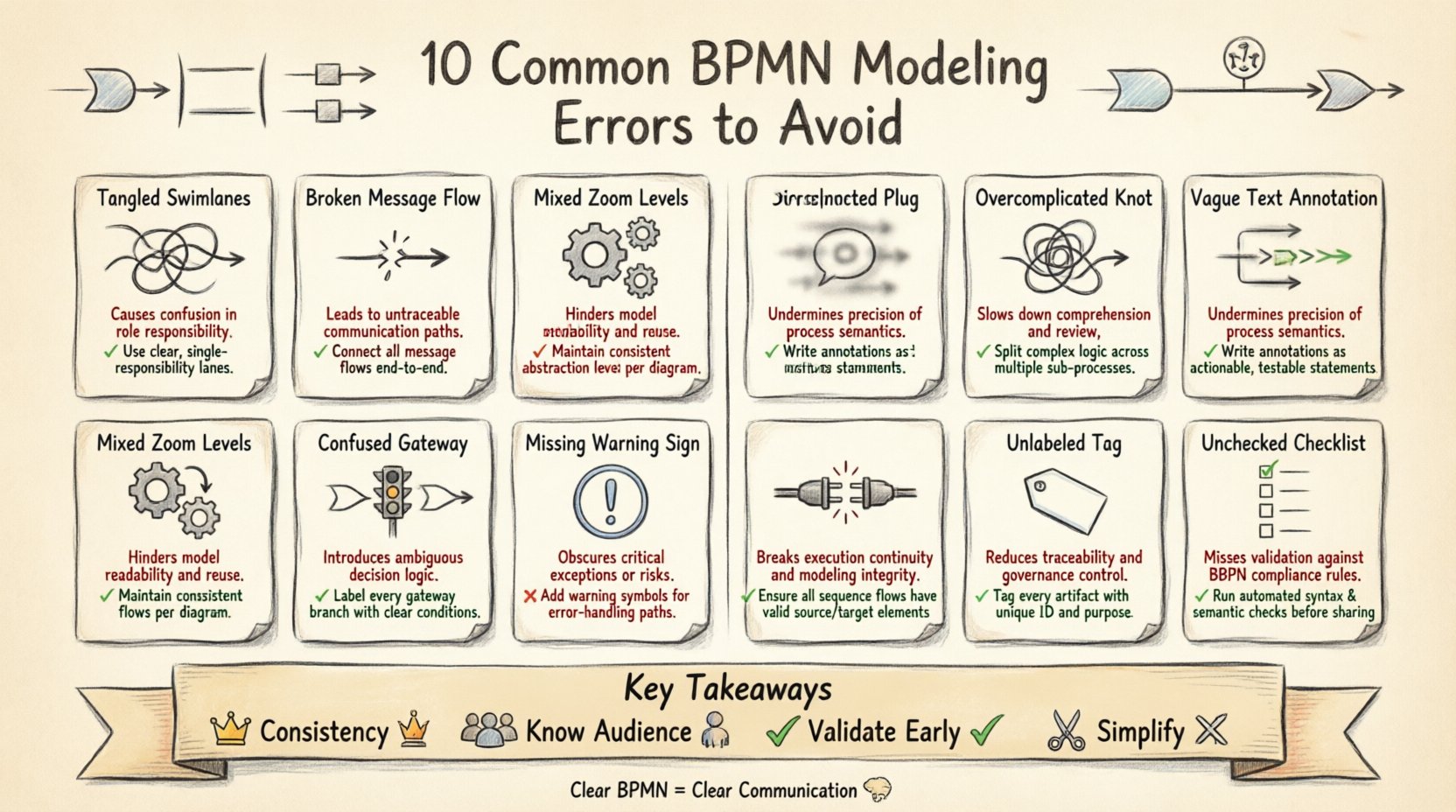
1. Overcomplicating Swimlanes 🏊
Swimlanes are designed to assign responsibility. A common mistake is creating excessive granularity in the vertical or horizontal axes. If a single process contains twenty separate swimlanes, the diagram becomes a labyrinth that is difficult to scan.
- The Error: Assigning every minor task to a distinct lane, often mirroring organizational charts too closely.
- The Impact: Stakeholders lose the ability to see the flow of the process across the entire organization. The visual noise drowns out the actual value stream.
- The Correction: Consolidate roles into functional groups. If a decision point does not require a new lane, keep it within the existing lane of the primary actor.
- Best Practice: Limit swimlanes to the primary roles involved in the end-to-end flow. Use sub-processes to encapsulate complex logic within a single lane.
2. Ignoring Message Flows Between Pools 📨
BPMN distinguishes between internal sequence flows and external message flows. A frequent oversight occurs when modelers treat interactions between different pools (representing different organizations or systems) as simple sequence flows.
- The Error: Connecting two pools with a solid line (Sequence Flow) instead of a dashed line with an arrowhead (Message Flow).
- The Impact: This implies the processes are synchronized and under the same control authority. It suggests a direct call rather than a request or notification.
- The Correction: Always use Message Flows for communication across pool boundaries.
- Technical Nuance: Ensure that Message Flows connect to Message Start Events or Message Intermediate Events, not directly to Tasks or Gateways.
3. Mixed Granularity in Sub-Processes ⚙️
Process modeling requires a consistent level of detail. Inconsistent granularity confuses the reader about what is happening inside a sub-process versus what is happening at the top level.
- The Error: Some sub-processes are collapsed while others are expanded, or some tasks within a sub-process are detailed while others are omitted.
- The Impact: The stakeholder cannot determine the scope of the sub-process. Is it a summary or a detailed instruction?
- The Correction: Define a standard for your modeling initiative. Typically, the top level should be high-level (collapsed), and the detailed level should be available upon request (expanded).
- Best Practice: Use the “General” type of Sub-Process for high-level views and “Ad-hoc” or “Mandatory” types only when the internal logic requires specific control structures.
4. Incorrect Gateway Logic 🚦
Gateways control the flow of the process. Misusing them is one of the most damaging errors because it alters the execution logic entirely.
- The Error: Using an Exclusive Gateway (XOR) where an Inclusive Gateway (OR) is needed, or vice versa.
- The Impact: An Exclusive Gateway ensures only one path is taken. An Inclusive Gateway allows multiple paths. Confusing these can lead to logic where multiple approvals are required but only one is expected, or where multiple actions happen simultaneously when they should be sequential.
- The Correction: Map the logic explicitly:
- XOR: One or the other, never both.
- OR: One, some, or all.
- AND: All paths must be taken (Parallel).
- Visual Check: Ensure every gateway has at least one incoming and one outgoing flow, unless it is a boundary event.
5. Missing Event Subprocesses for Exception Handling ⚠️
Processes do not always run smoothly. A standard process model often ignores what happens when things go wrong, leaving the exception handling to verbal explanation.
- The Error: Modeling only the “Happy Path” (the ideal scenario) and ignoring interrupts.
- The Impact: Developers and analysts assume the process is robust. When an error occurs in production, the lack of a defined path causes confusion and delays.
- The Correction: Use Event Sub-Processes to capture interruptions. Place a boundary event (like a Timer, Error, or Message) on the activity that is being protected.
- Technical Detail: The boundary event must be placed on the edge of the activity it protects. The sub-process triggered by the event should contain the recovery logic.
6. Ambiguous Labels and Text Annotations 📝
Text is a critical part of the notation. Vague descriptions like “Process Item” or “Check Status” provide no actionable information.
- The Error: Using generic verbs or nouns that do not describe the specific business action.
- The Impact: Stakeholders must ask the modeler for clarification, breaking the flow of review.
- The Correction: Use the “Verb + Noun” structure for Task labels (e.g., “Validate Invoice” instead of “Validate”).
- Best Practice: If the task logic is complex, move the details to a Text Annotation linked to the task, rather than cluttering the task label itself.
7. Using Complex Patterns for Simple Flows 🌀
BPMN offers many constructs. Using advanced constructs for simple logic creates unnecessary cognitive load.
- The Error: Using a Parallel Gateway to split and join a single sequential flow, or using a Complex Gateway pattern for a simple decision.
- The Impact: The diagram looks technical but lacks readability. It suggests complexity where none exists.
- The Correction: Apply the principle of Occam’s Razor. If a single line connects two tasks, do not add a Gateway.
- Technical Detail: Only use Parallel Gateways (AND) when you need to split the flow into concurrent paths that must all complete before merging.
8. Ignoring Exception Handling in Integration Points 🔌
When a process interacts with external systems, failures are inevitable. Modeling assumes success unless stated otherwise.
- The Error: Connecting an integration task directly to the next task without an error boundary event.
- The Impact: The model implies the system never fails. In reality, timeouts and network errors require defined handling paths.
- The Correction: Attach an Error Boundary Event to the service task or send task.
- Outcome: Define a specific path for “Retry,” “Escalate,” or “Cancel” based on the error code received.
9. Poor Naming Conventions for Events 🏷️
Events drive the process. If the triggers are not named clearly, the starting point of the workflow is ambiguous.
- The Error: Naming a Start Event “Start” or “Process Begin”.
- The Impact: The diagram lacks context. What actually triggers this? A form submission? A timer? A file arrival?
- The Correction: Name the Start Event based on the trigger. Use “Order Placed,” “Timer: Daily 9 AM,” or “Message: Payment Received”.
- Consistency: Maintain a glossary for event names across all diagrams in the repository to ensure uniformity.
10. Skipping Validation Rules Before Release 🔍
Even experienced modelers make syntax errors. Releasing a diagram without validation leads to runtime errors in execution engines.
- The Error: Saving and sharing the diagram without checking for dangling flows or invalid connections.
- The Impact: The model cannot be deployed. It creates a bottleneck in the delivery pipeline.
- The Correction: Implement a mandatory validation step in the modeling workflow.
- Checklist:
- Are all Gateways connected?
- Are there any loops that could cause infinite execution?
- Is there a clear End Event for every path?
Summary of Common Errors 📊
| Error Category | Primary Impact | Recommended Fix |
|---|---|---|
| Swimlane Granularity | Visual Clutter | Consolidate roles into functional groups |
| Flow Types | Logic Misinterpretation | Use Message Flows for external communication |
| Sub-process Detail | Scope Confusion | Standardize collapse/expand states |
| Gateway Logic | Execution Failure | Match Gateway type to decision logic |
| Exception Handling | Unresolved Errors | Use Boundary Events for interrupts |
| Labels | Clarification Delays | Use Verb + Noun structure |
| Pattern Complexity | Cognitive Load | Simplify where possible |
| Integration Errors | Runtime Failures | Attach Error Boundary Events to services |
| Event Naming | Context Loss | Name events by trigger |
| Validation | Deployment Block | Enforce syntax checks before release |
Building a Culture of Clarity 🧠
Adopting these corrections requires more than just technical knowledge; it requires a shift in culture. Process modeling is not a solitary activity. It is a communication tool that serves the business.
When stakeholders can look at a diagram and understand the flow without asking questions, the model has succeeded. This reduces the time spent in meetings explaining the process and increases the time spent executing it.
Key Takeaways for Modelers
- Consistency is King: Apply the same rules across all diagrams in your repository.
- Know Your Audience: Tailor the level of detail to the reader. Executives need high-level views; developers need technical precision.
- Validate Early: Check your syntax before you share your work.
- Simplify: If a path is confusing, remove a step or split the diagram.
By avoiding these ten common errors, you ensure that your BPMN models remain effective instruments of change. They become reliable documentation that stands the test of time and organizational shifts.
Technical Reference for Correct Patterns ✅
To assist in your modeling, here is a quick reference for the standard patterns that should be used instead of the errors listed above.
- Parallel Split: One flow in, multiple flows out (AND Gateway).
- Parallel Join: Multiple flows in, one flow out (AND Gateway).
- Exclusive Choice: One flow in, multiple flows out based on condition (XOR Gateway).
- Inclusive Choice: One flow in, multiple flows out based on conditions (OR Gateway).
- Event Sub-Process: A sub-process that is triggered by an event rather than a sequence flow.
- Boundary Event: An event attached to the boundary of an activity to catch interruptions.
Adhering to these standards ensures that the notation remains a robust tool for business analysis. It transforms the diagram from a static picture into a dynamic specification that can be reviewed, understood, and eventually automated with confidence.
Remember, the goal is not to create the most complex diagram possible. The goal is to create the clearest representation of reality. When stakeholders understand the process, they can improve it. When they understand it, they can support it. When they support it, the business succeeds.
Review your current models against this list. Identify the errors present. Apply the corrections. The clarity you gain will be reflected in the efficiency of your operations.