Collaborating on academic projects has changed significantly in recent years. The shift to remote environments requires a fundamental adjustment in how student teams coordinate their efforts. Scrum, an agile framework originally designed for software development, offers a robust structure for managing complex work. However, applying Scrum in a remote student setting introduces unique challenges regarding visibility, trust, and timely information exchange.
Effective communication is the backbone of any successful Scrum implementation. Without face-to-face interaction, teams must rely on intentional, structured, and transparent methods to ensure everyone remains aligned. This guide outlines proven strategies to optimize communication within remote student groups, ensuring projects are delivered on time and with high quality.
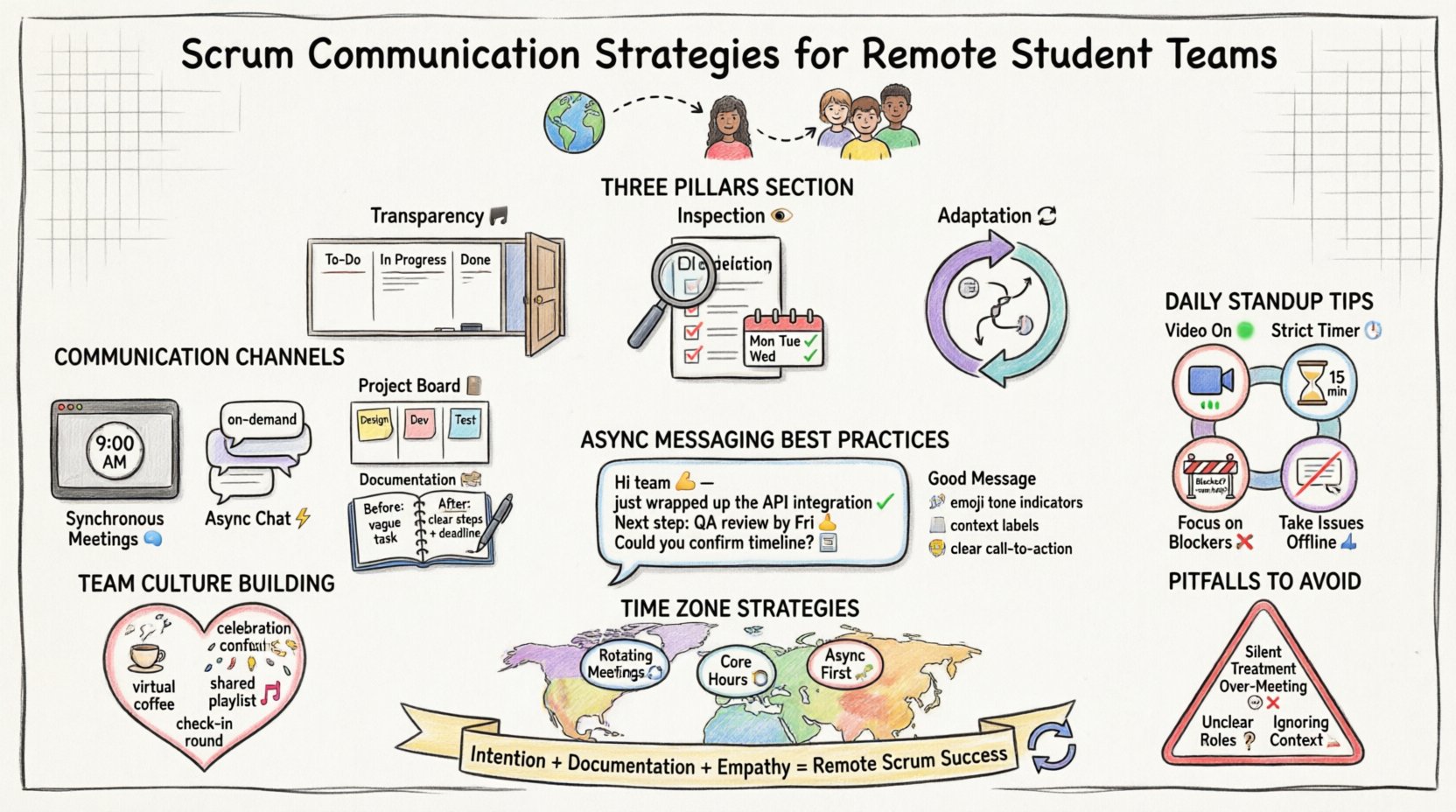
Understanding the Remote Dynamic 🌐
In a physical classroom or library, students can glance at a teammate’s screen, ask a quick question, or read body language to gauge understanding. Remote environments strip away these non-verbal cues. This creates a higher risk of misinterpretation, delays, and feelings of isolation. To counter this, teams must adopt a “remote-first” mindset where communication is documented, scheduled, and explicit.
Key challenges include:
- Time Zone Differences: Students often live in different locations, making synchronous meetings difficult.
- Context Switching: Balancing coursework with project work requires focused time blocks.
- Tool Fatigue: Using too many different platforms can fragment information.
- Lack of Spontaneity: The inability to chat casually reduces team cohesion.
Core Principles for Remote Scrum Teams 🛡️
Successful remote Scrum teams adhere to three core principles: Transparency, Inspection, and Adaptation. These pillars must be supported by specific communication behaviors.
1. Transparency 📢
All work must be visible to the entire team. In a physical setting, a whiteboard provides this visibility. Remotely, this requires a central digital space where progress is updated in real-time. No task should be hidden behind a closed door or a private conversation.
2. Inspection 👀
Work must be reviewed frequently. Regular check-ins allow the team to inspect the product and the process. In a remote setting, this means scheduled meetings that are strictly time-boxed and focused on outcomes rather than just status updates.
3. Adaptation 🔄
If a process is not working, it must be changed. Remote teams face unique friction points. The team must be empowered to adjust their communication rhythm without fear of breaking protocol.
Setting Up the Communication Infrastructure 🏗️
Before starting a Sprint, the team must agree on how they will talk. This agreement should be documented in the team charter. Below is a breakdown of communication channels and their specific purposes.
| Channel Type | Best Use Case | Frequency |
|---|---|---|
| Synchronous Meetings | Decisions, Planning, Retrospectives | As Scheduled |
| Asynchronous Chat | Quick questions, Updates, Announcements | On Demand |
| Project Board | Task Status, Ownership, Deadlines | Real-time | r>
| Documentation | Technical Specs, Meeting Notes, Decisions | Before/After Events |
It is critical to avoid using chat for complex discussions. Chat is for coordination; documentation is for knowledge. If a decision is made in a chat message, it must be copied to the documentation space to ensure it is not lost.
Mastering the Daily Standup Remotely 📅
The Daily Standup is often the most misunderstood event in Scrum. It is not a status report for the Scrum Master. It is a planning meeting for the Developers. In a remote environment, this meeting is vital for alignment.
Best Practices for Remote Standups
- Video On: Seeing faces helps build trust and allows for non-verbal cues.
- Strict Timeboxing: Keep the meeting under 15 minutes. Use a timer.
- Focus on Blockers: Spend the majority of time discussing impediments.
- Don’t Solve Problems Live: If a technical issue arises, take it offline with the specific people involved.
When a student is stuck, they should state the blocker clearly. For example, instead of saying “I am working on the API,” they should say “I am blocked on the API because I cannot access the test server.” This allows the team to offer immediate help.
Managing Asynchronous Communication ⏳
Not every student can be online at the same time. Asynchronous communication is the art of working without everyone being present simultaneously. This requires discipline and clear writing.
Writing Clear Asynchronous Messages
Text lacks tone. A short message can be read as aggressive or dismissive. To avoid this:
- Use Context: Explain the background of the message.
- Use Emojis for Tone: A smiley face can soften a request for feedback.
- State the Goal: Tell the reader exactly what you need from them.
- Set Expectations: Specify when you need a response by.
Example of a poor message:
“Fix this bug.”
Example of a good message:
“Hi Team 👋, I noticed the login form fails on mobile. Could someone review this by tomorrow morning? Thanks for helping out! 🙏”
Conducting Effective Sprint Reviews 🔄
The Sprint Review is where the team demonstrates the work done to stakeholders. In a remote setting, this is often the most critical moment for feedback. Since stakeholders may be external (like professors or clients), the presentation must be polished.
Remote Review Strategies
- Live Demo: Share your screen and walk through the product live.
- Recordings: If time zones prevent live attendance, record a video walkthrough.
- Feedback Forms: Use a simple form for stakeholders to provide written feedback.
- Q&A Session: Reserve the last 10 minutes for questions.
It is important to show what was not done as well. Transparency about unfinished work builds credibility. If a feature was cut, explain why. This prevents the assumption that the team failed.
Retrospectives for Remote Teams 📈
The Retrospective is a safe space to discuss what went well and what did not. In a remote environment, students may feel hesitant to speak up. The facilitator must actively encourage participation.
Facilitation Techniques
- Anonymous Input: Allow team members to submit feedback anonymously if they fear conflict.
- Round Robin: Go around the virtual room so everyone speaks once.
- Visual Boards: Use a digital whiteboard for sticky notes.
- Action Items: End with specific, assigned tasks to improve the process.
Common topics for remote retrospectives include:
- Connection stability issues
- Meeting fatigue
- Clarity of instructions
- Response times on chat
Handling Conflict in Virtual Spaces ⚔️
Conflict is inevitable in student teams. In a remote setting, it can escalate quickly due to miscommunication. A disagreement over text can feel personal.
Conflict Resolution Steps
- Identify the Issue: Is this about the work or the person?
- Move to Voice: Text is bad for conflict. Switch to a call immediately.
- Listen Actively: Let the other person finish without interrupting.
- Focus on the Goal: Remind each other of the project objective.
- Document the Resolution: Write down the agreement to prevent future confusion.
Students should avoid public shaming in chat channels. If a teammate makes a mistake, address it privately. Public criticism damages the psychological safety of the team.
Time Zone Management Strategies 🌍
When team members are in different time zones, scheduling becomes a major hurdle. The team must decide on a core overlap time for meetings and respect quiet hours for others.
| Strategy | Description | Benefit |
|---|---|---|
| Rotating Meetings | Rotate inconvenient meeting times among team members. | Shared burden of inconvenience |
| Core Hours | Define 3-4 hours where everyone is expected online. | Guaranteed collaboration time |
| Async First | Default to documentation over meetings. | Flexibility for all time zones |
Never assume everyone is available during standard business hours. Check the local time of teammates before scheduling calls. Using a world clock tool can help visualize overlap.
Building Team Culture Remotely 🤝
It is easy to treat remote students as resources rather than people. Building culture requires intentional effort. The team should dedicate time to non-work interactions.
Culture Building Activities
- Virtual Coffee Breaks: 10 minutes at the start of a meeting for casual chat.
- Check-in Round: Ask “How are you feeling today?” before starting work.
- Celebration: Acknowledge small wins publicly.
- Shared Playlists: Create a music playlist for focus sessions.
When students feel connected, they are more likely to communicate openly. Isolation leads to silence, and silence leads to project failure.
Common Pitfalls to Avoid 🚫
Even experienced teams make mistakes. Here are common pitfalls specific to remote student Scrum teams.
1. The Silent Treatment
Team members stop responding to messages because they feel overwhelmed. This must be addressed immediately. Silence is not agreement; it is often avoidance.
2. Over-Meeting
Trying to replace physical presence with too many Zoom calls causes burnout. Protect deep work time. Students need uninterrupted blocks to study and code.
3. Unclear Roles
Everyone doing everything leads to chaos. Ensure the Scrum Team roles (Product Owner, Scrum Master, Developers) are clearly defined and respected.
4. Ignoring the Context
Students have exams and deadlines. A remote team must understand the academic calendar of its members. Do not schedule a Sprint Review during finals week.
Conclusion on Remote Scrum Communication 🏁
Remote Scrum for student teams is not just about using technology; it is about adapting human behavior. It requires more intention, more documentation, and more empathy than traditional classroom collaboration. By establishing clear channels, respecting time zones, and prioritizing transparency, teams can overcome the distance.
The skills learned in managing remote Scrum projects are highly valued in the modern workforce. Students who master these communication strategies gain a competitive edge. They learn to deliver value without constant supervision and to collaborate effectively across boundaries.
Start small. Implement one new strategy per Sprint. Review its effectiveness in the Retrospective. Iterate on your communication process just as you iterate on your product. With patience and discipline, remote student teams can achieve high performance and strong cohesion.
Remember, the goal is not just to finish the assignment, but to build a team that can work together effectively, regardless of where they are located. This is the true power of Scrum in a remote context.