
Now Reading: A Comprehensive Guide to the Visual Paradigm AI Assistant for TOGAF ADM: Streamlining Enterprise Architecture with Generative Intelligence
-
01
A Comprehensive Guide to the Visual Paradigm AI Assistant for TOGAF ADM: Streamlining Enterprise Architecture with Generative Intelligence


A Comprehensive Guide to the Visual Paradigm AI Assistant for TOGAF ADM: Streamlining Enterprise Architecture with Generative Intelligence
Transforming Enterprise Architecture with AI: A Deep Dive into Visual Paradigm’s TOGAF ADM Intelligence
Enterprise architecture has long been a cornerstone of strategic transformation, providing structured frameworks to align business objectives with technological execution. Among the most widely adopted methodologies, the TOGAF Architecture Development Method (ADM) stands out for its iterative, phase-based approach to designing, implementing, and managing architectures across complex organizations. However, traditional ADM execution—often reliant on manual artifact creation, cross-functional coordination, and extensive documentation—has historically been time-consuming, inconsistent, and prone to cognitive overload.
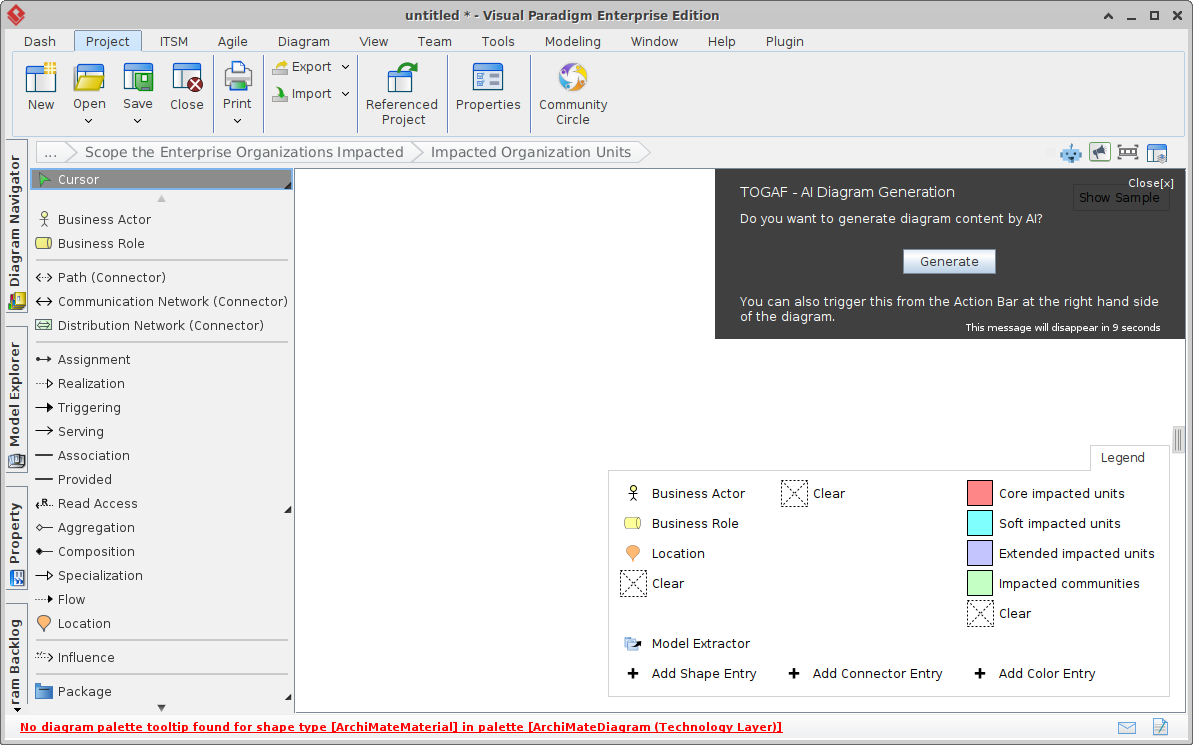
Enter the Visual Paradigm AI Assistant for TOGAF ADM: a groundbreaking integration of generative artificial intelligence into the enterprise architecture workflow. This intelligent co-pilot leverages natural language processing (NLP) and deep domain knowledge of TOGAF and ArchiMate standards to automate, guide, and enrich the architecture development lifecycle. By embedding AI directly within Visual Paradigm’s TOGAF Guide-Through navigator—available in the Desktop Enterprise edition and compatible VP Online plans—the tool reduces friction in every phase of the ADM cycle, enabling architects to focus on strategic thinking rather than repetitive modeling.

Core Architecture of the AI Assistant
At its heart, the AI Assistant operates as a context-aware, phase-driven generative engine. It does not replace human judgment or expertise; instead, it acts as a dynamic bridge between human insight and enterprise-level structural modeling, ensuring outputs remain compliant with TOGAF 10 and ArchiMate 3.x standards.
The system functions through a tightly integrated workflow:
- Natural Language Input: Users describe project challenges, business pain points, or desired outcomes in plain, conversational English—without needing technical jargon or architectural terminology.
- Intent Parsing & Pattern Recognition: The AI processes the input using NLP models trained on TOGAF documentation, ArchiMate pattern libraries, and real-world enterprise scenarios to extract key elements such as capabilities, organizational units, technology gaps, constraints, business goals, and performance metrics.
- Compliance-Driven Artifact Generation: Based on the extracted elements and the current phase of the ADM, the AI generates high-fidelity, TOGAF-compliant artifacts—such as ArchiMate diagrams, maturity assessments, WBS structures, gap analysis matrices, or transition roadmaps—within seconds.
- Progressive Context Awareness: The tool maintains continuity across phases. For example, a business capability map from Phase B can be referenced in Phase D to validate technology alignment, ensuring logical progression and coherence throughout the architecture lifecycle.
- Editable & Reviewable Outputs: All generated artifacts appear in dedicated editors (e.g., ArchiMate diagram editor, radar chart tools). Users retain full control to modify elements, adjust relationships, refine metrics, or re-engage the AI for iterative updates.
This process transforms what was once a manual, linear workflow into a dynamic, iterative, and intelligent experience—where the tool anticipates user needs and offers proactive guidance.
Step-by-Step Implementation: From Prompt to Deliverable
Using the AI Assistant is straightforward, but effective results depend on clear, context-rich input. Below is a detailed, actionable walkthrough of the process:
1. Launch the TOGAF Guide-Through Navigator
Begin by opening Visual Paradigm (Desktop or Online). From the main dashboard or menu, select TOGAF Guide-Through. This launches an intuitive, visual workflow map that represents the full ADM cycle—from Preliminary to Implementation—complete with clickable phases and activities.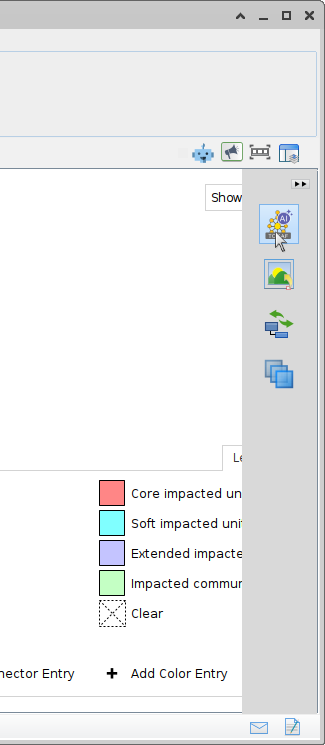
2. Select the Target Phase or Activity
Navigation is guided by a process map. Users can hover over or click on specific phases (e.g., Phase A: Architecture Vision, Phase B: Business Architecture) and activities (e.g., ‘Define Business Capabilities’ or ‘Create Baseline Business Model’).
AI support is explicitly indicated: a prominent AI icon or ‘Generate with AI’ button appears next to supported activities, signaling that the tool can assist at that point.
3. Provide a Clear, Context-Rich Prompt
The quality of the output directly correlates with the clarity and specificity of the user prompt. The AI is designed to function optimally when:
- Input is concise yet comprehensive—ideally between 3 to 8 sentences.
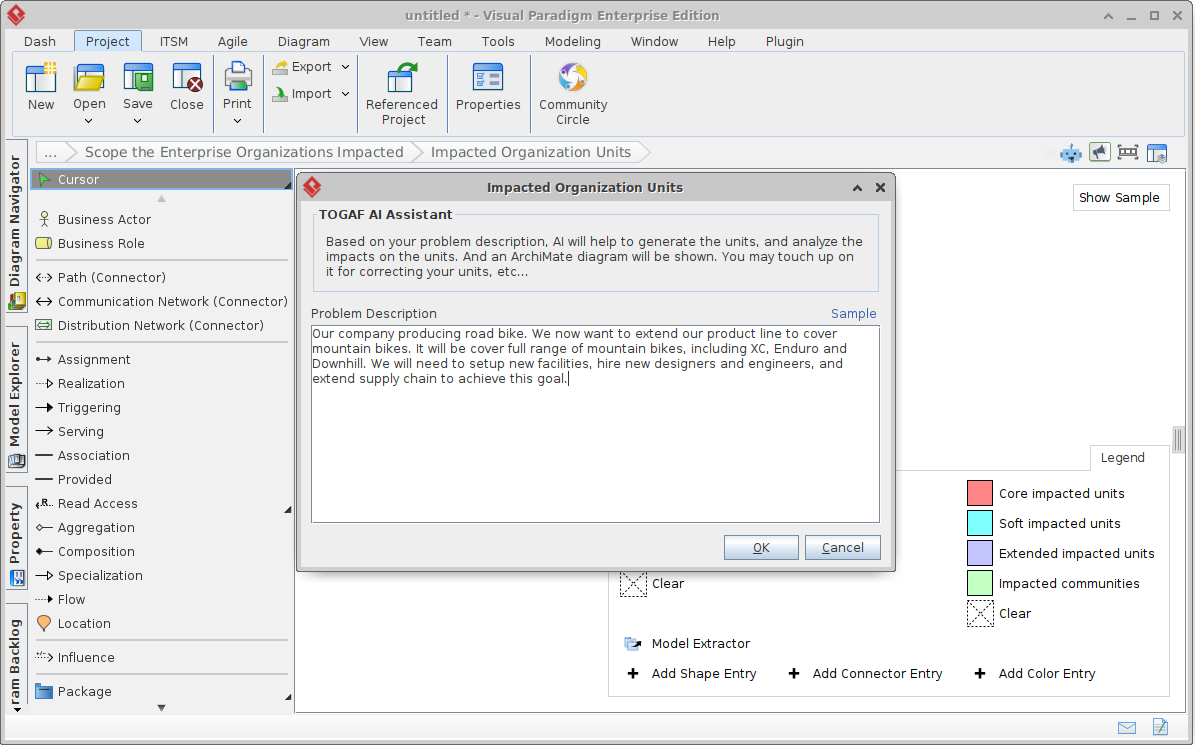
- It includes current operational challenges, desired outcomes, target metrics, scope (e.g., department, system, process), and relevant stakeholders.
- It references measurable goals (e.g., ‘reduce delivery time from 5 days to 1 day’, ‘decrease error rate by 80%’).
Example Prompt (Phase B – Business Architecture):
“Current order fulfillment is manual with handoffs between sales, warehouse, and finance, causing 5-day delays and errors. Target: automated digital process with real-time inventory, integrated CRM-ERP, 1-day delivery, and 80% error reduction. Focus on the retail finance department, including sales, logistics, and finance teams.”
This prompt enables the AI to extract key elements—process bottlenecks, stakeholder roles, success criteria—and generate a tailored business capability map, baseline process model, and gap analysis aligned with TOGAF’s business architecture principles.
4. Generate and Review the Output
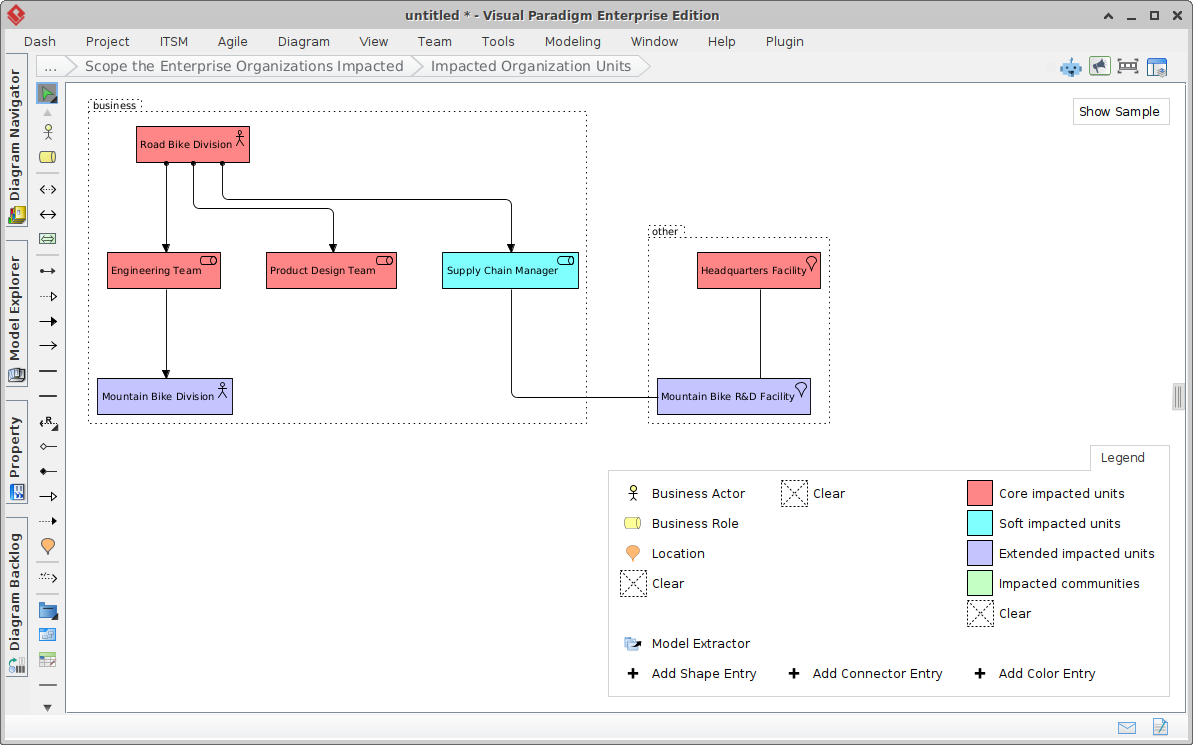
Click the ‘Generate with AI’ button. The system processes the input and produces a relevant artifact in seconds. Outputs include:
- ArchiMate Diagrams: Business, application, technology, and organization layers; impact analysis; solution concept models; baseline and target state comparisons.
- Assessments: Maturity radar charts, capability assessment matrices, gap analysis diagrams (e.g., feature vs. capability).
- Planning Artifacts: Work Breakdown Structures (WBS), implementation roadmaps, migration timelines, and high-level project schedules.
- Governance & State Models: Architecture states, compliance tracking, governance structures.
Each output appears in its native editor (e.g., ArchiMate canvas, radar chart tool), where users can immediately begin refining details—dragging elements, adjusting relationships, modifying parameters, or adjusting scoring.
5. Refine, Validate, and Proceed
After initial generation, the output is not final. The AI supports iterative refinement:
- Users can edit the model directly and re-trigger the AI to generate updated versions.
- AI-powered review features can assess maturity levels, identify missing capabilities, or recommend improvements based on current TOGAF best practices.
- Outputs from earlier phases (e.g., a capability map in Phase B) are automatically referenced in later phases (e.g., Phase D or E), ensuring architectural continuity.
6. Archive and Report
Once the architecture deliverables are finalized, they are saved to the Architecture Repository and can be exported in standardized formats (e.g., PDF, PPT, XML, or JSON) for stakeholder review or audit. A single-click ‘Generate TOGAF Report’ function compiles all phases into a professional, compliant report aligned with TOGAF 10 standards.
Phase-Specific AI Support in the ADM Lifecycle
The AI Assistant is not a one-size-fits-all tool—it is deeply contextualized to the structure and objectives of each ADM phase. Below is a detailed breakdown of how it supports every stage:

| Phase | AI-Powered Deliverables | Key Use Cases |
|---|---|---|
| Preliminary Phase | Organization impact diagrams, maturity radar charts, governance structures, high-level schedule proposals | Assessing enterprise impact, identifying key stakeholders, establishing governance, defining project scope |
| Phase A: Architecture Vision | Solution concept diagrams, capability/maturity radar charts, high-level objectives and success metrics | Defining the ‘why’ and ‘what’ of transformation; aligning with business strategy |
| Phase B: Business Architecture | Baseline and target business models, capability maps, gap analysis diagrams | Mapping current processes, identifying capability gaps, defining business capabilities |
| Phase C: Information Systems Architecture | Data, application baseline and target models, gap analysis | Aligning business needs with data and system capabilities |
| Phase D: Technology Architecture | Technology baseline and target models, technology gap identification | Mapping IT infrastructure to business capabilities |
| Phase E: Opportunities & Solutions | Work packages, WBS, transition architectures, solution concept models | Breaking down implementation into actionable components |
| Phase F: Migration Planning | Migration roadmaps, implementation timelines, architecture state transitions | Planning phased rollouts, risk mitigation, resource allocation |
| Later Phases (G, H) | Architecture change proposals, compliance reviews, performance monitoring | Validating implementation, tracking progress, ensuring sustained alignment |
Best Practices for Effective Use
To maximize the value of the AI Assistant, organizations should adopt the following best practices:
- Start Broad, Then Deepen: Use the AI in early phases (Preliminary, A, B) to quickly establish scope, stakeholders, and high-level goals before diving into detailed modeling.
- Use AI for Initial Drafts: Generate first versions of models as a foundational starting point—then refine with domain experts and business analysts.
- Combine with Manual Control: While the AI generates models, final validation and styling (e.g., naming conventions, visual consistency) should be handled manually using Visual Paradigm’s ArchiMate editor.
- Iterate Prompt Refinements: If the initial output misses key nuances, revise the prompt with additional context or clarify objectives.
- Leverage Samples and Templates: The Guide-Through navigator includes built-in examples and sample prompts to help users build confidence in crafting effective inputs.
- Always Validate Outputs: Generative AI may introduce inaccuracies, assumptions, or context gaps. All outputs must be reviewed against TOGAF standards, organizational policies, and actual business realities.
Key Benefits and Strategic Value
Organizations adopting this AI-enhanced approach realize significant gains across multiple dimensions:
- Speed: Reduces artifact creation time by up to 70–80%. What used to take days or weeks can now be completed in minutes.
- Consistency: Ensures compliance withTOGAF 10 and ArchiMate3.x standards across all phases and deliverables.
- Accessibility: Enables junior staff, project managers, or business analysts to produce enterprise-grade architecture artifacts with minimal prior experience.
- Learning & Guidance: The AI acts as a tutor—providing contextual prompts, examples, and feedback that reinforce understanding of ADM phases and ArchiMate principles.
- Collaboration: Enables seamless sharing of polished, visual models with stakeholders, executives, or cross-functional teams for rapid alignment.
- Cost Efficiency: Reduces dependency on external consultants and cuts labor hours, especially in early-stage feasibility and vision phases.
Important Limitations and Ethical Considerations
While the AI Assistant is a powerful tool, it is not infallible. Key considerations include:
- Output Accuracy: The AI may generate plausible but incorrect assumptions, especially in complex or ambiguous scenarios. Always cross-check outputs with domain knowledge and real-world data.
- Contextual Dependencies: The AI relies on the user’s ability to provide accurate and complete input. Missing constraints, assumptions, or stakeholder dynamics can lead to misaligned models.
- Compliance Verification: The AI ensures format and structure compliance, but not necessarily strategic or business validity. Final approval must be achieved through human review.
- Proprietary Sensitivity: Sensitive or confidential information should not be shared with the AI—inputs must remain secure and confidential.
Furthermore, organizations must ensure that AI outputs are used ethically and transparently. The tool should be framed as a supporting intelligence, not a decision-making engine. Final architectural decisions still rest with experienced enterprise architects and governance boards.
Conclusion: A New Era of Enterprise Architecture
The Visual Paradigm AI Assistant for TOGAF ADM marks a pivotal evolution in how enterprises approach architecture development. It does not eliminate the need for human judgment or domain expertise—it amplifies it by removing time-consuming manual tasks, enabling faster iteration, and elevating the overall quality of the architectural process.
Whether you are a seasoned enterprise architect leading a digital transformation or a new professional navigating the complexities ofTOGAF, this AI-driven approach lowers entry barriers, enhances creativity, and improves consistency. For organizations embarking on a journey of architectural maturity, it provides a scalable and accessible starting point.
Recommendation: Begin with a pilot project—a small-scale initiative such as a process automation in a finance or operations department—to experience the full workflow, assess usability, and build confidence in the tool’s capabilities before scaling to larger enterprise initiatives.
For the most up-to-date documentation, features, and integration details, refer to the official Visual Paradigm support portal and TOGAF Guide-Through AI Assistant feature documentation.
Visual Paradigm integrates Generative AI to automate and enhance the TOGAF Architecture Development Method (ADM), transforming traditionally manual enterprise architecture tasks into streamlined, AI-driven workflows.
AI-Powered ArchiMate and Viewpoint Generation
- Automated Diagramming: The platform’s AI Diagram Generator revolutionizes the creation of detailed ArchiMate diagrams, which are essential for visualizing complex relationships between business goals and IT infrastructure,.
- Instant Viewpoints: Users can generate ArchiMate viewpoints in seconds, allowing architects to quickly produce standardized views that align with the latest industry best practices,.
- Context-Aware Modeling: Unlike generic LLMs, Visual Paradigm’s AI understands ArchiMate-specific concepts, including information flows, business-technology alignment, and nesting rules,.
Strategic Analysis and Gap Assessment
- AI Gap Analysis: A dedicated AI-powered Gap Analysis tool identifies discrepancies between current (Baseline) and desired (Target) states, automating the creation of action plans to bridge these divides,.
- Maturity and Stakeholder Mapping: The AI Chatbot can instantly produce stakeholder maps and maturity assessment visuals based on simple text descriptions, which are critical for the preliminary and vision phases of the ADM,.
- Business Framework Integration: The AI assistant provides natural language generation for strategic frameworks often used within TOGAF, such as SWOT, PESTLE, and TOWS analysis,.
Enhancing the ADM Lifecycle
- Modeling Partner: The AI functions as a co-designer, interpreting intent and maintaining naming consistency across different architectural layers (Business, Application, Technology),.
- Agile Visual Modeling: By combining AI-driven automation with the TOGAF ADM Guide-Through process, teams can adhere to rigid standards while maintaining the speed required for digital transformation projects,.
- Technical Documentation: AI tools like Doc.Composer and the Use Case Diagram Report Generator can transform visual models into comprehensive, text-based reports for stakeholders,.
Articles Related to TOGAF AI
- AI-Powered ArchiMate Viewpoints Generator: Details on the release of AI tools to automate ArchiMate views.
- AI-Powered ArchiMate Diagram Generation in Visual Paradigm Desktop: A step-by-step tutorial for generating architecture diagrams.
- AI-Powered ArchiMate Modeling Guide: An overview of ArchiMate 3.1 support and notation.
- How the Gap Analysis Tool Works: Technical functionality of the AI gap analysis feature.
- Mastering Enterprise Architecture with Visual Paradigm’s AI ArchiMate Generator: A comprehensive guide to AI-driven architecture design.
- AI ArchiMate Diagram Generator – Instant Text-to-Diagram: How to generate models from natural language descriptions.
- ArchiMate Explained: A Guide to AI-Powered Enterprise Architecture: An introduction to how AI transformative partners empower EA practitioners.