Business processes are rarely linear. In the real world, data is incomplete, systems go offline, and human judgment varies. When modeling workflows using Business Process Model and Notation (BPMN), assuming everything will always succeed is a recipe for production failure. Exception handling and error paths are not optional features; they are fundamental components of a resilient process architecture. This guide details how to structure error management effectively within your process models.
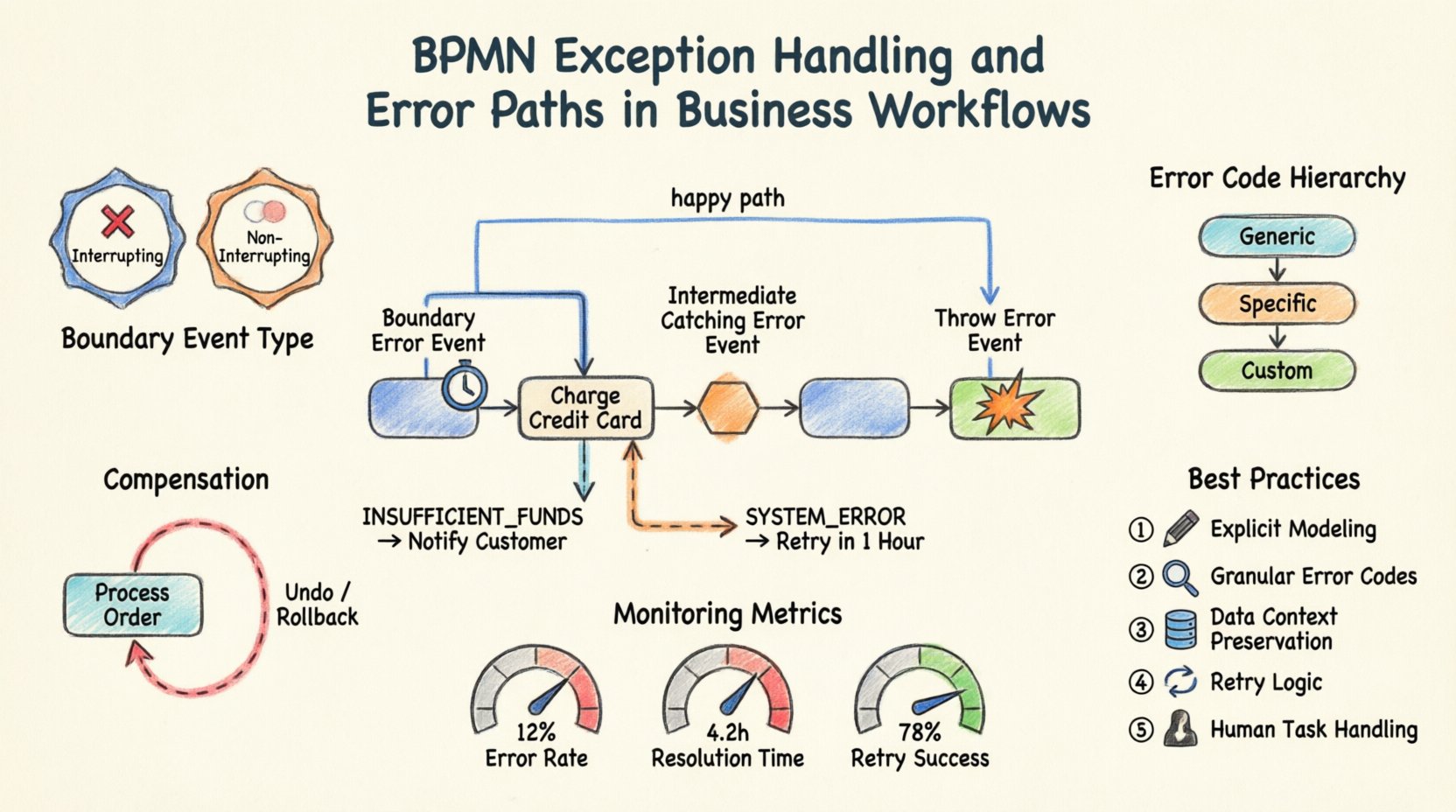
🛑 Why Exception Handling Matters in BPMN
A process model without defined error paths is incomplete. It describes the “happy path”—the scenario where every step succeeds perfectly. However, operational reality is far more complex. When a task fails in a live environment, the workflow engine needs explicit instructions on how to react. Without clear modeling:
- Stuck Instances: Processes may pause indefinitely, waiting for a condition that never resolves.
- Data Loss: Critical information might be discarded if the flow terminates abruptly.
- Operational Blind Spots: Teams may not know which errors are critical versus which are warnings.
- Manual Intervention: Users might be forced to manually restart failed instances without a structured recovery plan.
By explicitly modeling exceptions, you transform a fragile script into a robust system. This approach ensures that when things go wrong, the system knows exactly what to do, who to notify, and how to record the outcome.
🧩 Understanding BPMN Error Event Types
BPMN 2.0 provides specific elements to represent failures. Understanding the distinction between these elements is crucial for accurate modeling. Errors are not just “stops”; they are events that trigger specific behaviors.
1. Boundary Error Events ⏱️
A boundary error event is attached to the boundary of an activity (task or subprocess). It represents a failure occurring during the execution of that activity. When the activity throws an error, the flow diverts to the boundary event, allowing for immediate handling without interrupting the main process flow prematurely.
- Use Case: A payment task fails due to a timeout. The boundary event catches this, allowing you to retry the payment or notify the user.
- Behavior: The main activity can be configured to continue or stop. If it continues, the boundary event triggers a parallel path.
2. Intermediate Catching Error Events 🛑
These events sit within the flow of a process, not attached to an activity boundary. They catch an error that has been thrown by a previous activity or an upstream process. They act as a checkpoint in the sequence flow.
- Use Case: After a series of validation steps, an intermediate error event catches a validation failure before proceeding to the fulfillment stage.
- Behavior: The process pauses at this event until the error is handled, then moves to the next step.
3. Throw Error Events 💥
These events are used within an activity to signal that an error has occurred. They are the source of the exception. An activity can define a specific condition under which it throws an error instead of completing normally.
- Use Case: A service integration task detects a 500 Internal Server Error and throws a specific error token.
- Behavior: It propagates the error up to the nearest boundary error event or intermediate catching error event.
⚙️ Deep Dive: Boundary Error Events
Boundary error events are the most common tool for handling errors in BPMN. They allow you to keep the main process flow clean while managing exceptions locally.
Configuration Options
When attaching a boundary error event to a task, you must define specific behaviors:
- Interrupting vs. Non-Interrupting:
- Interrupting: The main task is stopped immediately. No further work is done on the task.
- Non-Interrupting: The task continues running in the background. The error handler path runs in parallel. This is useful for logging or notification without stopping the work.
- Error Definition: You must specify the Error Code. This allows different boundary events to catch different types of errors (e.g., “PAYMENT_TIMEOUT” vs “PAYMENT_DECLINED”).
Practical Scenario: The Payment Gateway
Consider a process for processing an order. A task called “Charge Credit Card” is central to this flow.
- Main Path: If successful, the process moves to “Ship Order”.
- Error Path: Attach a boundary error event to “Charge Credit Card”.
- Logic: If the error code is “INSUFFICIENT_FUNDS”, the flow goes to “Notify Customer”.
- Logic: If the error code is “SYSTEM_ERROR”, the flow goes to “Retry in 1 Hour”.
This structure prevents the process from crashing. It routes the user to the correct resolution path based on the specific nature of the failure.
🔄 Intermediate Error Events and Propagation
Not all errors are caught immediately at the source. Sometimes, errors need to propagate up the process hierarchy. Intermediate catching error events facilitate this.
Subprocess Error Handling
When using an embedded subprocess, errors occurring inside the subprocess can be handled in two ways:
- Internal Handling: Errors are caught within the subprocess using boundary events. The subprocess completes normally (or with a specific completion state) without throwing an error to the parent.
- External Propagation: Errors are thrown out of the subprocess. The parent process catches them using a boundary event on the subprocess itself or an intermediate error event in the main flow.
Error Codes and Hierarchy
To manage propagation effectively, define a hierarchy of error codes:
- Generic Errors: Catch-all events for unexpected system failures.
- Specific Errors: Events for known business logic failures (e.g., “Invalid Address”).
- Custom Codes: Specific codes defined by your integration layer.
Using specific codes ensures that the right handler is triggered. A generic catch-all should be the last resort, not the first.
💸 Compensation and Rollback Strategies
Sometimes, an error is discovered after a series of actions have already completed. In these cases, simply stopping the process is not enough. You may need to undo changes. This is where compensation events come into play.
What is Compensation?
Compensation is the act of reversing a completed activity. It is distinct from error handling because it addresses the aftermath of success followed by a failure in a subsequent step.
- Use Case: You successfully booked a flight, but the hotel booking fails. The flight booking must be canceled to avoid charges.
- Modeling: You define a compensation activity linked to the original activity.
When to Use Compensation
Use compensation events when:
- The process is long-running.
- External systems cannot be easily rolled back.
- Data integrity must be maintained across multiple steps.
Without compensation, your process model leaves orphaned records or inconsistent states in the system of record.
📊 Error Handling Comparison Matrix
To clarify the differences between various error handling mechanisms, refer to this structured comparison.
| Element | Location | Trigger | Primary Use Case |
|---|---|---|---|
| Boundary Error Event | Attached to Task | Task Failure | Immediate retry or user notification |
| Intermediate Error Event | Within Flow | Upstream Error | Catch errors after a sequence of tasks |
| Throw Error Event | Inside Task | Logic Condition | Signal failure to upstream handlers |
| Compensation Event | Linked to Completed Task | Subsequent Failure | Undo previous actions (Rollback) |
🗂️ Managing Data Context During Errors
When an error occurs, the data state is critical. Simply knowing an error happened is often insufficient. You need to know why and what data caused it.
Error Variables
BPMN engines allow you to pass variables to error handlers. Ensure your model captures:
- Error Code: A standardized identifier (e.g., “ERR_101”).
- Error Message: A human-readable description for logs.
- Context Data: Relevant business data (e.g., Order ID, Customer Name) to aid troubleshooting.
Data Persistence
Ensure that data collected before the error is persisted. Do not rely on transient memory. If a process instance stops due to an error, the next instance must have access to the same data context to resume processing.
🧪 Testing and Validation of Error Paths
Modeling error paths is only half the work. You must verify that they function correctly in the runtime environment. Testing error paths requires a different mindset than testing happy paths.
Validation Checklist ✅
- Unreachable Logic: Ensure error paths do not create deadlocks or unreachable nodes.
- Coverage: Verify that every potential failure point has a corresponding error handler.
- Timeouts: Test what happens when a task exceeds its time limit.
- Integration Failure: Simulate API downtime to ensure the boundary event triggers.
- Data Integrity: Confirm that no partial data is left behind after a rollback.
Simulation Tools
Use process simulation tools to inject faults into the workflow. This allows you to observe how the process behaves under stress without impacting production data. Look for:
- Unexpected process termination.
- Incorrect error messages being logged.
- Failure to notify the correct stakeholders.
🚧 Common Pitfalls to Avoid
Even experienced modelers make mistakes when designing error handling. Be aware of these common traps.
1. Ignoring the “Happy Path”
Do not clutter the main flow with error handling logic. Keep the main flow clean. Use boundary events and subprocesses to isolate error logic. This makes the model easier to read and maintain.
2. Overusing Boundary Events
Attaching a boundary event to every single task can make the diagram messy and confusing. Only attach them to tasks where failure has a significant impact or requires specific handling logic.
3. Vague Error Messages
Avoid generic error messages like “Something went wrong.” Use specific codes and messages that developers and business users can understand. This aids in faster resolution.
4. Lack of Retry Logic
Transient errors (like network glitches) should be retried. Model retry mechanisms explicitly using timers or loops. Do not let a transient error become a permanent failure.
5. Forgetting Human Tasks
Human tasks also fail. A user might ignore a task, or enter invalid data. Define what happens if a human task is abandoned or rejected. This often requires a different error path than system tasks.
🔍 Monitoring and Operational Readiness
Once the process is live, the error paths become your first line of defense. Monitoring is essential to ensure these paths are working as intended.
Key Metrics
- Error Rate: The percentage of process instances that hit an error path.
- Resolution Time: How long it takes to recover from an error.
- Retry Success Rate: How often automatic retries resolve the issue.
Alerting
Configure alerts for critical error paths. If a specific error code spikes, it indicates a systemic issue that needs immediate attention. Do not treat all errors as equal; prioritize those that impact revenue or compliance.
📝 Summary of Best Practices
To ensure your business workflows are resilient, adhere to these core principles:
- Explicit Modeling: Never assume an error will be handled by the engine. Define it in the diagram.
- Granular Handling: Use specific error codes to route to the correct handler.
- Data Awareness: Preserve context data during failure for auditing and debugging.
- Compensation: Plan for undoing actions when necessary.
- Testing: Validate error paths as rigorously as the main flow.
By investing time in modeling exceptions, you build processes that are not only efficient but also robust. A well-handled error is often better than no error at all, as it maintains trust and clarity in the system. Focus on clarity, precision, and operational readiness in your BPMN models.
🔗 Next Steps for Implementation
Start by auditing your existing processes. Identify high-risk tasks where failure would be costly. Model boundary events for these tasks first. Gradually expand to intermediate events and compensation logic. This phased approach ensures stability while improving resilience.
Document your error handling strategy. Create a reference guide for developers and analysts that explains the error codes and expected behaviors. This documentation becomes a vital asset for maintaining the process over time.
Remember, the goal is not to eliminate errors, but to manage them effectively. When you model error paths clearly, you empower the system to recover gracefully and keep the business moving forward.