
Business processes are not static artifacts. They evolve alongside market conditions, regulatory requirements, and organizational goals. Without a disciplined approach to versioning, your Business Process Model and Notation (BPMN) diagrams risk becoming outdated references rather than operational guides. Managing process model versions is the backbone of process governance. It ensures that the logic driving automation aligns with current business reality.
This guide details the technical and organizational strategies required to maintain integrity across your process landscape. We will explore how to structure version histories, handle active instances, and establish governance that prevents drift without stifling innovation.
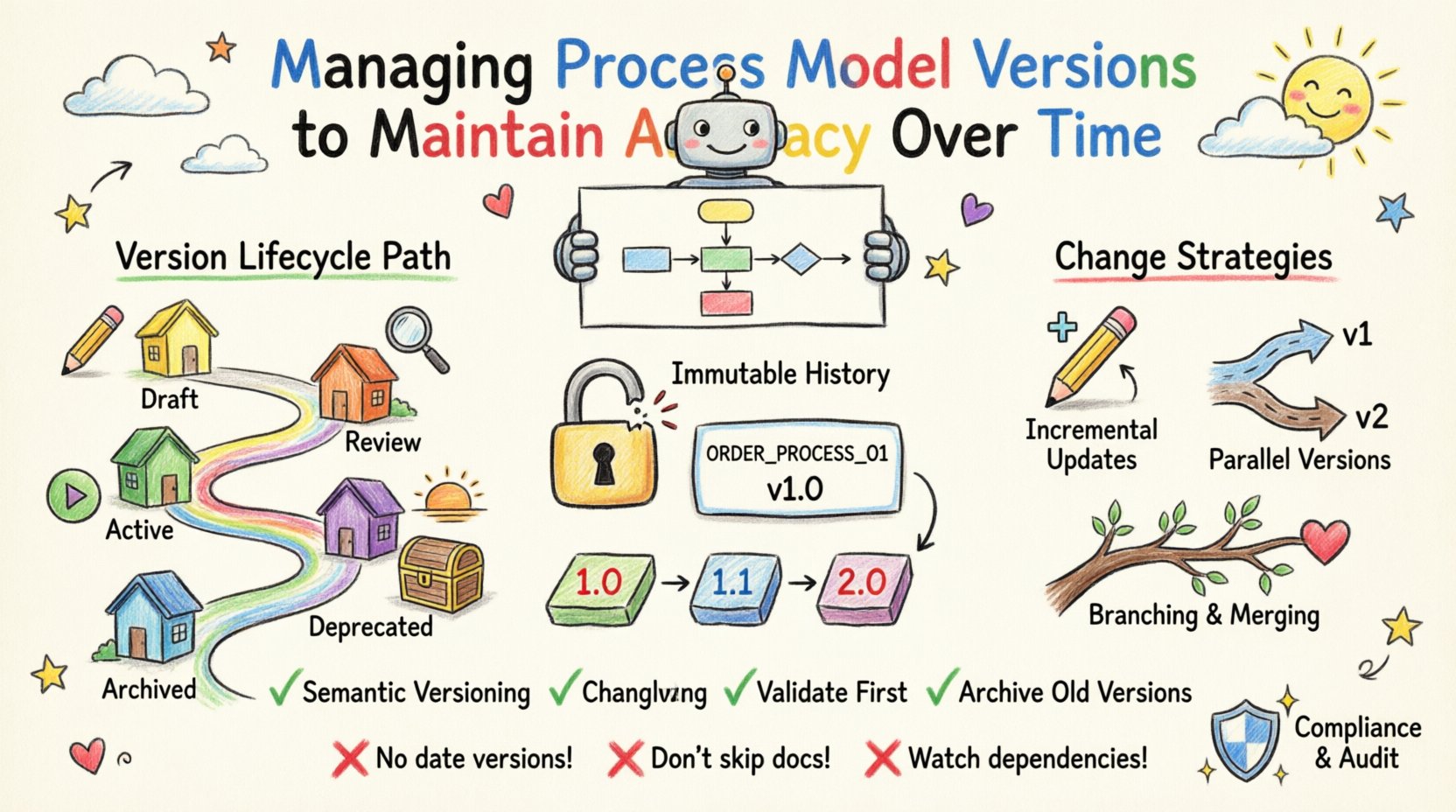
Why Process Version Control is Critical 🛡️
Process models act as the source of truth for automation engines, compliance audits, and operational training. When a model changes, the ripple effects are significant. A version control system for BPMN provides a reliable mechanism to track these changes over time.
Key Drivers for Version Management
- Compliance and Auditability: Regulators often require proof of how a process operated at a specific point in time. Versioning creates an immutable audit trail.
- Operational Stability: Running workflows depend on specific model versions. Uncontrolled changes can cause execution errors or data mapping failures.
- Collaboration Clarity: Multiple analysts often work on the same process. Versioning prevents conflicting edits and ensures everyone references the correct baseline.
- Performance Analysis: To measure improvement, you need a baseline. Comparing Version 2.0 against Version 3.0 requires clear demarcation between the two states.
Without these controls, organizations face process drift. This is where the documented process no longer matches the actual execution. This discrepancy creates risk, inefficiency, and confusion.
Core Principles of BPMN Versioning 🧠
Effective version management relies on a few non-negotiable technical principles. These principles ensure that the versioning system is robust enough to handle complex organizational needs without becoming a bottleneck.
1. Immutable History
Once a version is released into production, it should not be overwritten. Overwriting a live model is a high-risk operation that can corrupt running instances. Instead, new changes should create a new version identifier. The old version remains available for reference or rollback if necessary.
2. Unique Identifiers
Every process model must have a unique identity. This typically involves two components:
- Process Definition ID: A static identifier that remains constant across all versions (e.g.,
ORDER_PROCESS_01). - Version Number: A numerical or string-based label that increments with changes (e.g.,
1.0,1.1,2.0).
This combination allows the system to distinguish between different iterations of the same logical process while maintaining a link between them.
3. Semantic Versioning
Adopting a semantic versioning scheme helps stakeholders understand the nature of the change without inspecting the diagram:
- Major Version (X.0): Indicates breaking changes. Existing workflows may fail if they attempt to load the new model. This requires explicit migration strategies.
- Minor Version (X.Y): Indicates additive changes. New steps or branches are added, but existing paths remain functional.
- Patch Version (X.Y.Z): Indicates bug fixes or corrections that do not alter the logical flow significantly.
Understanding the Version Lifecycle 🔄
A process model moves through distinct states as it matures. Managing these states ensures that work in progress does not leak into production prematurely. The following table outlines the standard lifecycle stages.
| Stage | State | Permissions | Visibility |
|---|---|---|---|
| Draft | Unpublished | Editor Only | Internal Team |
| Review | Under Approval | Editor + Reviewer | Stakeholders |
| Active | Production | Read Only | Public/System |
| Deprecated | Retired | Read Only | Internal Team |
| Archived | Historical | Restricted | Compliance/Audit |
Each stage requires specific governance actions. For instance, moving a model from Draft to Active should trigger an automated validation check to ensure no syntax errors exist. Moving from Active to Deprecated should be logged with a reason, such as “Replaced by Version 3.0”.
Strategies for Managing Changes 🛠️
When a business requirement changes, how do you handle the update? There are three primary strategies for managing these transitions. Each has trade-offs regarding complexity and stability.
1. Incremental Updates (Minor Versions)
This is the most common approach. You modify the existing diagram and increment the minor version number. This is suitable for:
- Adding a new approval step.
- Correcting a typo in a task label.
- Adding a new gateway condition.
Impact: Existing instances usually continue on their current version path. New instances follow the new version. This is generally safe for operations.
2. Parallel Versions (Major Versions)
When the logic changes fundamentally, you create a major version. This is necessary when:
- The process flow is restructured significantly.
- Data requirements change (new input fields).
- Compliance rules have shifted entirely.
Impact: You must decide whether to migrate running instances to the new version or let them finish on the old version. This decision impacts data consistency and reporting.
3. Branching and Merging
In complex environments, you may need to experiment with a process without affecting the main line. Branching allows you to create a parallel copy of a model. You can test this branch in a sandbox environment. Once validated, you merge it back into the main version line.
This approach reduces risk but requires strong discipline. Merging branches manually can lead to conflicts where two analysts edited the same element differently. Automated conflict resolution tools help mitigate this.
Handling Active Instances During Updates 🏃
One of the most complex challenges in version management is the running instance. A workflow instance represents a specific execution of a process model. It holds state, variables, and progress data.
Scenario A: Non-Breaking Changes
If you update a label or add a non-critical step, existing instances typically continue unaffected. They remain on Version 1.0 while new requests start on Version 1.1. This is the ideal scenario for stability.
Scenario B: Breaking Changes
If you remove a task that an active instance is currently waiting on, the instance will fail. To manage this:
- Mapping: Map the old task ID to the new task ID so the engine knows how to proceed.
- Migration: Create a script to move active instances from the old version to the new version at a specific state (e.g., at the next gateway).
- Freeze: Prevent new instances from starting on the old version until all existing ones complete.
Choosing the right strategy depends on your tolerance for downtime and the criticality of the process. Financial processes often require a “freeze” strategy to ensure audit accuracy. Customer service processes might allow migration to ensure faster resolution times.
Common Pitfalls to Avoid 🚫
Even with a strategy in place, teams often fall into traps that undermine version control efforts. Being aware of these pitfalls helps you maintain a clean process repository.
- Version Number Confusion: Using dates (e.g., “2023-10-01”) instead of numbers makes it hard to sort chronologically. Use semantic versioning.
- Skipping Documentation: A version number is meaningless without a changelog. Always document what changed between versions.
- Over-Versioning: Creating a new version for every tiny typo increases maintenance overhead. Group minor fixes into a single patch release.
- Ignoring Dependencies: A process model might call external services or share data with other models. Changing a model version might break these integrations.
- Lack of Access Control: If anyone can publish a new version, you lose control over what enters production. Require approval workflows.
Establishing Collaboration and Audit Trails 🤝
Process modeling is rarely a solo activity. It involves analysts, developers, business owners, and compliance officers. A robust versioning system facilitates this collaboration.
Change Logs
Every version entry should include:
- Author: Who made the change?
- Timestamp: When was it published?
- Reason: Why was the change made? (e.g., “Updated tax calculation per new regulation”)
- Approval Status: Who signed off on this version?
This information is crucial for debugging. If a process fails in production, you can look at the version history to see if a recent change introduced the bug.
Access Control
Define who can do what:
- Analysts: Can create drafts and modify models.
- Reviewers: Can review and approve drafts.
- Administrators: Can publish to production and archive old versions.
- Viewers: Can read versions but cannot edit.
Restricting write access prevents accidental overwrites. Restricting publish access ensures that only tested models reach the production environment.
Best Practices Checklist ✅
To ensure your process model versions remain accurate and reliable, implement the following checklist as part of your standard operating procedure.
- Establish a Naming Convention: Define rules for IDs and version numbers before starting.
- Enforce Semantic Versioning: Train your team on when to bump Major vs. Minor versions.
- Maintain a Changelog: Never publish a version without a description of changes.
- Validate Before Publishing: Use automated syntax checks and simulation tools before moving to Active.
- Plan Instance Migration: Have a strategy for handling running workflows during breaking changes.
- Archive Old Versions: Do not delete old versions. Archive them for compliance and historical reference.
- Review Regularly: Schedule quarterly reviews of active versions to ensure they still match business needs.
Long-Term Maintenance of Accuracy 🔍
Maintaining accuracy is not a one-time task. It requires a continuous cycle of review and adjustment. As business rules evolve, your models must reflect those changes. However, this evolution must be measured.
Conduct regular audits of your process repository. Check for:
- Orphaned Versions: Models that have no active instances and no recent updates. Consider archiving these.
- Inconsistent Naming: Ensure all process definitions follow the ID convention.
- Documentation Gaps: Identify versions that lack a changelog or approval record.
- Integration Health: Verify that external integrations still function with the current model versions.
This proactive maintenance prevents the accumulation of technical debt in your process landscape. It ensures that when you need to report on a process or troubleshoot an issue, the data you rely on is trustworthy.
Summary of Version Control Impact 📈
The discipline of managing process model versions transforms your BPMN repository from a collection of diagrams into a reliable asset. It provides the stability needed for automation while allowing the flexibility required for business adaptation.
By adhering to strict lifecycle management, implementing clear versioning strategies, and maintaining rigorous documentation, you safeguard your organization against operational risks. Accuracy over time is not accidental; it is the result of deliberate governance and consistent execution.
Focus on the principles of immutability, unique identification, and semantic clarity. Support these principles with the right collaboration tools and access controls. In doing so, you ensure that your process models remain accurate, compliant, and effective for the long term.