Agile methodologies have transformed how teams deliver value, prioritizing flexibility and customer feedback over rigid documentation. However, a persistent challenge remains: maintaining clarity and efficiency when complex workflows are involved. This is where process modeling, specifically using Business Process Model and Notation (BPMN), becomes a critical asset. Integrating process modeling into Agile project management cycles allows organizations to bridge the gap between high-level operational structure and iterative development speed.
Without a clear map of the underlying processes, Agile teams often find themselves reinventing the wheel or creating technical debt that is difficult to refactor later. By embedding BPMN standards into the sprint lifecycle, teams gain visibility into dependencies, bottlenecks, and handoffs without sacrificing the speed that makes Agile effective. This guide details how to effectively merge these two disciplines for sustainable improvement.
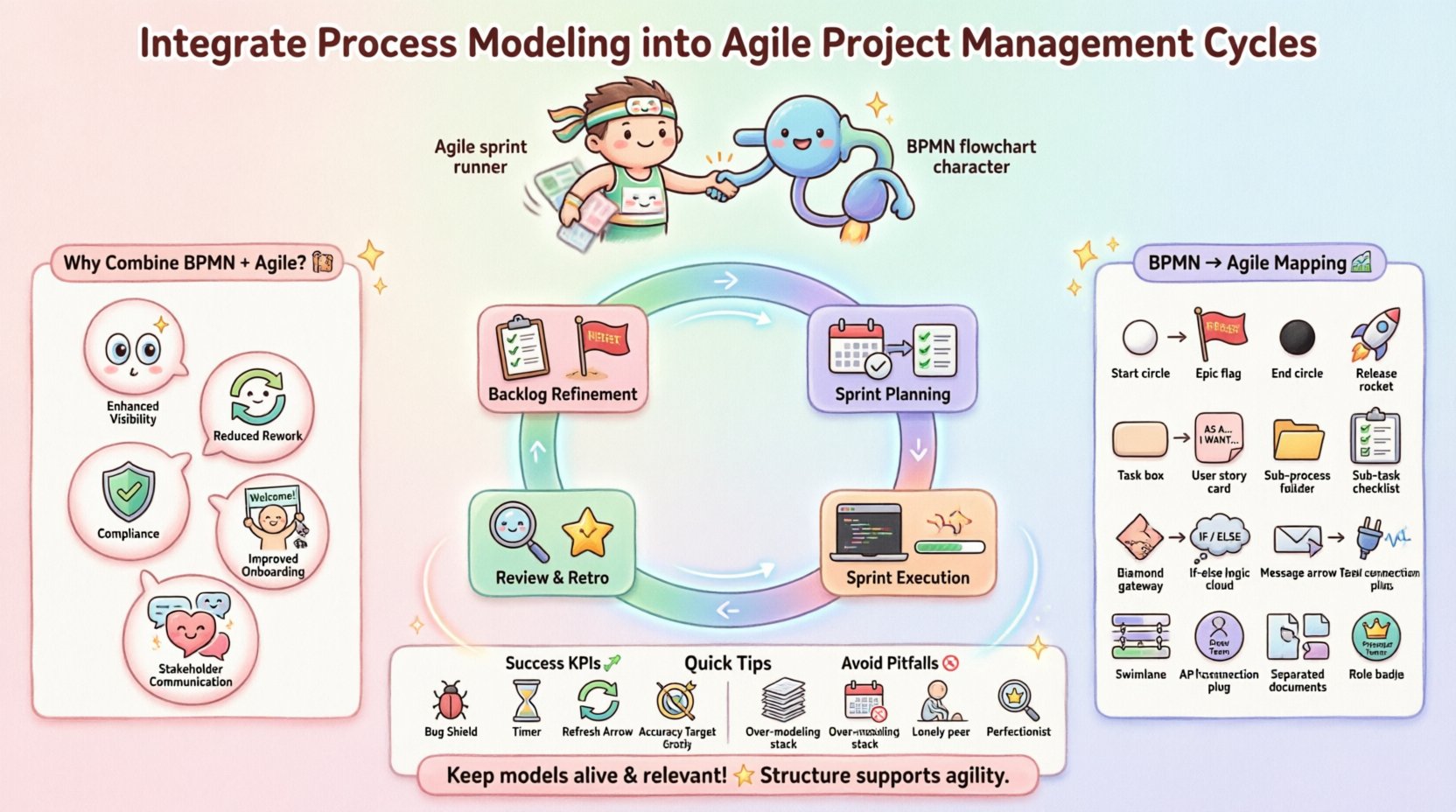
Why Combine BPMN and Agile? 🤝
Agile focuses on the “what” and the “why” through user stories and epics, while process modeling often defines the “how” and the “when” across organizational boundaries. When these are treated as separate silos, friction occurs. The following points outline the core value of integration:
- Enhanced Visibility: Agile boards show task progress, but process models show flow logic. Combining them reveals where work actually gets stuck.
- Reduced Rework: Understanding the end-to-end process before writing code prevents building features that do not fit the operational reality.
- Compliance and Governance: Certain industries require audit trails. Process models provide the structure needed to satisfy regulatory requirements without halting development.
- Improved Onboarding: New team members can understand the broader context of their tasks by reviewing the process maps alongside the backlog.
- Stakeholder Communication: Visual diagrams translate better to business stakeholders than rows of spreadsheet data or Jira tickets.
The goal is not to create heavy documentation that sits in a vault. The goal is to create living artifacts that evolve with the product. This approach requires a shift in mindset from documentation as a deliverable to documentation as a navigational tool.
Understanding the Friction Points ⚡
Integrating these methodologies is not without challenges. Agile teams often resist process modeling because it feels like a return to waterfall practices. To succeed, one must acknowledge and address these specific tensions.
1. The Speed vs. Accuracy Debate
Agile values working software over comprehensive documentation. Process modeling requires time to define boundaries and logic accurately. If the modeling effort takes longer than the sprint, the team will resent it. The solution lies in creating models at the right level of abstraction. Use high-level swimlanes for stakeholder alignment and detailed flowcharts only for complex logic within the sprint.
2. The Change Management Dynamic
In Agile, requirements change frequently. A static process diagram created at the start of a project is obsolete by the second sprint. Models must be treated as dynamic. When a user story changes the workflow, the model should be updated immediately, or it becomes misleading.
3. Tooling and Accessibility
Teams need tools that allow both business analysts and developers to edit or view the models easily. If the modeling tool requires a separate license or complex installation, adoption will fail. The environment should support collaboration and version control similar to code repositories.
Implementation Framework 🛠️
Successful integration requires a structured approach. Below is a framework for embedding process modeling into the standard Agile cadence.
Phase 1: Backlog Refinement and Epics
Before work begins on specific stories, the Epic level needs a process context. This is not about detailing every click, but understanding the business context.
- Map the Current State: Create a high-level diagram of the existing process. Identify where the new feature fits.
- Define Boundaries: Mark the start and end events of the process. This clarifies the scope of the sprint.
- Identify Roles: Use swimlanes to show who is responsible for each part of the flow. This helps assign tasks correctly.
- Link to Stories: Associate the model with the Epic in the backlog management system. This ensures traceability.
Phase 2: Sprint Planning
During planning, the focus shifts to specific tasks. Process modeling helps clarify acceptance criteria.
- Break Down Flows: For complex stories, create a sub-process diagram. This helps developers see edge cases.
- Gateways and Logic: Use decision gateways in the model to represent conditional logic in the code (e.g., “If user is premium, show X”).
- Dependency Checks: Review the model to ensure no tasks are dependent on work that is not in the sprint.
- Visual Walkthrough: Walk the team through the diagram during the planning session to ensure shared understanding.
Phase 3: Sprint Execution
During development, the model serves as a reference. It is not meant to be the primary tracking mechanism, but a validation tool.
- Acceptance Testing: QA teams use the process model to verify that the end-to-end flow works, not just the individual feature.
- Incident Resolution: When bugs occur, the model helps trace where the flow broke.
- Continuous Updates: If a developer finds a better way to handle a step, the model should be updated to reflect the new reality.
Phase 4: Review and Retrospective
The end of the sprint is the best time to evaluate the process model itself.
- Validate the Model: Does the current diagram match what was actually built? If not, update it.
- Identify Bottlenecks: Look for paths in the model that had too many delays during the sprint.
- Refine the Workflow: Adjust the process based on what was learned. Agile is about adaptation, and the model must adapt too.
Mapping BPMN Elements to Agile Artifacts 🗺️
To make this integration practical, it helps to map specific BPMN elements to common Agile artifacts. This table provides a quick reference for teams starting this journey.
| BPMN Element | Agile Equivalent | Usage Context |
|---|---|---|
| Start Event | Epics / Initiatives | Defines the trigger for the project or major feature set. |
| End Event | Release / Done | Indicates when the value is delivered to the user. |
| Task | User Stories | Represents a unit of work that adds value. |
| Sub-Process | Sub-Tasks / Technical Tasks | Used for breaking down complex stories into smaller steps. |
| Exclusive Gateway | Conditional Logic | Maps to if-else statements or user role checks. |
| Parallel Gateway | Concurrency / Dependencies | Indicates tasks that can happen simultaneously or depend on multiple inputs. |
| Message Flow | API / Integration | Shows interaction between systems or external services. |
| Pool / Swimlane | Team / Role | Assigns responsibility for specific steps to a team or role. |
Roles and Responsibilities 🧩
Clear ownership is essential for process modeling to work within an Agile team. Unlike traditional roles, these responsibilities are often shared or rotated.
Product Owner
The Product Owner ensures the process model aligns with business value. They validate that the flow supports the user journey and that no critical business rules are missing. They have the final say on whether a process change is necessary.
Scrum Master
The Scrum Master facilitates the integration. They ensure the modeling activity does not become a bottleneck. They coach the team on when a diagram is needed versus when a conversation is sufficient.
Business Analyst / Process Owner
This role is often the primary creator of the models. They translate the Product Owner’s vision into visual logic. In smaller teams, this duty may fall to a Senior Developer or a dedicated Technical Writer.
Development Team
Developers validate the technical feasibility of the process. They point out constraints, technical debt, or architectural limitations that the model might overlook. They are responsible for keeping the model technically accurate.
Measuring Success and KPIs 📈
How do you know if integrating process modeling is working? You need metrics that reflect efficiency and quality, not just documentation activity.
- Defect Leakage: Measure the number of bugs found in production that relate to process logic errors. A decrease indicates better modeling.
- Cycle Time: Track how long it takes for a story to move from “In Progress” to “Done”. Improved clarity should reduce waiting times.
- Rework Rate: Count how often work is rejected because it did not meet the full process requirements. This highlights gaps in understanding.
- Model Accuracy: Periodically audit the process diagrams against the actual system. A high accuracy rate means the team is keeping the models up to date.
- Sprint Velocity Consistency: While velocity varies, stable velocity often indicates that the team understands the work requirements clearly, aided by process visibility.
Common Pitfalls to Avoid 🚫
Even with a solid plan, teams often stumble. Here are the most common mistakes to watch out for.
- Over-Modeling: Creating detailed diagrams for every single user story leads to burnout. Reserve modeling for complex flows.
- Outdated Models: A diagram that is two months old is worse than no diagram. It creates false confidence. Enforce a “model update” task in every sprint.
- Ignoring the Human Element: A process model shows steps, not people. Do not forget to account for human decision-making and variability in the flow.
- Separation of Concerns: Do not keep the model in a separate document from the code or the backlog. Integrate it into the workflow tools.
- Perfectionism: Do not strive for a perfect diagram. A sketch that solves a communication problem is better than a perfect diagram that no one reads.
Future Considerations 🚀
The landscape of project management and process modeling is evolving. Automation and AI are beginning to play a role. In the near future, some systems may automatically generate process models from code or user journey data. Teams should be prepared to adopt these tools to reduce manual overhead.
Additionally, the distinction between “Process” and “Project” is blurring. Organizations are moving towards product-centric operating models. In this context, process modeling becomes less about project control and more about product health. The model becomes a product feature itself, ensuring the software operates as intended in the real world.
Final Thoughts on Integration 🌟
Integrating process modeling into Agile cycles is not about choosing one over the other. It is about leveraging the structure of BPMN to support the agility of Scrum or Kanban. When done correctly, it creates a robust environment where speed does not come at the cost of clarity.
Start small. Pick one complex Epic and model the flow. Observe how it helps the team. Then expand. The key is to keep the models alive and relevant. If the team stops updating the model, it stops being useful. Treat the process map as a living document that reflects the current state of the product.
By following these guidelines, teams can achieve a balance that satisfies business stakeholders and development needs alike. The result is a smoother delivery pipeline, fewer surprises, and a product that truly fits the operational environment.