问答:学生关于配置图基础最常见的15个问题

理解复杂系统的架构不仅需要画方框和线条,还需要一种能够表达领域特定细微差别的语言。这正是配置图发挥作用的地方。对于深入学习系统工程或软件架构的学生来说,这些图表常常构成概念上的障碍。以下指南解答了关于这些图表最常见的疑问,剖析其理论、应用和结构要求。

无论你是准备考试还是设计自定义建模扩展,对基础概念的清晰理解都至关重要。我们将探讨构造型、标记值和约束的机制,而不涉及任何特定的商业工具。重点始终放在任何建模环境中的理论框架和实际应用上。
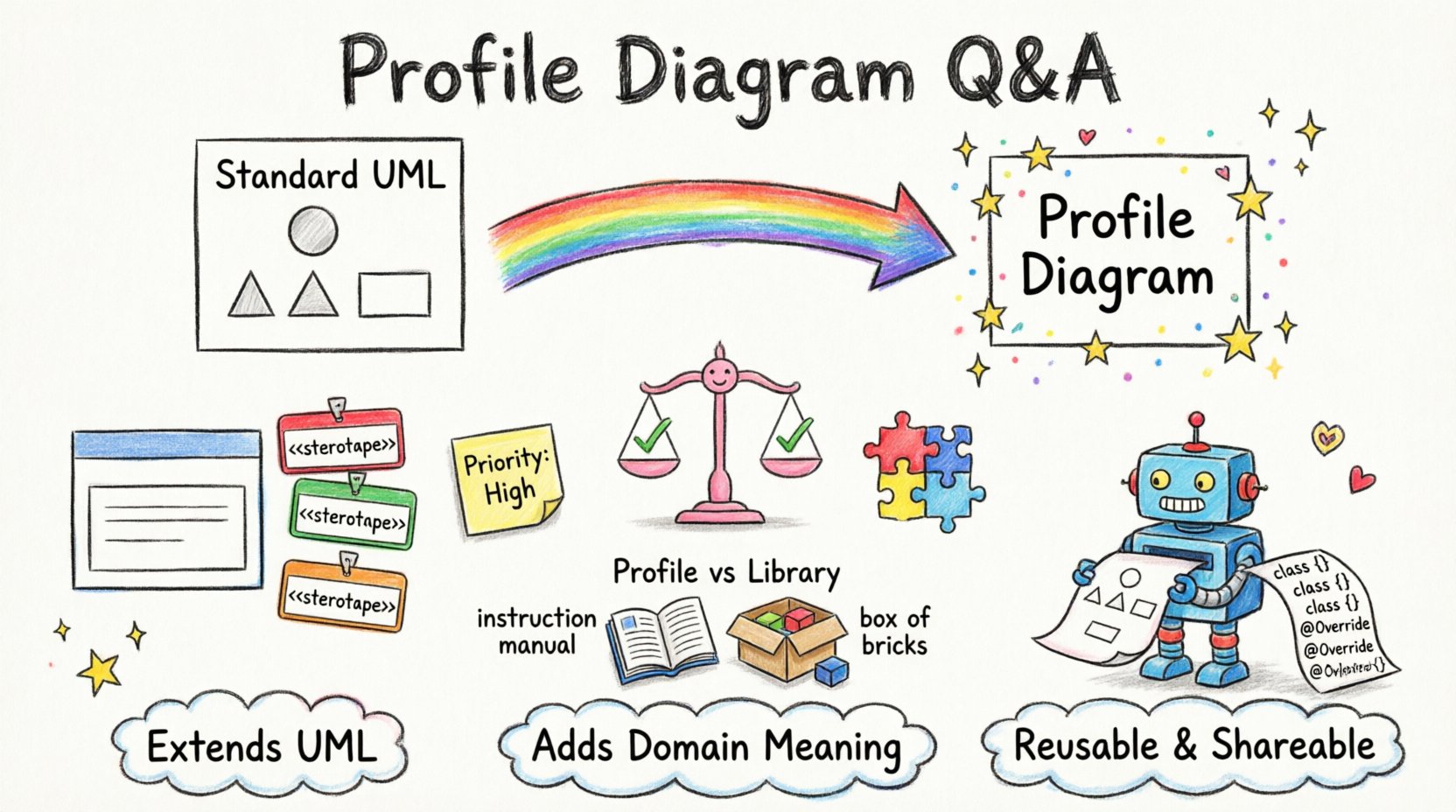
A playful child's drawing style infographic explaining UML Profile Diagram fundamentals with colorful hand-drawn illustrations showing stereotypes as name tags with << >> symbols, tagged values as sticky notes, constraints as friendly balance scales, and metaclasses as interlocking puzzle pieces, all connected with wobbly crayon arrows demonstrating how profiles extend standard UML for domain-specific modeling in aerospace, medical, or automotive fields, with simple comparison visuals for Profile vs Class Diagram and Profile vs Library, plus key takeaways about reusability, code generation, and validation presented in a fun, accessible visual format for students and learners”/></figure>
</div>

<h2>1. What exactly is a Profile Diagram? 🤔</h2>

<p>A Profile Diagram is a specialized type of diagram used to extend the Unified Modeling Language (UML) to suit specific application domains. Standard UML provides a general-purpose set of notations. However, industries like aerospace, medical devices, or automotive engineering have unique requirements that standard symbols cannot capture efficiently.</p>

<ul>
<li><strong>Extension Mechanism:</strong> It allows users to define new metaclasses.</li>
<li><strong>Domain Specificity:</strong> It tailors the modeling language to a specific context.</li>
<li><strong>Reusability:</strong> Profiles can be packaged and reused across multiple projects.</li>
</ul>

<p>Think of a Profile as a dictionary of terms added to the base language. It does not replace the standard UML but augments it with new semantics.</p>

<h2>2. How does a Profile differ from a standard Class Diagram? 📊</h2>

<p>Students often confuse the two because both involve classes and attributes. The distinction lies in intent and scope.</p>

<table>
<thead>
<tr>
<th>Feature</th>
<th>Profile Diagram</th>
<th>Standard Class Diagram</th>
</tr>
</thead>
<tbody>
<tr>
<td>Primary Purpose</td>
<td>Define extensions to the language</td>
<td>Model system structure and behavior</td>
</tr>
<tr>
<td>Scope</td>
<td>Metamodel level (defines rules)</td>
<td>Model level (defines instances)</td>
</tr>
<tr>
<td>Usage</td>
<td>Used to create other diagrams</td>
<td>Used to document the application</td>
</tr>
<tr>
<td>Components</td>
<td>Stereotypes, Tagged Values, Constraints</td>
<td>Classes, Associations, Inheritance</td>
</tr>
</tbody>
</table>

<h2>3. What is a Stereotype? 🏷️</h2>

<p>A stereotype is the core building block of a profile. It is a way to classify elements within the model. When you apply a stereotype to a standard UML element, you change its meaning.</p>

<ul>
<li><strong>Notation:</strong> Typically displayed in guillemets like <code><<Component>></code>.</li>
<li><strong>Function:</strong> It adds semantic meaning without changing the underlying structure.</li>
<li><strong>Example:</strong> Applying <code><<Entity>></code> to a class might indicate it maps directly to a database table.</li>
</ul>

<p>Without stereotypes, a class is just a generic container. With them, it becomes a specific domain object.</p>

<h2>4. What are Tagged Values and why are they needed? 📝</h2>

<p>Tagged values allow you to store additional data associated with a model element. They function like custom attributes for the model itself.</p>

<ul>
<li><strong>Metadata Storage:</strong> They hold information that is not part of the visual diagram but is crucial for processing.</li>
<li><strong>Code Generation:</strong> Values can drive the generation of source code or configuration files.</li>
<li><strong>Customization:</strong> You define the tags when creating the profile.</li>
</ul>

<p>For instance, a profile might define a tag named <code>Priority</code>. Any class in the system can then have a <code>Priority</code> value assigned to it, which might influence scheduling logic.</p>

<h2>5. How do Constraints work within a Profile? ⚖️</h2>

<p>Constraints are rules that restrict how elements can be used. In a profile, you can define specific rules that apply to the stereotypes you create.</p>

<ul>
<li><strong>OCL:</strong> Object Constraint Language is often used to formalize these rules.</li>
<li><strong>Validation:</strong> They ensure model integrity before code generation.</li>
<li><strong>Logic:</strong> They define relationships, such as “A <code><<Server>><<负载均衡器>>.

约束条件可防止无效架构被建模,在设计阶段早期就能发现错误。

6. 我能否从标准配置中继承? 🔄

可以。配置支持类似于面向对象编程的继承机制,这使得可以进行分层的配置开发。

  • 基础配置: 一个包含通用扩展的通用配置。
  • 派生配置: 一个扩展基础配置的特定配置,增加了领域特定的功能。
  • 优势: 通过将共享逻辑集中在一个位置,减少冗余。

如果你创建了一个通用的“安全”配置,就可以在此基础上扩展,创建“企业安全”配置,而无需重新定义基础规则。

7. 在此上下文中,元类是什么? 🧩

元类是一种定义其他类结构的类。在配置中,你通过定义元类来指定新元素的外观。

  • 定义: 它描述了构造型的属性。
  • 结构: 它包括属性、操作和关系。
  • 示例: 如果你创建一个构造型 <<数据库>>,元类将定义该构造型必须具备的属性(例如 表名

这确保了模型中该构造型的所有实例都保持一致。

8. 如何打包配置以实现重用? 📦

打包配置意味着将所有定义——构造型、标记值和约束——整合为一个单一单元。

  • 可移植性:打包的配置文件可以导入到其他模型中。
  • 版本控制: 它使团队能够管理其建模标准的更新。
  • 安装: 在大多数建模环境中,您只需加载包文件即可激活配置文件。

对于多个团队可能使用相同标准的大型组织来说,这一点至关重要。

9. 配置文件和库之间有什么区别? 📚

虽然相似,但在建模生态系统中它们的作用不同。

方面 配置文件
重点 扩展语言语法 提供可重用的模型元素
输出 新的构造型和规则 类、接口、组件
用途 定义如何建模 定义建模的内容

库为您提供砖块;配置文件则提供如何使用这些砖块来实现特定目的的说明。

10. 配置文件如何影响代码生成? 💻

代码生成引擎读取配置文件以理解模型元素的语义。

  • 构造型映射: 一个 <<服务>> 构造型可能映射到一个 Java 接口。
  • 标记值映射: 一个标记 接口_版本可能会在生成的代码中成为常量。
  • 验证:代码生成器通常在写入文件前检查约束条件。

如果没有正确定义的配置文件,代码生成将是通用的。有了它,输出将针对特定的框架或架构进行定制。

11. 我可以修改标准UML配置文件吗? ⚙️

通常情况下,你不应该修改UML规范提供的标准配置文件。相反,你应该创建一个导入并扩展它们的新配置文件。

  • 稳定性:标准配置文件由标准组织维护。
  • 兼容性:修改标准会破坏与其他工具的兼容性。
  • 最佳实践:应扩展,而非替换。

这确保了你的模型仍能被遵循标准的其他软件读取。

12. 使用什么符号来显示配置文件? ✍️

配置文件图通常使用特定的视觉布局,以将其与其他图区分开来。

  • 包图标:配置文件通常以包的形式表示。
  • 构造型列表:该图列出了配置文件中定义的构造型。
  • 依赖关系:箭头显示配置文件与标准UML元类之间的关系。

这种视觉表示有助于建模人员快速识别在特定视图中激活的配置文件。

13. 如何在使用前验证配置文件? ✅

验证可确保在部署前配置文件的逻辑是正确的。

  • 语法检查:确保所有构造型和标签都正确定义。
  • 逻辑检查:验证约束条件之间没有冲突。
  • 测试运行: 将该配置文件应用于一个小的示例模型以验证其行为。

配置文件中的错误可能会传播到使用它的每一个模型,因此必须进行严格的测试。

14. 配置文件图是否属于最终交付物? 📄

通常不是。配置文件图是一种元模型构件。

  • 文档: 它记录了项目中使用的标准。
  • 运行时: 它不会被执行或部署。
  • 参考: 它作为其他建模人员的参考,以确保符合规范。

虽然它不是最终系统,但却是设计文档包中的关键组成部分。

15. 如何随时间维护一个配置文件? 🛠️

维护配置文件需要版本控制和沟通。

  • 变更日志: 记录每个构造型的添加或删除。
  • 通知: 在配置文件更新时通知所有用户。
  • 向后兼容性: 避免在新版本中引入破坏性更改。

若不加以维护,配置文件将变得过时,导致组织内建模不一致。

关键概念总结 📌

回顾这些问题中的核心要点:

  • 配置文件扩展了UML: 它们增加了领域特定的含义。
  • 构造型定义类型: 它们对元素进行分类。
  • 标记值添加数据: 它们存储元数据。
  • 约束强制执行规则: 它们维护完整性。
  • 可重用性是关键:打包并分享你的配置文件。

通过掌握这些基础知识,你将能够根据项目的具体需求定制建模语言,确保系统设计的清晰性和精确性。