


Revolutionizing Software Design with Intelligent Diagram Generation
Modern software development demands rapid, accurate, and scalable design processes. Traditionally, creating Unified Modeling Language (UML) diagrams has been a time-intensive activity requiring deep domain expertise and manual drafting. However, Visual Paradigm has introduced a transformative shift through its AI-powered diagram generation capabilities—enabling developers, architects, and product managers to produce high-fidelity UML models from simple natural language inputs or guided workflows.
Understanding the Core Capabilities
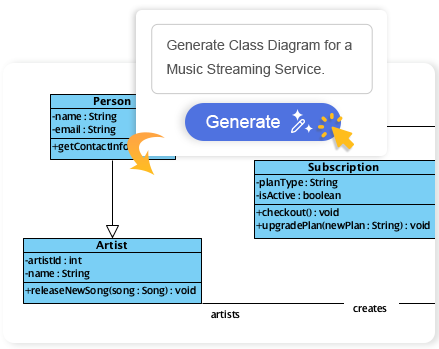
At the heart of Visual Paradigm’s new AI suite lies a robust natural language processing (NLP) engine trained on extensive UML semantics, design patterns, and industry-standard modeling practices. This engine transforms plain text prompts—such as “Generate a use case diagram for an online shopping system”—into fully structured, semantically valid, and contextually accurate UML diagrams with minimal user intervention.
Supported UML Diagram Types
The AI engine supports a wide spectrum of UML diagram types, each serving a critical role in system analysis and design:
- Class Diagrams: Model the static structure of a system, including classes, attributes, operations, and relationships. Ideal for early-phase object modeling.
- Use Case Diagrams: Capture functional requirements by identifying actors and their interactions with system features. Perfect for requirement elicitation.
- Sequence Diagrams: Depict time-ordered interactions between objects, crucial for understanding flow and messaging in distributed systems.
- State Machine Diagrams: Represent dynamic behavior of objects through states, transitions, and events—particularly useful in reactive systems such as IoT or user interfaces.
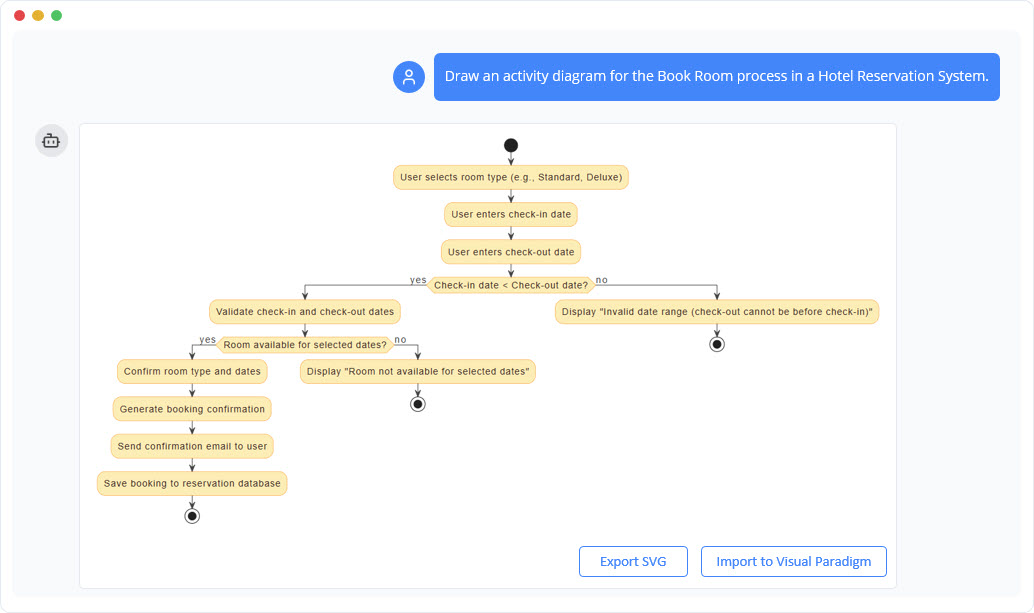
- Activity Diagrams: Model workflows, business processes, or concurrent activities, offering a clear path of execution and decision points.
- Package Diagrams: Organize components and classes into logical groups, improving maintainability and modularity.
- Component Diagrams: Illustrate the architecture of a system by showing how components interact, essential for system-level design.
- Requirement Diagrams: Map functional and non-functional requirements to system elements,
- : Provide snapshots of runtime instances and their relationships, useful for testing and debugging.
facilitating traceability and validation.
Object Diagrams
How the AI Transforms Natural Language into UML
When a user inputs a textual prompt, the system performs several intelligent steps:
- Parsing and Semantic Interpretation: The NLP engine identifies key entities, actions, and system boundaries in the prompt.
- Contextual Inference: It interprets implicit relationships (e.g., “users place orders” implies a “User” actor and an “Order” class).
- Model Construction: The AI constructs the UML elements, ensuring consistency with UML rules (e.g., proper cardinality, visibility, inheritance).
- Automated Validation: Built-in constraints verify that the generated diagram adheres to UML standards and business logic.
Guided Workflows for Complex Designs
For more intricate models—especially class diagrams—the AI offers an interactive, step-by-step wizard to guide users through the modeling process. This guided approach reduces cognitive load by breaking down the design into manageable phases:
- Define system scope and purpose
- Identify key actors and domains
- Discover and name core classes
- Define attributes and operations
- Establish relationships (inheritance, association, dependency)
- Refine with extend/include relationships and constraints
This method is especially valuable for junior developers or those new to UML, providing a scaffolded learning experience while empowering experienced professionals to iterate quickly.
AI-Driven Refinement and Analysis
Visual Paradigm’s AI doesn’t stop at generation—it evolves the model through intelligent analysis and refinement. After creating the initial diagram, the system can:
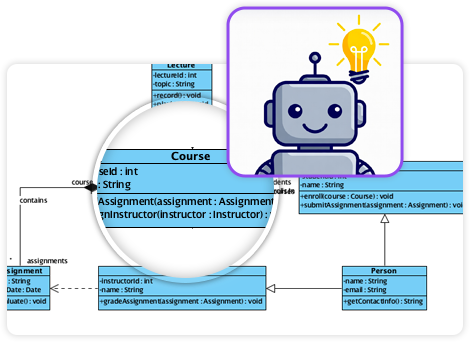
- Identify missing relationships or inconsistent cardinalities
- Propose additions such as extend or include relationships to improve completeness
- Highlight potential anti-patterns (e.g., too many classes without cohesion)
- Generate a detailed analysis report including coverage, completeness, and best-practice compliance
This not only improves the quality of the final model but also serves as a powerful feedback loop for iterative design refinement.
Seamless Integration and Workflow Compatibility
All AI-generated diagrams are fully embedded within the Visual Paradigm environment, maintaining full editability in both desktop and online versions. This ensures continuity in workflows—users can:
- Edit elements directly (e.g., rename a class, modify attributes)
- Refine relationships (e.g., convert an association to an aggregation)
- Apply constraints, stereotypes, or notes
- Integrate with project documentation and version control
The seamless integration means that AI-generated diagrams are not just placeholders—they become active artifacts in the design lifecycle, supporting team collaboration and auditability.
Export and Distribution Options
Once the model is finalized, users can export it in multiple formats to suit different use cases:
| Format | Use Case |
|---|---|
| SVG | Embed in web documentation or presentations; scalable and editable |
| PNG | Share in meetings or print materials; simple, universally readable |
| Generate professional reports or deliverables for stakeholders | |
| JSON | Integrate into automated tools for API or model-to-code generation |
| PlantUML Code | Enable model-to-code generation, CI/CD pipelines, or IDE plugins |
Access and Implementation Guide
To utilize AI-powered diagram generation, users must have a compatible license:
- Desktop Users: Professional Edition or higher with an active maintenance plan
- Online Users: Combo Edition or higher
These editions include the full suite of AI features, ensuring access to both generation and analysis tools.
Step-by-Step: Using AI in Visual Paradigm Desktop
- Open Visual Paradigm Desktop and navigate to the Tools menu in the main toolbar.
- Click on AI Diagram Generation (or a variant such as AI Diagram).
- Select the desired diagram type—for example, Class Diagram.
- Enter a descriptive prompt in the input field (e.g., “Design a class diagram for a banking application that includes accounts, transactions, and customers with login and withdrawal operations.”).
- Click OK to generate the diagram.
- Review, edit, and refine as needed using the full modeling tools.
Step-by-Step: Using AI in Visual Paradigm Online
- Go directly to the Visual Paradigm AI tool on the official website.
- Define the system scope and purpose of the diagram.
- Enter a textual prompt or use guided input suggestions.
- Let the AI generate the initial structure based on context.
- Review the output and make manual adjustments as required.
Real-World Applications and Benefits
This technology is already transforming workflows across industries:
- Agile Teams: Quickly generate diagrams during sprint planning to visualize user stories and features.
- Education and Training: Students can generate diagrams from textbook descriptions, accelerating learning.
- Startup Environments: Founders can rapidly model MVPs based on vision statements, reducing time-to-first-design.
- Legacy System Modernization: Extract design patterns from existing documentation using AI to build new models.
By reducing the time spent on manual sketching and increasing design accuracy, organizations can focus more on value creation and less on mechanical modeling.
Conclusion
Visual Paradigm’s AI-powered UML diagram generation is not simply a UI enhancement—it represents a fundamental shift in how software professionals approach system design. By combining natural language understanding with deep UML domain knowledge, the platform enables faster iteration, higher fidelity, and greater collaboration. As AI continues to mature, such tools will become indispensable in both academic and enterprise software development environments.
Articles and resources
-
AI-Powered Visual Modeling and Design Solutions by Visual Paradigm: This portal allows users to explore cutting-edge AI-driven tools for visual modeling, diagramming, and software design. It serves as a central hub for various intelligent modeling applications designed to enable faster development workflows.
-
AI Chatbot Feature – Intelligent Assistance for Visual Paradigm Users: This feature leverages AI-powered chatbot functionality to provide users with instant guidance and task automation. It is designed to enhance productivity by interpreting natural language instructions within the modeling environment.
-
Visual Paradigm Chat – AI-Powered Interactive Design Assistant: This interactive AI chat interface assists users in generating diagrams, writing code, and solving design challenges in real time. It supports real-time collaboration and conversational creation of various visual models.
-
AI Textual Analysis – Transform Text into Visual Models Automatically: This tool utilizes AI to analyze unstructured text documents and automatically generate structured diagrams such as UML, BPMN, and ERD. It streamlines documentation workflows by identifying entities and relationships directly from natural language descriptions.
-
AI-Assisted UML Class Diagram Generator – Visual Paradigm: This application provides an interactive, step-by-step tool that helps users create UML class diagrams using AI-powered suggestions and validation. It also includes support for PlantUML export and design analysis for software engineers.
-
AI Tree Diagram Maker | Visualize Hierarchical Data Instantly: This tool, also known as IntelliTree, combines generative AI with Markdown-style text editing to create stunning hierarchical diagrams. Users can simply describe a topic to instantly generate mind maps, organizational charts, and work breakdown structures.
-
C4-PlantUML Studio | AI-Powered C4 Diagram Generator: This specialized tool transforms natural language prompts into correct, layered C4 diagrams for software architecture. It supports all core levels of the C4 model, including Context, Container, Component, and Code.
-
AI-Powered SWOT Analysis in Visual Paradigm: This resource explains how AI facilitates automated insights and strategic planning within the SWOT framework. It helps teams move from descriptive analysis to actionable TOWS strategies through intelligent interpretation of internal and external factors.
-
AI Powered Chart Generator Archives: This collection of articles details how AI transforms raw data into ready-to-use charts. It covers tools for generating bar charts, column charts, and other data visualizations to make insight generation more efficient.
-
AI Table Generator Launch for Rapid Data Modeling: This release introduces an AI-driven tool that can generate database tables and models from data inputs in seconds. It is designed to accelerate rapid data modeling and schema design for developers.
Related posts:
 Mastering UML Deployment Diagrams with Visual Paradigm: From Manual Design to AI Generation
A Comprehensive Guide to the Visual Paradigm AI Assistant for TOGAF ADM: Streamlining Enterprise Architecture with Generative Intelligence
Transforming Enterprise Architecture with Generative AI: A Comprehensive Guide to Intelligent TOGAF ADM Execution
From Business Vision to Database Blueprint: A Structured Approach to Data Modeling
Mastering UML Deployment Diagrams with Visual Paradigm: From Manual Design to AI Generation
A Comprehensive Guide to the Visual Paradigm AI Assistant for TOGAF ADM: Streamlining Enterprise Architecture with Generative Intelligence
Transforming Enterprise Architecture with Generative AI: A Comprehensive Guide to Intelligent TOGAF ADM Execution
From Business Vision to Database Blueprint: A Structured Approach to Data Modeling